
SBE Fusion Overview
Fusion aims to enhance collaboration among Digital Thread Users, transcending the boundaries of their individual organizations and teams. This will be accomplished offline by refreshing and generating SBE file-formatted zip files, which can subsequently be published both natively and through the Digital Thread platform. Furthermore, the Digital Thread platform will have the capability to communicate directly with other Digital Thread platforms, enabling the transmission of Digital Thread artifacts.
The Fusion service is compatible exclusively with Melrose (8.x)+ Platform versions. This service facilitates the transmission of Digital Thread objects to any team or user within the SBE Digital Thread. Initially, the transmission will focus on models, but it will eventually extend to include all necessary Digital Thread artifacts for collaborative efforts. This encompasses the sharing of models, partitions, subscriptions, and ontologies.
At present, the overall workflow closely mirrors the standard adapter workflows regarding the creation of channels, mapping, and subscription usage. This similarity arises because the Fusion service utilizes the same mechanisms as all existing adapters.
SBE Adapter/Plugin Documentation Template

Adapter & Extension Package Documentation go together
Plugins are Separate
1. Getting Started: Using the Adapter
1.1 Operations Overview
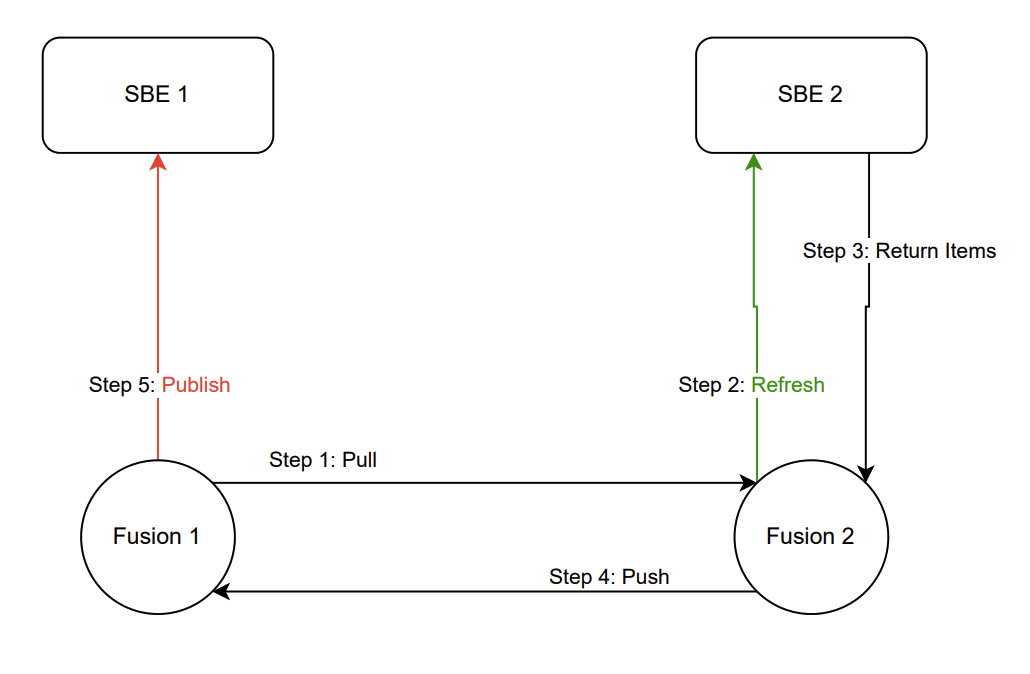
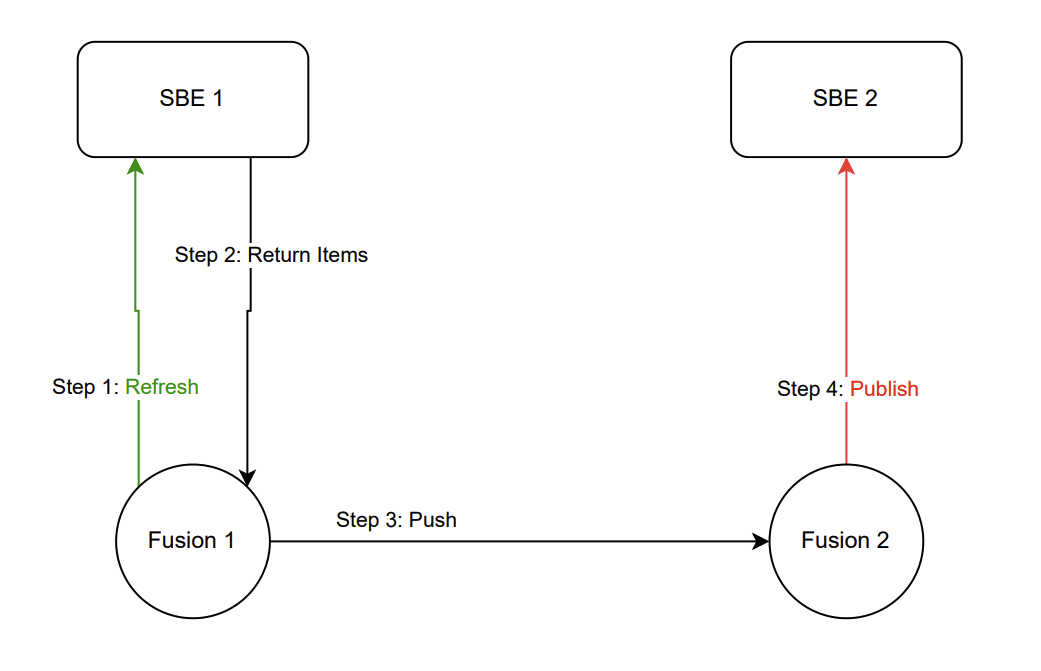
The Fusion service functions similarly to an Adapter, enabling users to Publish and Refresh models between SBE Platforms.
Online Publish
Create a SBE datasource, publish through the SBE Data Source Manager by creating a channel.
Connect to a target SBE Platform’s channel and publish all of the models associated with that channel’s subscriptions, partitions into the source SBE where the publish was triggered. Provide the credentials of the target SBE Platform when prompted.
Online Refresh
Create a SBE datasource, refresh through the SBE Data Source Manager by creating a channel.
Create a channel on a source SBE, create a subscription(s) and/or publish to the channel’s partition,
Refresh from the source SBE and connect to a target SBE Platform’s channel and publish to the target SBE. Provide the credentials of the target SBE Platform when prompted.
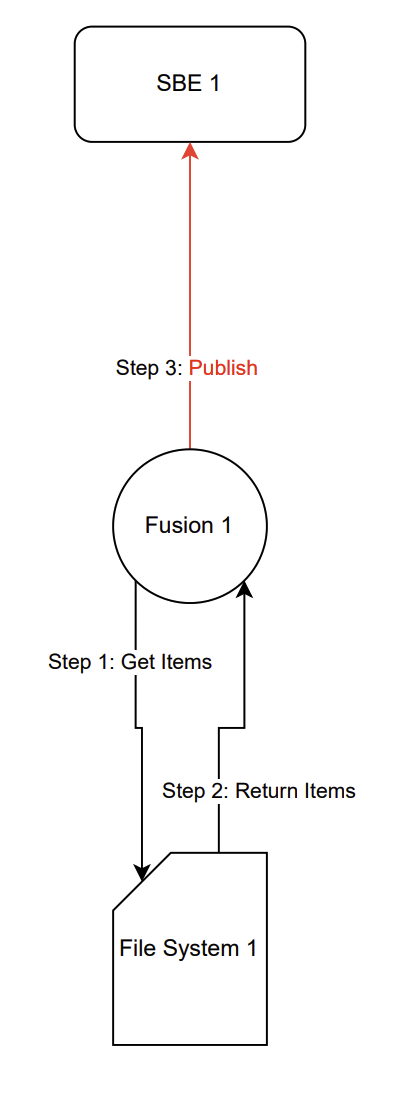
Offline Publish
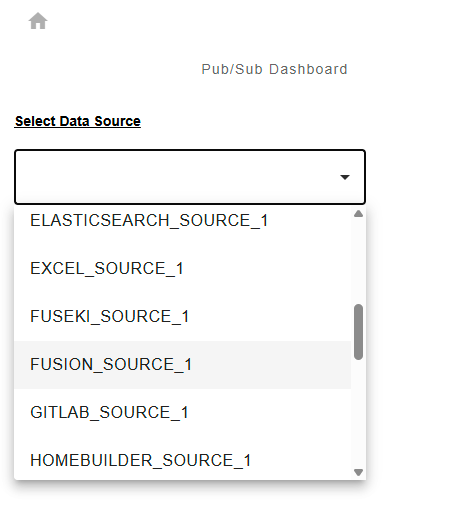
Create a FUSION datasource, publish through the SBE Data Source Manager by creating a channel.
Provide a zip file produced by an offline Refresh
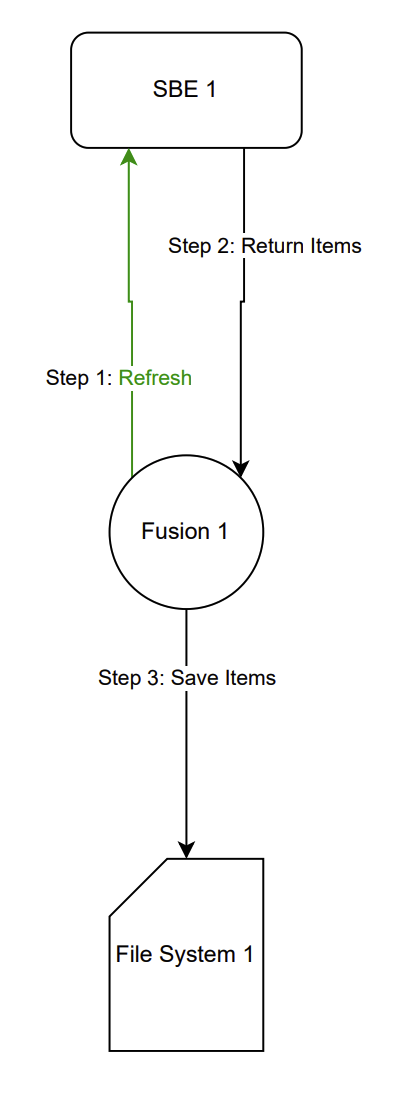
Offline Refresh
1.2 Accessing the Adapter
Use the Data Source Manager, like with all adapters, and use the REST APIs (refers to Section 11.1)
1.3 Attaching & Connecting
Minimal Channel Configuration (refers to Section 7.1)
1.4 Publishing Items
Online Publish
Create an SBE Datasource type/ Datasource.
Create a channel on the source SBE, use the channel name as the targetChannel of the target SBE where you want to publish objects from (refer to Section 7.1)
Create a channel on the target SBE, (the targetChannel is irrelevant on the target, put anything unique)
On the target SBE, subscribe models you want to publish to the source SBE.
Create mappings for the SBE datasource type of the models (classes, properties, and relations) that you want to refresh on both SBEs.
Publish on the source SBE.
Offline Publish
Provide a Fusion Zip file which can be produced by Offline Refresh or shared by other Fusion users. Use the REST API to upload the file to the SBE stack where you want to publish the file (see Section 11.1).
Create a Fusion Data source type/ Data source.
Create a channel on the source SBE, use the
fileLocatorof the target SBE where you want to publish objects from (refer to Section 7.1)Define your
fileLocatorbased on thefileNameusing either thetrackingIdorchannelNumbervalue of the zip file
Create mappings for the Fusion data source type of the models (classes, properties, and relations) that you want to refresh on both SBEs.
Click Publish on the channel.
Supported object types/entities (overview in Section 11.3)
SBE Models of ItemV7, which is the standard as of todays date for 7.x, 8.x, 9.x releases.
1.5 Refreshing Items (Including Subscribed Items)
Online Refresh
Supported object types/entities (overview in Section 11.3)
SBE Models of ItemV7, which is the standard as of todays date for 7.x, 8.x, 9.x releases.
Create an SBE Datasource type/ Datasource.
Create a channel on the source SBE, use the channel name as the
targetChannelof the target SBE where you want to refresh objects into(refer to Section 7.1)Create a channel on the target SBE, (the
targetChannelis irrelevant on the target, put anything unique)On the source SBE, subscribe models you want to refresh to the target SBE.
Create mappings for the SBE data source type of the models (classes, properties, and relations) that you want to refresh on both SBEs.
Hard Refresh on the source SBE.
Offline Refresh
Supported object types/entities (overview in Section 11.3)
SBE Models of ItemV7, which is the standard as of todays date for 7.x, 8.x, 9.x releases.
Create a Fusion Datasource type/ Datasource.
Create a channel on the source SBE,
fileLocatoris irrelevant for Offline Refresh.Subscribe to the entity sets that you want to refresh into a zip file
Create mappings for the Fusion data source type of the models (classes, properties, and relations) that you want to refresh.
Click Hard Refresh on the channel.
The remarks in the tracking center will contain the
downloadUrlwhich you can send via postman or navigate into your browser, it should look like thishttps://sbe-devops.com/fusion/download/67e44b923f65287b8f2aa953-3-fusionModels-master.zipthe zip consists of
{trackingId}-{channelNumber}-{partitionName}-{entitySet}.zip
Download the zip by navigating to the URL in your browser or using postman GET Request via Send and Download. (see Section 11.1).
1.6 Verify
N/A, implementation TBD
1.7 Advanced Operations
Offline Diff
WARNING! This is a temporary stopgap arrangement until this is properly integrated into the platform.
Assuming you have either a partition published from a fusion zip file or a partition from another datasource that is mapped to Fusion, you can perform a diff of the zip file which contains models from the same partition prior to the publish.
Hard Refresh from the channel of the prior mentioned partition.
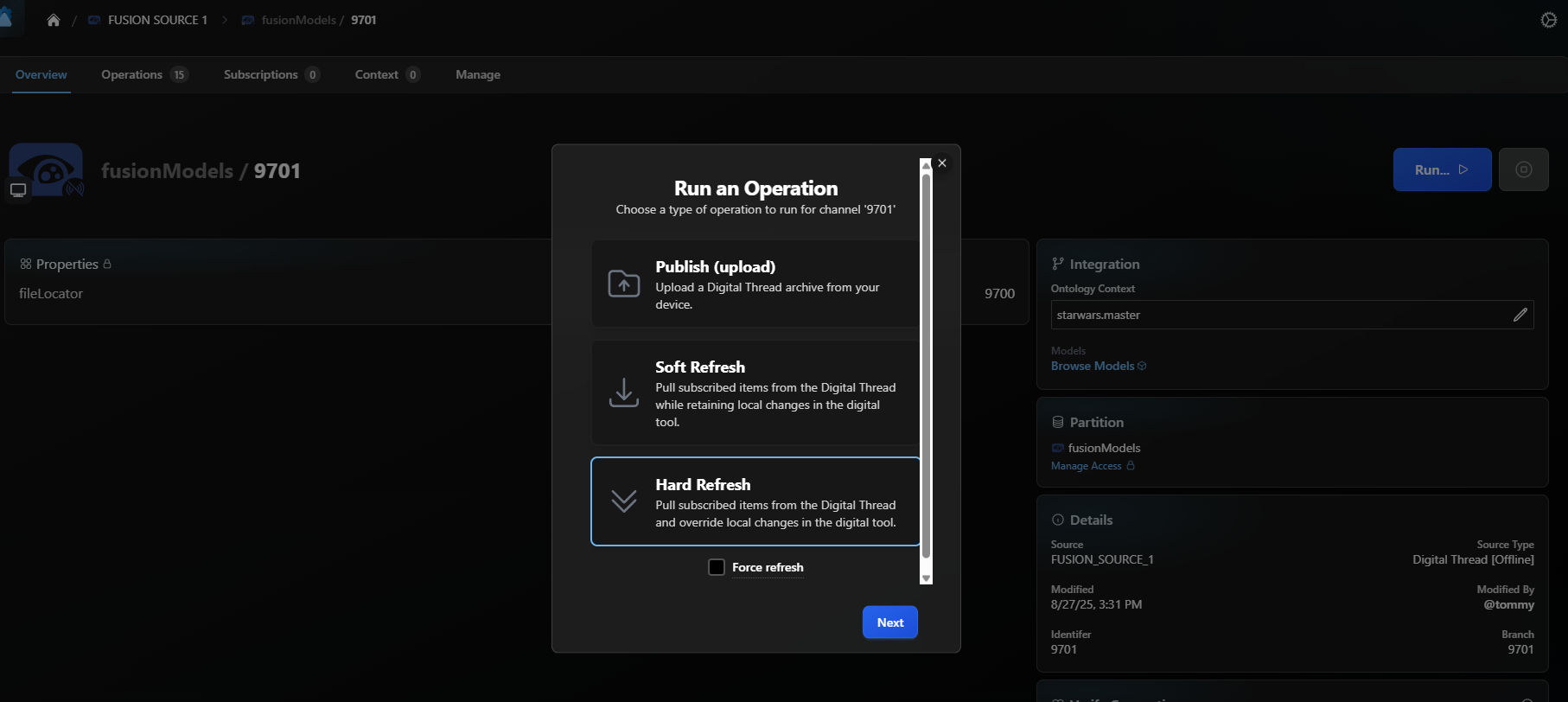
Download the file from the hard refresh
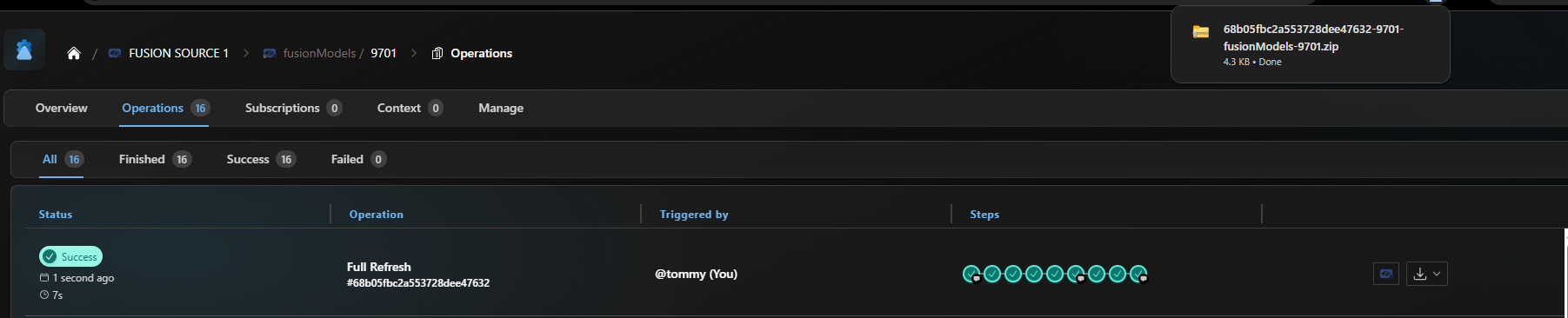
This file now reflects the exact state of models, properties, and relations of the partition you refreshed from.
To perform the diff
Generate a token

Call the diff
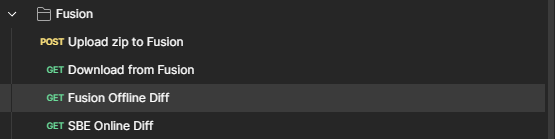
Provide a valid format (
text-detailed,text-simple,json-detailed, orjson-simple)Provide the channel
fusion/diff/{channel}, i.e:fusion/diff/9701containing the partition of the models you want to diff and make sure the partition and the zip file have the same models.Provide the zip file you downloaded from the previous step in the file parameter.
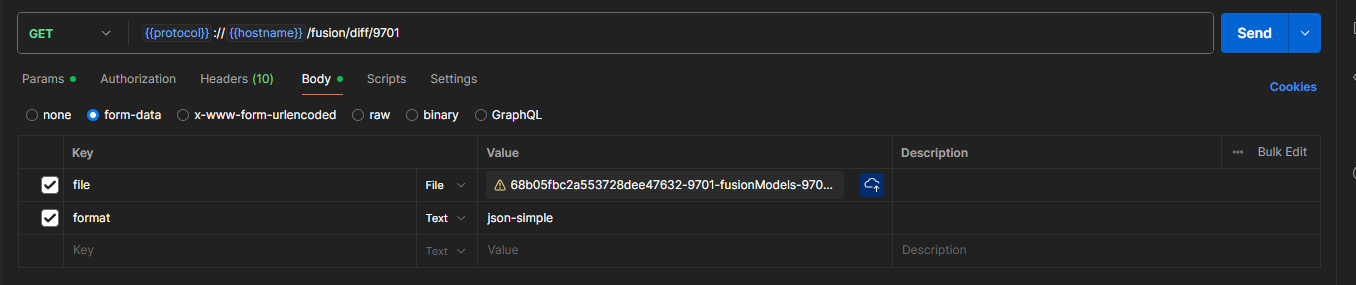
At this stage you should see no diffs if you called it now
Navigate to the legacy model authoring UI, Make some changes to the partition and call the diff again.
In this case I deleted
generalJanDodonnafrom my partition, but since the zip file still has the model, it would publish(ADD/CREATE) this model to the partition.- CODE
Item generalJanDodonna(68af5d1f112e030e3eeec8da): 6 diffs
ADD ShapeId human
ADD Property origin = {"homeworld": "Commenor","died":"1 ABY, Star Cruiser Republic"}
ADD Property height = 2.6
ADD RelationDto loyalty = highCommand
ADD RelationDto member = rebelAlliance
CREATE Model generalJanDodonna
1.8 Troubleshooting for End Users
2. Document Overview
2.1 Document Overview
This document provides essential information for using, configuring, and supporting the SBE Vision adapters for Fusion. It covers multiple adapter products, each supporting different versions of the external tool. There is a different version of this document for each major release of the SBE Platform.
2.2 Document Orientation
This document is designed to inform users with various roles:
End Users should begin with Section 1 to understand how to access and operate the adapter, and Section 5 for issues pertaining to the setup, configuration, and use of the digital tool itself.
Digital Thread Specialists should focus on Section 1, and also consult Sections 3, 4, and 5 for deployment and semantic mapping. Section 11 contains details related to mapping items from this tool into a semantic ontology.
Administrators should refer to Section 6 and beyond for setup, security, support, and version management.
3. Adapter Use Cases
3.1 Adapter Overview
The purpose of this adapter is to allow the data contained within instances of the SBE Platform to connect with other SBE Digital Thread platforms. This adapter was built using the SBE Java Pro-SDK product and SBE internal services and libraries.
3.2 Typical Use Cases
Offline:
Sharing of information in one SBE with another inside the same company but on a separate network because one of them is in a higher level of classification. In this case, the data transmission will be either through a data diode or portable media. This situation is at Sandia, SAIC, RMD, and Mantech.
Offline Publish:
A user refreshes SBE Fusion to the filesystem and then transfers the data to a USB drive. The user plugs the USB drive into the target SBE system and publishes the data.
Online Publish:
This will be used when two companies/units want to share bidirectional information. In this scenario, SBE 1 wants to publish data from SBE 2. Each SBE/Fusion pair will have its own set of mappings and will include/ignore whatever it chooses from the external items.
Online Refresh:
This will be used when two companies/units want to share directional information. In this case, SBE 1 wants to refresh data but needs to keep SBE 2 updated on what is refreshed. This data sharing is done in an outbound-only manner. Each SBE/Fusion pair will have its own set of mappings and will include/ignore whatever it chooses from the external items.
4. Supported Versions
4.1 Supported Adapter Products
Fusion 8.0, 8.1
4.2 External Tool Versions Supported
Melrose (8.x)
Reading (9.x)
4.3 Differences Across Tool Versions
No differences in Reading/Melrose
4.4 Supported Plug-Ins and Add-Ons
N/A
5. Digital Tool Best Practices
Source: Existing Info & Knowledge
5.1 Tool Configuration Considerations
5.2 Usage Tips & Gotchas
5.3 Tool Limitations and Workarounds
There is no offline version of SBE yet.
There is no UI for Fusion yet.
6. Installation
6.1 Installation Instructions
OS, Java, network requirements
Java 21
Installation requires a fully functioning and deployed SBE Stack Requirements
Fusion is a DMZ Service which can be deployed in Melrose+ / Develop release trains. To deploy fusion run the pipeline and set
FUSION=trueMake sure the release train is Melrose, Develop, or later.
6.2 Configuration
Keycloak
Add the Client with client id “fusion” to keycloak

Datasource Type / Datasource
Configure an empty datasource type usin`g DST name:
“FUSION” for Online

Configure the datasource – using any datasource name of your choosing: ex: “FUSION_SOURCE_1”
or “SBE” for Offline
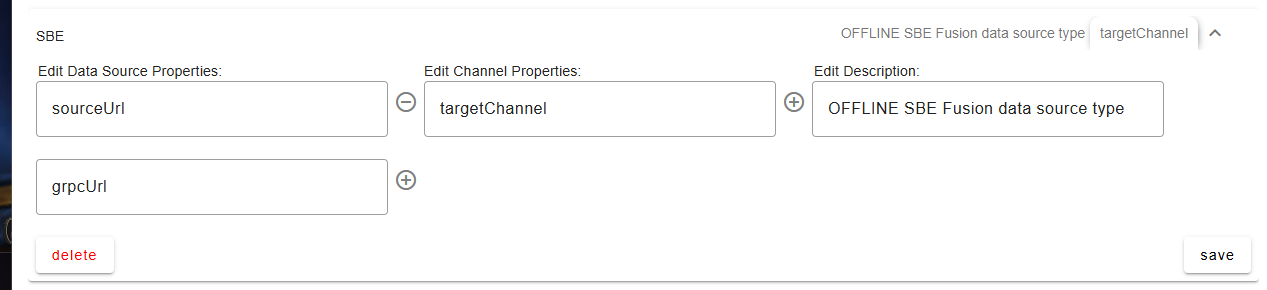
Configure the datasource – using any datasource name of your choosing: ex: “SBE_SOURCE_1”
6.3 DataSource Type Definition
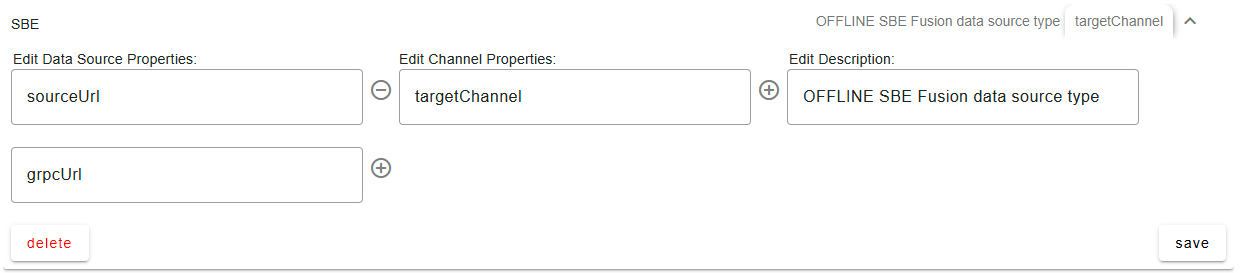
SBE
Data Source Properties:
sourceUrl
grpcUrl
Channel Properties:
targetChannel
FUSION
Channel Properties:
fileLocator
7. Channels and Mappings
7.1 Channel Definition
FUSION
(required) fileLocator: This property is only used for determining which zip file to PUBLISH, this property is irrelevant during refresh and should be unique per channel.
Example file name from refresh:
67e2cba83f65287b8f2aa7f2-6502-fusionModels-master.zipexample values:
6502,67e2cba83f65287b8f2aa7f2
SBE
(required) targetChannel: This is the targetChannel you want to refresh to or publish from of the target SBE. Supply the channel ID containing the models and of the same datasource type. If you are refreshing to targetChannel, Fusion will send all of the models within the current channel’s partition + subscriptions and publish them to the targetChannel of the target SBE.
ex.
1,2,3
7.2 Approaches to Mapping
Mappers will rarely create mappings for models where SBE is the authoritative tool, so generally the approach is to share mappings with other users of the Digital Thread and convert them to be used in Fusion.
The mapping involves converting existing tools mappings and changing the datasource or datasource type of the mapping to SBE or FUSION shapetypes depending on the OFFLINE or ONLINE use case.
Mappers will have to decide how to resolve overlapping mappings of tools, i.e. if there are Requirements which have Fuseki, Cameo, and DNG mappings for Requirements.
8. Security and Access
8.1 Authentication Methods
See RFC 006 - Authentication & Authorization for the standard on how to authenticate to use SBE and Fusion services.
For REST API Endpoints
Supply credentials to token end point, receive an Auth token to invoke Publish, Refresh
For SBE Platform Services
Login to SBE Platform
8.2 Authorization and Roles
Currently, there is no custom authorization and roles for Fusion. The authorization and roles is consistent across the platform.
8.3 Secure Communication
Currently, there is no custom secure communication for Fusion. The communication is consistent across the platform.
8.4 Identity Integration
Currently, there is no custom integration available for Fusion. The identity integration is managed through the SBE Platform and its Keycloak deployment. Consequently, any security and identity integration remains consistent across the platforms.
10. Release Notes
10.1 Version History
8.1
** Fully working online publish & refresh
    * Documentation for offline use case
    * Updated remarks during offline refresh to only output file name
    * Output metadata to L2 Audit during offline refresh
8.0
** Fusion Offline Refresh / Publish Support
    * Enables publishing from an uploaded file.
    * Facilitates refreshing from subscriptions to generate a zip file, which can be transferred via offline publish to another SBE Melrose stack.

** REST Support (temporary until Fusion UI is developed)
    * Download
        * This feature allows you to download any file located in the `/.sbe/fusion/downloads` directory.
        * Access the download using the following URL format:
        `{{protocol}}://{{hostname}}/fusion/download/{trackingId}-{channelId}-{partitionName}-{entitySet}.zip`

    * Upload
        * This functionality lets you upload a zip file for Fusion to publish.
        * Use the following URL for the upload:
        `{{protocol}}://{{hostname}}/fusion/upload`
        * Ensure to use form-data to submit the file, which will be uploaded to the `.sbe/fusion/uploads` directory.
        For example:
        `--form 'file="@/C:/path/to/Downloads/67c6252ee2000666f7e36e6a-3-fusionModels-master.zip"'`

* GRPC Server Interface for Online Fusion (Fetch, Report, Receive)
* GRPC Client Interface for invoking GRPC methods: Fetch, Receive
10.2 Breaking Changes
N/A
11. Technical Reference
11.1 Adapter API Endpoints
Fusion offers several endpoints designed to facilitate the provision and generation of zip files for offline use cases. This process utilizes Bearer authentication through Keycloak, consistent with the authentication methods employed in standard SBE operations.
Endpoint | Method | Parameters | Usage Example | Description |
|---|---|---|---|---|
Upload Fusion Zip File
| POST | file (required): The zip file that needs to be uploaded, provided as a form parameter. |
BASH
| This endpoint is designated for uploading zip files to SBE using Fusion. Users can submit their files for publishing through this interface. |
Download Fusion Zip File
| GET | file.name (required): The name of the file that is to be downloaded. |
BASH
| This command allows users to download a zip file produced by the offline refresh. |
Offline Fusion Diff
| GET | channel (required): The channel containing the models you want to diff. file (required): The zip file for the diff. format (optional): The output of the response containing your diffs, there are 4 formats: |
BASH
| This endpoint provides the diff between your channel’s models and the provided zip file in requested format. |
Online Fusion Diff
| GET | channel (required): The channel containing the models you want to diff. sbe (required): The url of the target SBE you want to diff. user (required): The user of the target SBE. password (required): The password of the target SBE you want to diff. format (optional): The output of the response containing your diffs, there are 4 formats: |
BASH
| This endpoint provides the diff between your channel’s models and the target SBE in requested format. |
11.2 Identity
Fusion will depend on the external locators provided by various adapters and external tools. As the primary objective is to facilitate collaboration and enable the sharing of data across other Digital Thread platforms.
11.3 Configuration File Format Reference
The Item Dto file will be generated as a zip by the SDK. The zip will be served over REST in offline SBE systems. Native Items Provider / Updater will be able to publish/refresh this zip natively.
zip contains multiple files
inventory file, which files+checksum included
data.bin– the actual model datamanifest– the metadata of the Refreshpublic.key– used to access the datasignature.bin– verifies the integrify ofdata.bin

## manifest
zip file name: /.sbe/fusion/downloads/67e2ea923f65287b8f2aa83a-3-fusionModels-master.zip
created by: sbe
created at: 2025-03-25 17:40:37 UTC
created at: 1742924437271 (unix epoch time)

object type: zip file
type info: contains metadata, signature, public key and exported external items

source
url: https://sbe-devops.com
version: 8.0.0
release: melrose

operation
type: full-refresh
tracking id: 67e2ea923f65287b8f2aa83a

provenance
channel: 3
channel properties
    fileLocator: 3
data source type: FUSION
data source: FUSION_SOURCE_1
data source properties
    fileLocator: 3
partition id: 67e2ea4302afe73916272909
partition name: fusionModels
entity set id: 67e2ea4402afe7391627290b
entity set name: master

filename       |  type    |  encoding  |  Serializing            |  Deserializing            |
---------------|----------|------------|-------------------------|---------------------------|
data.bin       |  binary  |  msgpack   |  OfflineItemsZipWriter  |  OfflineItemsZipReader    |
signature.bin  |  binary  |  base64    |  OfflineItemsZipWriter  |  OfflineItemsZipVerifier  |
manifest.txt   |  text    |  none      |                         |                           |
public.key     |  key     |  base64    |                         |                           |
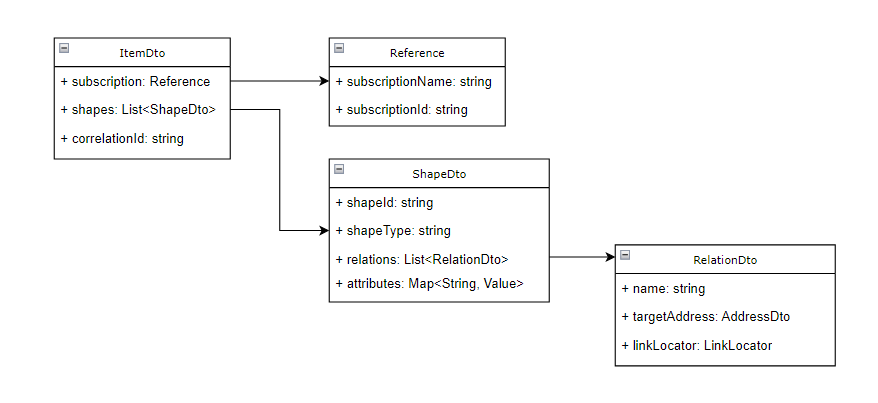
[
    {
      "createdDate": "10/10/2024",
      "createdBy": "ottomaton",
      "channel" : {
          "partition": "sbePartition",
          "entitySet": "sbeEntitySet",
          "token": "xyz"
          }
      "datasource": {
        "hostname": "https://sbe.com",
      },
      "datasourceType": "SBE",
      "modelCount": "1"
    },
    {
        "name": "itemName",
        "subscriptionName" : "subName",
        "subscriptionId" : "subId",
        "itemLocator" : {"key": "itemLocatorValue"},
        "shapes" : [{
            "shapeName": "shapeNameValue",
            "shapeType": "main",
            "attributes": {
                "exampleStrValue": {"value": "stringVal", "type": "string", "format": "BASE64"},
                "exampleIntValue": {"value": "1", "type": "integer", "format": "BASE64"}
            }
            }],
            "relations": [
               { "name": "relationNameValue",
                 "address" : {
                    "name": "addressNameValue",
                    "locator": { "key":  "addressLocatorValue" }
                 },
                 "linkLocator" : { "linkLocatorKey" : "linkLocatorValue" }
               }]
    }
]
11.4 Schema Support
Supported object types
All External Items
Directionality:
Bi-directional
Supported relationships and metadata
All relationships/metadata which can be published and refreshed from SBE.
Mapping rules and constraints
All rules and constraints conform to the version of SBE Platform.
11.5 Glossary of Terms
Common technical terms across tools/adapters
11.6 Compliance and Certification
Adapter Maturity Model ratings (PENDING)