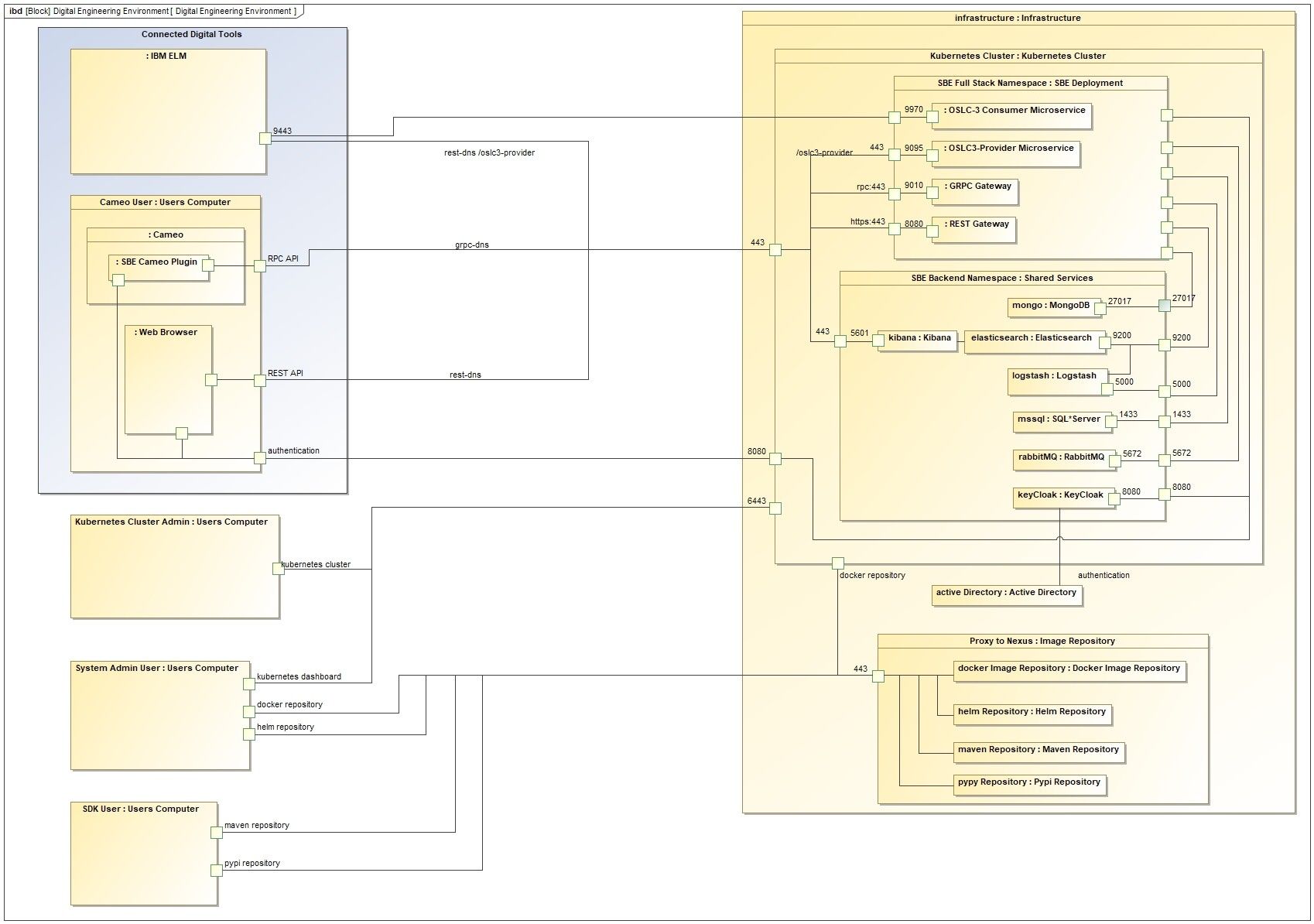
Requirements
CaaS Environment
Supported Versions: Kubernetes 1.17 or later
Two namespaces dedicated to SBE deployment.
Kubernetes Storage Class Provider
SSD
ReadWriteOnce
Kubernetes Implementations Supported:
OpenShift
Google GKE
AWS EKS
Azure AKS
Kubernetes Per Node Requirements:
Node Groups: 1 group of 5 nodes
Node Size: 8 CPU-cores, 32GB RAM, at least 200GB of storage
Outbound Internet Access:
for access to SBE Deployment Docker images and Helm charts
NOTE: SBE uses Helm v3 which does not require tiller installation
Image Repository
Directly pull from or proxy the SBE artifact repository.
If required, SBE Vision will support uploading artifacts to any desired repository with both Docker and Helm support.
SBE customers have successfully proxied from the following image repositories:
Artifact Repository | Docker Proxy | Helm Proxy |
|---|---|---|
Sonatype Nexus | Yes | Yes |
JFrog Artifactory | Yes | Yes |
GCR (Google Container Registry) | No | No |
ACR (Azure Container Registry) | No | No |
AWS ECR (Elastic Container Registry) | No | No |
OCR (Openshift Container Registry) | No | No |
Red Hat Quay | No | No |
Helm Chartmuseum | N/A | No |
Harber Helm Repo | N/A | TBA |
Shared Services (Backstage Services)
Service | Version |
|---|---|
SQL Server | 2019.15.0 |
Elasticsearch | 7.9.3 |
Kibana | 7.9.3 |
RabbitMQ | 3.8.5 |
Keycloak | 17.0.0 |
MongoDB | 4.4.6 |
SBE Vision Requirements for SSL Certificate
Network load balancer should be used with passthrough
Certificate must be terminated at the ingress level (not at the load balancer level)
One to Three ingresses to secure (SBE platform, optional SBE backstage, optional ELK domain on Openshift deployments)
Wildcard certificate is recommended
Required Ports
Into SBE:
HTTP traffic 80, 443
HTTP2 traffic 443
For OpenShift 4.5 and earlier users, node port 32710 needs to be opened.
From SBE
Access to digital engineering servers as needed
For example, DOORS Next requires port 9443 exposed
Required Administrative Tools
Approved SQL management tool
Azure Data Studio (preferred)
SQL Server Management Studio (SSMS)
Helm v3 and kubectl/oc installed on an admin workstation
Rest client installed on admin workstation
Postman (preferred)