
Teamcenter Adapter (TC 13.x + AWC 5.x)
SBE Teamcenter Documentation Template
1. Getting Started: Using the Adapter
1.1 Operations Overview
Publish an Item with Bom Structure
1.2 Accessing the Adapter
Teamcenter is a Server adapter, the Digital Thread operations are run from the SBE’s Embedded web applications
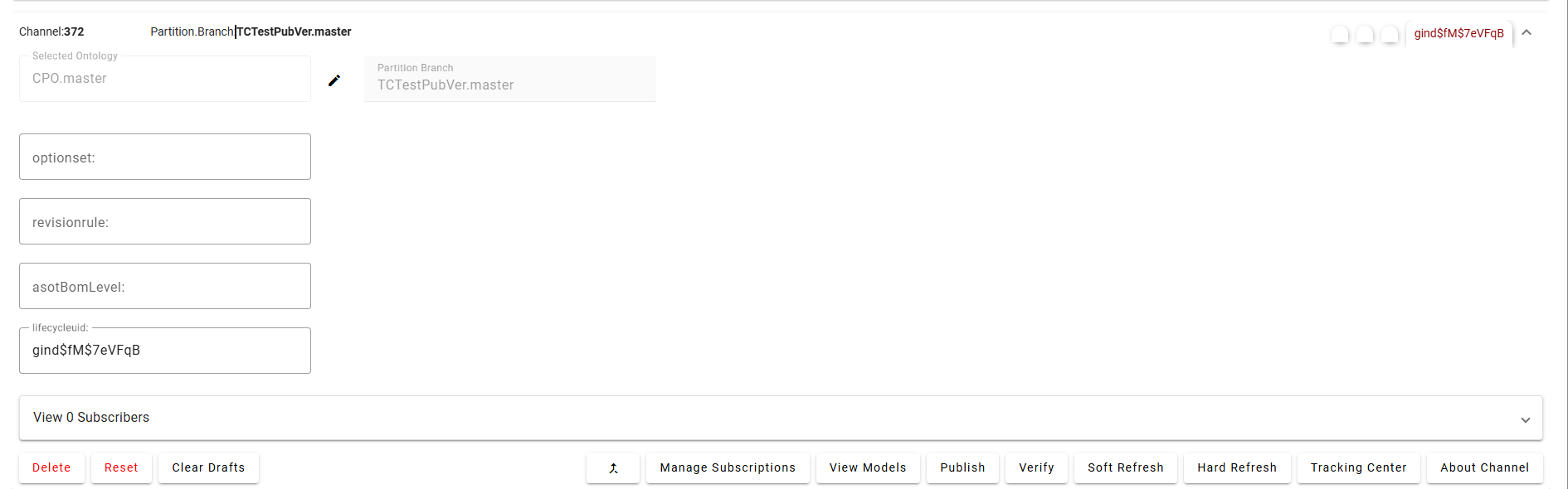
For performing Refresh operation, the user needs to have write permissions on the items in the Channel
1.3 Attaching & Connecting
Name | Mandatory | Description |
|---|---|---|
lifecycleuid | Y | UID of the Item revision |
revisionrule | N | Name of the revision rule, only needed for Bom expansion |
optionset | N | Name Value pair for options in the context of Bom Structure, only needed for Variants |
asotBomLevel | N | Level of BOM structure we need to extract for a given Part |
Detailed Channel Configuration can be found in Section 7.1
1.4 Publishing Items
1.4.1 Supported
Item with properties
Part Structure
1.4.2 Not Supported
Publish of Form properties
Publish of non-Trace link relations
1.5 Refreshing Items (Including Subscribed Items)
Item, Bom Subscriptions are supported.
1.6 Verify
Performs a validation check to ensure that the items published from SBE exist in the target system (e.g., Teamcenter) and are consistent.
The
Verifyoperation compares each item present in both SBE and the target/source system.It ensures that:
All properties (e.g., Name)
All relations (e.g., Trace Links, BOM Structure)
All metadata (e.g., Subscription Info)
are accurately synchronized and consistent between the systems.
This helps ensure that no item is missing, degraded, or out-of-sync after publishing.
1.7 Advanced Operations
Verify: Checks that the items published from SBE exist in the target system and are consistent.
Reset: Deletes any degraded or invalid items from the specified channel in SBE.
Force Publish: Force Publish triggers a full publish of data, regardless of whether only a subset of data has changed since the last operation. It bypasses the usual "delta" mechanism, which would otherwise only send changes since the last publish. This is useful when you want to ensure that all data is sent to the target system, even if some data hasn't changed or if previous publishes may have missed something.
This feature is available starting from version 8.x.
Force Refresh: Force Refresh triggers a full refresh of data from the source, again bypassing the delta mechanism. It ensures that the local or client system is completely updated with the latest data from the source, not just the changes since the last refresh. This is helpful for resolving sync issues or when you want to guarantee that the client has the most up-to-date and complete data
This feature is available starting from version 8.x.
Clear Drafts: The Clear Drafts action in the SBE platform is an advanced operation available in the Digital Thread adapter menu. This action is designed to remove or clear any "draft" data or unpublished changes that are stored locally for a given channel or project. Drafts typically accumulate when you make changes but haven't yet published them to the SBE server.
2. Document Overview
2.1 Document Overview
This document provides essential information for using, configuring, and supporting the SBE Vision adapters for Teamcenter. It covers multiple adapter products, each supporting different versions of the external tool.
2.2 Document Orientation
This document is designed to inform users with various roles:
End Users should begin with Section 1 to understand how to access and operate the adapter, and Section 5 for issues pertaining to the setup, configuration, and use of the digital tool itself.
Digital Thread Specialists should focus on Section 1, and also consult Sections 3, 4, and 5 for deployment and semantic mapping. Section 11 contains details related to mapping items from this tool into a semantic ontology.
Administrators should refer to Section 6 and beyond for setup, security, support, and version management.
3. Adapter Use Cases
3.1 Adapter Overview
The purpose of this adapter is to allow the data contained within instances of Teamcenter to connect with the SBE Digital Thread platform.
4. Supported Versions
4.1 Supported Adapter Products
This document covers all the version of adapter that support SBE 7.x (woburn) and SBE 8.x (melrose)
4.2 External Tool Versions Supported
TC 13.2.14 with Active workspace 6.3.x and 5.2.x
TC 2406
4.3 Differences Across Tool Versions
Different SBE packages are provided for different version of TC
4.4 Supported Plug-Ins and Add-Ons
No plug-ins or add-ons are currently supported
5. Digital Tool Best Practices
5.1 Usage Tips & Gotchas
Common user mistakes
Refreshing without mappings for required properties
Solution: Ensure all mandatory properties are mapped before performing a Refresh operation.
6. Installation
6.1 Installation Instructions
The adapter installation is as per the official SBE platform installation guide
Installing SBE Teamcenter Package
6.1.1 Getting Started
This document contains the steps to install the SBE Digital Thread Teamcenter package.
SBE currently supports TC 13.x with Active workspace 6.3.x
6.1.2 Deployment Package
The following components are part of the TC deployment package.
3rd party dependencies for the TC server
SBE TC library and includes
BMIDE template containing the Soa services and Data model
Post installation package with Preferences, Stylesheets and Tiles
Active workspace package for custom locations
There are 3 different packages that need to be installed
TC 13 SBE Package, e.g.:
sbe-tc13-package-x.zipAWC Package, e.g.:
tc13-awc-6.3-x.zipBMIDE template, e.g.:
sbeservices_wntx64_x.zip,sbeservices_lnx64_x.zip
Download the configuration related package from the SBE repository
6.1.2.1 3rd Party Dependencies
All the necessary 3rd party dependencies are included in the sbe-tc13-package-x.zip
6.1.3 Installing the SBE Package
Unzip the sbe-tc13-package-x.zip, this extracted directory contains 2 directories for the OS we are on
lang- contain labels, messagesTCRoot- copy the files to respective directories under your TCRoot
6.1.3.1 Add labels and error messages
Create/Update custom lang directory to add the texts and errors
Copy the directories under lang
Update
TC_USER_MSG_DIRvariable under$TC_DATA/tc_profilevarsDelete the temporary files.
Restart the server if needed
cp -rf ./lang/* $TC_USER_MSG_DIR/
echo "TC_USER_MSG_DIR=/home/tcuser/sbe/lang
$TC_USER_MSG_DIR" >> $TC_DATA/tc_profilevars
6.1.4 Installing BMIDE Template
We will need TC admin account for installing a template on TC server.
Download the SBE Services BMIDE template package which matches your environment
SSH or RDP to the TC Server
Run tem as admin and install the SBE BMIDE template
Verify if the libraries were copied during install,
For windows, this will be the
libst5soasbeservices.libunder lib andlibst5soasbeservices.dllunder binfor linux,
libst5soasbeservices.sounder libIf the files are not present, copy them to respective directories
Restart the TC server.
6.1.5 Post Installation Steps
6.1.5.1 Create/Update Preferences
Create/Update the following preferences before using the Awc components.
There are also preferences related to stylesheets included in the file.
Name | COTS | Description | CREATE/UPDATE |
|---|---|---|---|
SBE_HOSTNAME | false | Url of the SBE instance. eg: https://sbe.acme.com | CREATE |
SBE_TC_DS_NAME | false | Data Source Name of the current TC instance. eg: TC_PROD_MA | CREATE |
AWC_StartupPreferences | true | Defines the list of preferences to be retrieved at startup by the Active Workspace client from the Teamcenter server. We need to add the custom preferences defined above to this list | UPDATE |
Please note that only the custom preferences are added in the file from the package.
preferences_manager -u=infodba -p=$tc_admin_pass -g=dba -mode=import -action=OVERRIDE -scope=SITE -file=SBE_AWC_Preferences.xml6.1.5.2 Create/Update Stylesheets
Create txt file sbelist.tx with SBE style sheets as shown below
SBE_SmartReq_Page,SBE_SmartReq_Page.xml
Awp0ST5SubscriptionRevSummary,Awp0ST5SubscriptionRevSummary.xml
Awb0ST5SubscriptionRevisionSummaryForShowObjectLocation,Awb0ST5SubscriptionRevisionSummaryForShowObjectLocation.xml
Copy the stylesheets to same directory and run the following command
install_xml_stylesheet_datasets -update -u=infodba -p=$tc_admin_pass -g=dba -input=${pwd}/sbelist.txt -filepath=${pwd}
Once the SBE style sheet is imported, the types for which the Digital Thread needs to be shown must be updated to add the inject as shown below
<inject type="dataset" src="SBE_SmartReq_Page" />Please note that the data set injects a Page
Labels
This section is application for AWC 5.x
We need to the add following entries under tc_xrt_text_locale.xml under $TC_ROOT/lang
 <key id="sbe_smart_req_view">Digital Thread</key>
 <key id="sbe_subscription_view">Subscriptions</key>
Delete the V13000* under Temp directory and restart TC server.
A sample tc_xrt_text_locale.xml file is provided in the awc-package
Once the style sheets are updated, we should see the new Digital Thread tab on items.
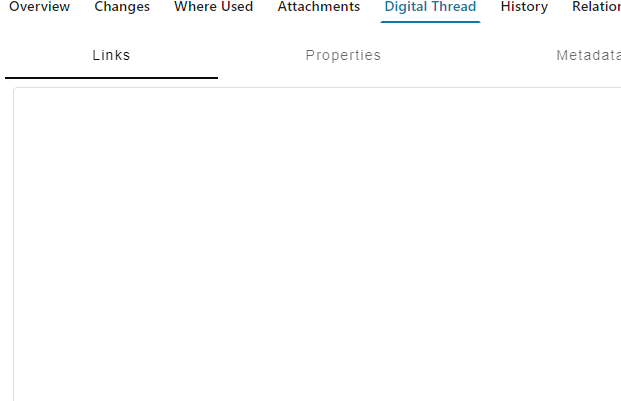
DT-Tab
6.1.5.3 Create AWC Tiles
Go to the tile's directory, open a TC terminal and run the following commands
Please note the Tile collection adds the tile to the group Engineering, if we want to use a different group, we need to update the collection file
aws2_install_tilecollections -u=infodba -p=$tc_admin_pass -g=dba -file=./TileCollections.xml -mode=add
Confirm that the SBE Tile Template, Tile and the Tile Collection were created from the log file.
6.1.6 Installing AWC package
Download the latest AWC package.
Copy the
sbe-digitalthreaddirectory to$TC_ROOT/aws2/stage/srcCopy
workspace_contribution_sbe-digitalthread_TcAuthorWorkspace.jsonto$TC_ROOT/aws2/stage/solutionCopy the image under images directory of the package to the image under
$AWC_STAGE
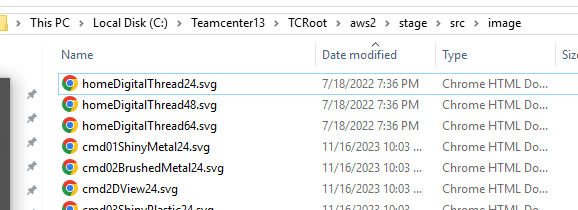
AWC Image
Edit
$TC_ROOT/aws2/stage/src/solution/kit.json,
a. Add sbe-digitalthread to modules if not already added.
b. Add the image under gatewayPageBundle as shown in screenshot below
"modules": [
    "tc-aw-solution",
    "sbe-digitalthread"
  ]
Rebuild Active workspace client by running
awbuild
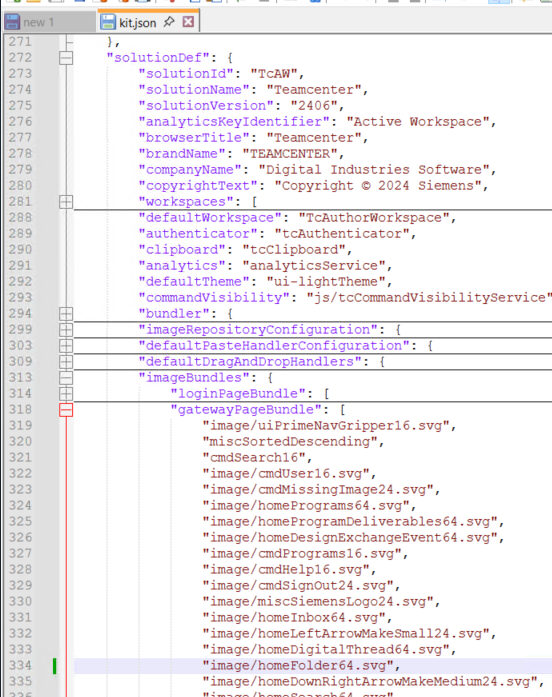
kit.json
6.1.6.1 Verify AWC package installation
Login as a user in `Engineering` group we should see the Tile Digital Thread on user home
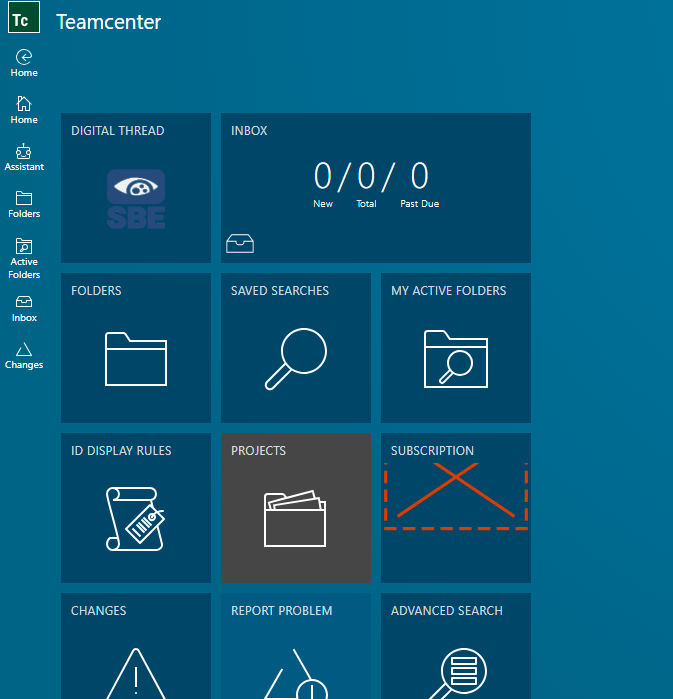
DT-HOME
6.2 Data Source Type Definition
The data source definition must contain the following Server properties.
Name | Description |
|---|---|
host | Host name, eg: qa-tc.plm.com |
port | port number at which the web server is running. eg: 80/443 |
uriScheme | two possible values: http/https |
context | default value, tc |
awcUrl | url to Active workspace, eg: http://tc13.plm.com:3000 |
7. Channels and Mappings
7.1 Channel Definition
To get the UID of an Item Revision from Active Workspace, Open an Item and from the url the uid argument is the UID
The uid in the following example uid=wCtZbEMp7eVFqB

Please note that in the new version of Active Workspace the uid can be URL encoded, eg: gind%24fM%247eVFqB, the value entered during attach must be decoded which in this case is gind$fM$7eVFqB

UID URL
Name | Mandatory | Description | |
|---|---|---|---|
lifecycleuid | Y | UID of the Item revision | |
revisionrule | N | Name of the revision rule, only needed for Bom expansion | |
optionset | N | Name Value pair for options in the context of Bom Structure, only needed for Variants | |
asotBomLevel | N | Level of BOM structure we need to extract for a given Part |
Note:
The
asotBomLevelproperty value must be a valid number >= 0, if no value is specified the whole BOM structure is publishedIf the input level is 0, Only the parent part is published.
It is advised to use a lower BOM level for a better Digital Thread experience
7.2 Approaches to Mapping
The shape Id will be the Item Revision Internal Type.
8. Security and Access
8.1 Secure Communication
8.1.1 TLS
The uriSchemeDataSource property defines the protocol http or https used by the adapter.
It is highly recommended the server communication is secured using https
The adapter assumes if customer certificates are used on the server, they are wired into SBE deployment
9. Release Notes
9.1 Version History
8.7 (Nov 11,2025)
Fixes for missing dynamic properties
Fixed issue with link deletion
Renamed shape type from
typetoTYPE, please note this will need changes to TC mappingsSupport Self signed certs on TC
Adapter now shows number of items processed in tracking.
Teamcenter Update
Needs the following packages to be installed/updated
SBE TC13 package 7.8 -
sbe-tc13-package-lnx-7.8.zip,sbe-tc13-package-win-7.8.zip
8.6 (Sep 26,2025)
SDK 8.18
Support TC 2406
Support the following property types - Char, String, Integer, Double, Boolean, Date (publish only)
Add SDK Cache
Item V7
8.5 (Aug 13,2025)
SDK 8.16
8.4 (Jul 04,2025)
SDK 8.15
8.3 (Jul 03,2025)
Support Reset
SDK 8.14
8.2 (Apr 16,2025)
SDK 8.11
Teamcenter Update
AWC package 8.0
8.1 (Feb 15,2025)
SDK 8.9
Fix issue with mismatching locator's issue during Refresh
8.0(Jan 08,2025)
Support SBE 8.x
SDK 8.8
Teamcenter Update
Needs SBE lib 7.3
TC Package 7.3
7.11 (Nov 24, 2025)
SDK 7.51
7.10 (Nov 10,2025)
Fixes for missing dynamic properties
Fixed issue with link deletion
Renamed shape type from
typetoTYPE, please note this will need changes to TC mappingsSupport Self signed certs on TC
Adapter now shows number of items processed in tracking.
Teamcenter Update
Needs the following packages to be installed/updated
SBE TC13 package 7.7 -
sbe-tc13-package-lnx-7.7.zip,sbe-tc13-package-win-7.7.zip
7.9 (Sep 29,2025)
Support Verify
Support TC 2406
Support the following property types - Char, String, Integer, Double, Boolean, Date (publish only)
Add SDK Cache
Teamcenter Update
Needs the following packages to be installed/updated
BMIDE template 7.6 -
sbeservices_lnx64_7.6.zip,sbeservices_win64_7.6.zipSBE TC13 package 7.6 -
sbe-tc13-package-lnx-7.6.zip,sbe-tc13-package-win-7.6.zip
7.8 (July 18, 2025)
Support Reset
SDK 7.50
Teamcenter Update
Needs SBE package 7.6
7.7 (May 08 ,2025)
Support Publish and Refresh of Custom properties on Occurrences
Teamcenter Update
Needs SBE package 7.5
7.6 (Jan 16 ,2025)
Fix issue with mismatching locator's issue during Refresh
7.5 (Jan 16, 2025)
Support new Channel Property
asotBomLevelSDK 7.45
Minor fixes/improvements for Refresh
10. Technical Reference
10.1 Adapter API Endpoints
Adapter uses custom Soa endpoints part of the SBE package
10.2 Identity
The following are the locator properties
Item Revision
Name | Description |
|---|---|
revisionUuid | Uid of the Item Revision , eg: |
StructureOccurrence
Name | Description |
|---|---|
id | Uid of the Occurrence, eg: |
itemType | type of the occurrence, eg: |
10.3 Schema Support
The Item revision of the given UID is published with the following
Item Revision properties
Trace link relations
BOM structure
The shape Id will be the Item Revision Internal Type.
10.3.1 Item Revision
Properties
All the properties on the Item Revision are Published
Links
The following links are currently supported
Trace Links
BOM Structure
10.3.2 Structure Occurrence
ShapeId: StructureOccurrence
Properties
Property Name | Data Type | Enum | Req’d | R/O | Description |
|---|---|---|---|---|---|
quantity | String | no | no | yes | quantity of the item, eq: 1 |
sequence | Integer | no | yes | yes | sequence order, eg: 2 |
Links
Name | Types | Mult | Description |
|---|---|---|---|
Target | Part | 0..1 | Child part |
11 Upgrade
11.1 Migrate from SBE 7.x to SBE 8.x
This section will cover the guide to upgrade from your SBE 7.x to SBE 8.x