
SAM Adapter

Adapter & Extension Package Documentation go together
Plugins are Separate
1. Getting Started: Using the Adapter
1.1 Operations Overview
Sam-adapter is a server-based SBE adapter. This allows users to interact with data from SAM within the Digital Thread via the SAM SysML V2 API.
Publish
Publishing moves data from SAM to the Digital Thread.
During publish, sam-adapter fetches the elements from the SAM server via REST per the SysML V2 spec. This raw data is then mapped by the SBE SDK to item DTOs using the @type types as the shape ids, before being sent to the SBE platform, where the items are published as SBE models on the Digital Thread using the ontology mappings.
Refresh
Refreshing moves data from the Digital Thread to SAM.
During refresh, the SBE platform maps the models to item DTOs, which are sent to sam-adapter. The sam-adapter then maps the item DTOs to SysML V2 elements and posts them to the DNG server via REST.
Verify
Verifying compares the data between the Digital Thread and SAM. Results, viewable in the “Detailed” Tracking Logs, show an item-by-item comparison of each corresponding DNG artifact/SBE model pair, indicating any discrepancies between the two in properties, relations, or metadata.
1.2 Accessing the Adapter
Since sam-adapter is a server-based adapter, the connection between SAM and the Digital Thread is managed by SBE, and all operations are performed via the SBE web interface. Once the connection is established, as described in Section 1.3, all data operations described above can be initiated and monitored within the SBE platform.
1.3 Attaching & Connecting
The following properties must be configured via the SBE Data Source Manager:
Data Source Type: SAM
Data Source properties:
hostUrl
Channel properties:
spaceId (i.e. Organization Id)
projectId
1.4 Publishing Items
Publishes can be triggered from the SBE UI:

The current, proof-of-concept sam-adapter only publishes a limited SysML V2 domain, including RequirementUsages, PartDefinitions, PartUsages, ConnectionUsages, PortUsages, SatisfyRequirementUsages, and Packages. See section 7.2 below for more info.
1.5 Refreshing Items (Including Subscribed Items)
Refreshes can be triggered from the SBE UI:

Hard refresh overwrites any changes in SAM since the last publish with changes from the Digital Thread. Soft refresh (aka rebase) does NOT overwrite changes in SAM since the last publish; only items in DNG that have NOT been updated since the last publish will be updated by rebase.
Refresh (including refreshing of subscribed items) is supported for the entire domain for which publish is supported. Subscribed elements will appear in the Digital Thread package:
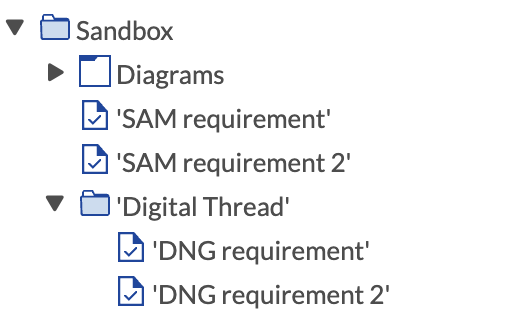
This package is merely organizational. It is NOT published/refreshed/managed by the Digital Thread. Furthermore, moving elements out of the Digital Thread folder will NOT unsubscribe the elements or make them ASOT (i.e. authoritative).
1.6 Verify
As described in Section 1.1, the verify operation compares the data between the Digital Thread and SAM. It can be triggered from the SBE UI:

1.7 Advanced Operations
Currently, sam-adapter does not support any advanced operations, given that it is in the proof-of-concept stage.
1.8 Troubleshooting for End Users
SAM has proved to be fairly reliable, and given the simple nature of the proof-of-concept adapter, unexpected issues are rare.
Sometimes, we have seen some outages with the SAM development server; the Ansys team has been quick to assist.
If data is wiped from a stack, but subscribed items remain in SAM, then subsequent publishes may fail and/or be corrupted. In this case, the subscribed items should be manually deleted out of the SAM project, until the Reset operation is implemented in a future release of sam-adapter.
2. Document Overview
2.1 Document Overview
SAM (System Architecture Modeler) is a systems modeling tool developed by Ansys which is intended to be the first of its class to support the new SysML V2 spec.
As of June 2025, SAM is in continued production and improvement. SBE Vision was granted SAM licenses to develop a proof of concept adapter.
This document provides essential information for using, configuring, and supporting the SBE Vision adapters for SAM. It covers multiple adapter products, each supporting different versions of the external tool. There is a different version of this document for each major release of the SBE Platform.
2.2 Document Orientation
This document is designed to inform users with various roles:
End Users should begin with Section 1 to understand how to access and operate the adapter, and Section 5 for issues pertaining to the setup, configuration, and use of the digital tool itself.
Digital Thread Specialists should focus on Section 1, and also consult Sections 3, 4, and 5 for deployment and semantic mapping. Section 11 contains details related to mapping items from this tool into a semantic ontology.
Administrators should refer to Section 6 and beyond for setup, security, support, and version management.
3. Adapter Use Cases
3.1 Adapter Overview
The purpose of this adapter is to allow the data contained within instances of SAM to connect with the SBE Digital Thread platform. Given that SAM is a server-side tool, all SBE operations are performed via the SBE web interface. This adapter was built using the SBE Java Pro-SDK product.
4. Supported Versions
4.1 Supported Adapter Products
7.x (features that are specific to a version are noted throughout this document)
4.2 External Tool Versions Supported
The sam-adapter proof-of-concept was built to support the current MVP version of SAM deployed to the SBE development server.
4.3 Differences Across Tool Versions
SAM is still under development by Ansys, but there are no major functional differences that have impacted development of sam-adapter.
4.4 Supported Plug-Ins and Add-Ons
Ansys team must be engaged to see whether plugins or add-ons are supported. Currently, there is no SAM plugin under development by SBE.
5. Digital Tool Best Practices
5.1 Tool Configuration Considerations
For the proof-of-concept sam-adapter, only a limited domain is supported, so if there are elements that are failing to publish, ensure that the domain is supported as described in Section 7.2 below.
5.2 Usage Tips & Gotchas
SAM has proved to be fairly reliable, and given the simple nature of the proof-of-concept adapter, unexpected issues are rare.
5.3 Tool Limitations and Workarounds
Production blocker: The SAM API currently doesn’t support reading/writing custom fields (e.g. SBE subscriptionId)
Production blocker: There is no password grant auth, so we are currently pasting tokens from the SAM UI.
The SysML V2 Query API is not yet implemented for all constraints (e.g. querying satisfy link elements by the id of the satisfying feature).
POST requests don’t return ids of the created/updated/deleted elements.
6. Installation
6.1 Installation Instructions
Ansys team has installed and deployed a SAM instance for SBE development.
6.2 Configuration
Ansys team has installed and deployed a SAM instance for SBE development.
6.3 DataSource Type Definition
Data Source Type: SAM
Data Source properties:
hostUrl
7. Channels and Mappings
7.1 Channel Definition
Channel properties:
spaceId: Organization Id (Required)
projectId (Required)
7.2 Approaches to Mapping
This table lists the SysML V2 shapes that are supported by sam-adapter as of release 7.22:
Shape Id | Properties | Relations |
|---|---|---|
RequirementUsage | @type | owner |
PartDefinition | @type | owner |
PartUsage | @type | owner |
ConnectionUsage | @type | owner |
PortUsage | @type | owner |
SatisfyRequirementUsage | @type | owner |
Package | @type | owner |
This table lists SysML V2 to SysML V1 mappings and example, OOTB MBE mappings:
SAM Shape Id | SysML V2 | SysML V1 | SBE MBE Mapping |
|---|---|---|---|
RequirementUsage | Requirement | Requirement | Requirement |
PartDefinition | Part Def | Block | Model Block |
PartUsage | Part | Part Property | Model Part Property |
ConnectionUsage | Connector | Connector | Model Connector |
PortUsage | Port | Port | Model Port |
SatisfyRequirementUsage | Satisfy Relation | Satisfy Relation | Satisfaction (non-iso) |
Package | Package | Package | Folder |
8. Security and Access
8.1 Authentication Methods
Currently, there is no support in SAM for password grant auth. Thus, for the sam-adapter proof-of-concept, we are simply pasting tokens from the SAM UI into the password field of the SBE operations dialog.
The following steps were suggested by Ansys to simulate browser login using authorization code flow:
1: GET to api/login to get csrf token + cookie
2: POST to api/login with username, password, and _csrf. This POST call will issue a 302, use the Location to have the URL to request the code (api/oauth/authorize...).
3: GET to that URL to request the code (with cookie). Response is also a 302, in the URL parameter you will find the code
4: POST to api/oauth/token with the grant_type (authorization_code), code, and redirect_uri (you can set the URL of the server).
8.2 Authorization and Roles
Members can be added by SAM admin to an Organization; roles are granted on a per-project basis. Projects can be created to restrict access to certain individuals or to grant access to all members of an Organization.
8.3 Secure Communication
All communication between clients (browsers, API consumers) and the SAM server should be over HTTPS.
This ensures encryption in transit, protecting:
Login credentials
API requests/responses
8.4 Identity Integration
N/A - more information needs to be procured from the Ansys team
9. Release Notes
9.1 Version History
7.22
filter out unsupported items
7.21
bump sdk version to 7.45
7.20
bump sdk to 7.44
7.19
bump sdk
7.18
bump sdk version
minor fix to hard refreshes
7.17
verify
link deletes
misc. refactors
7.16
initial release
8.0
initial release
9.2 Breaking Changes
There are currently no breaking changes
10. Technical Reference
10.1 Adapter API Endpoints
SAM implements SysML V2, so everything in SAM adheres to the SysML V2 docs. However, since SAM only partially implements SysML V2, not everything in SysML V2 applies to SAM.
There is no official SAM API documentations. We’ve been provided with the following list of endpoints that have been implemented in SAM:
getProjects
getProjectById
createProject
updateProject
deleteProject
getElements
getElementById
getRootElements
createCommit
getBranchById
executeQuery
10.2 Identity
The external locator (i.e. identifier) for SAM elements on the SBE platform is simply the SAM Element UUID.
10.3 Configuration File Format Reference
N/A - sam-adapter does not use a configuration file
10.4 Schema Support
The shape ids are taken from the @type field from the incoming SAM elements, which are then mapped to their corresponding shape types in sam-adapter as indicated in Table 1 below.
Shape Id | Properties | Relations |
|---|---|---|
RequirementUsage | @type | owner |
PartDefinition | @type | owner |
PartUsage | @type | owner |
ConnectionUsage | @type | owner |
PortUsage | @type | owner |
SatisfyRequirementUsage | @type | owner |
Package | @type | owner |
10.5 Compliance and Certification
Maturity | Key Verification Parameters |
|---|---|
Level 1 | Design Ready, Review documentation |
Level 2 | Technology Demonstrated for initial scope. |
Level 3 | Test full-publish, full-refresh on authoritative and subscribed entity sets on current release train. Review Architecture. |
Level 4 | Test all actions on current and future release trains. Test mandatory telemetry. Basic tests are automated. Review Architecture and adoption of best practices. |
Level 5 | Tuned for performance. Introspectable. Full test automation. Stable for 6 months. |
Level 6 | Realizes all domains. Automated L3-L5 tests passes. Stable for 6 months. |
Level 7 | Ongoing security and dependency patches. Stable for a year. |
As a proof-of-concept adapter, sam-adapter is currently rated at Level 2 in the adapter maturity model.