
PTC Codebeamer Documentation
1. Getting Started: Using the Adapter
1.1 Introduction
Codebeamer is an Application Lifecycle Management (ALM) platform from PTC designed for complex software and product development. It provides a central, integrated environment for requirements management, test management, and risk management, supporting the entire product development lifecycle
1.2 Accessing the Adapter
Codebeamer is a Server adapter, the
Digital Threadoperations are run from the SBE’s web applications
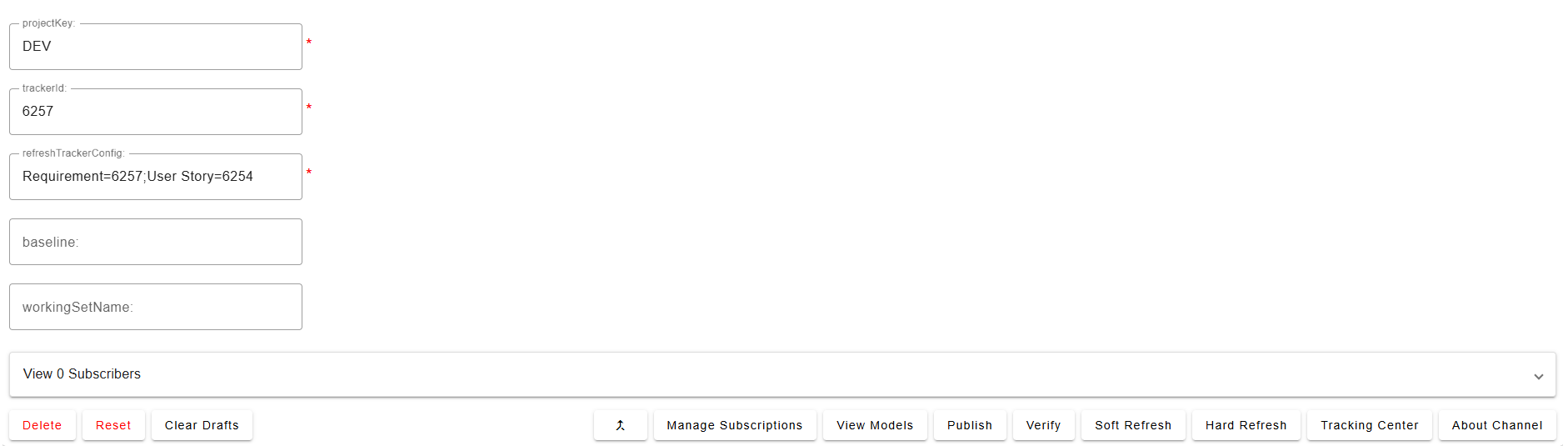
For performing Refresh operation the user needs to have write permissions on the items in the
Channel
1.3 Attaching & Connecting
Name | Mandatory | Description |
|---|---|---|
projectKey | Y | The key of the project |
trackerId | Y | Tracker ID |
baseline | N | Baseline ID, used when we want to publish baselines |
workingSetName | N | Working Set name, used when we want to publish a working set |
refreshTrackerConfig | Y | Used during Refresh, a combination of |
There are 2 types of Channels that can be created in Jama
Project Based
TrackerId Based
Detailed Channel Configuration can be found in Section 7.1
1.4 Publishing Items
The following use cases for Publish are currently supported:
If only
projectKeyis provided, then Publish all tracker and tracker items fromWork Items
folder from the given Project.If
projectKey,trackerId,andrefreshTrackerConfigare provided, then Publish items under thetracker name and also items under trackers which are present in config.
1.5 Refreshing Items (Including Subscribed Items)
Subscription of tracker items with type Requirement are supported.
Subscription of
Trackeris not supported.We are not supported
HTMLproperties ,we are supporting plain text.Please note that on all the types we want to subscribe into Codebeamer, we need to add a property
SBE Correlation Info, please look at section # 11.4.3 for more details
1.5.1 How it Works After Subscriptions
Once subscriptions are configured, performing a Refresh will:
Create new items in the target system for the subscribed content.
Update existing items if changes are detected in the SBE source.
1.5.2 Behavior of Refreshed Items
The created or updated items:
Include subscribed properties and relations from SBE.
Contain a special property:
SBE Correlation Info, which helps to distinguish between:Items created natively in the target system (real items)
Items created via subscription from another source (subscribed items)
This approach ensures:
Clarity between source and synced content
Traceability of item origin
Consistent synchronization across systems
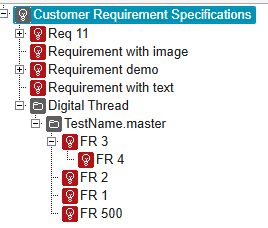
The Subscribed items are created under the Component Digital Thread, Digital Threadcreated will be created under Tracker
1.6 Verify
Performs a validation check to ensure that the items published from SBE exist in the target system (e.g., Codebeamer) and are consistent.
What does Verify check?
The
Verifyoperation compares each item present in both SBE and the target/source system.It ensures that:
All properties (e.g., Summary, Status, Priority)
All relations (e.g., Linked issues, Child Of)
All metadata (e.g., Subscription Info)
are accurately synchronized and consistent between the systems.
This helps ensure that no item is missing, degraded, or out-of-sync after publishing.
1.7 Advanced Operations
1.7.1 Reset
Deletes any degraded or invalid items from the specified channel in SBE.
Note : Reset is supported from version 7.12 for Woburn and 8.04 for Melrose and above.
1.7.2 Clear Drafts
The Clear Drafts action in the SBE platform is an advanced operation available in the Digital Thread adapter menu. This action is designed to remove or clear any "draft" data or unpublished changes that are stored locally for a given channel or project. Drafts typically accumulate when you make changes but haven't yet published them to the SBE server.
1.7.3 Force Publish
Force Publish triggers a full publish of data, regardless of whether only a subset of data has changed since the last operation. It bypasses the usual "delta" mechanism, which would otherwise only send changes since the last publish. This is useful when you want to ensure that all data is sent to the target system, even if some data hasn't changed or if previous publishes may have missed something.
This feature is available starting from version 8.x.
1.7.4 Force Refresh
Force Refresh triggers a full refresh of data from the source, again bypassing the delta mechanism. It ensures that the local or client system is completely updated with the latest data from the source, not just the changes since the last refresh. This is helpful for resolving sync issues or when you want to guarantee that the client has the most up-to-date and complete data
This feature is available starting from version 8.x.1.8 Troubleshooting for End Users
Failed to Publish
This may occur due to the following reasons:
Incorrect Mappings
Ensure all required mappings are correctly configured. Refer to the #7.2 Mappings Configuration section for guidance.Invalid Authentication
The authentication may be outdated or incorrect. Please reconfigure it as explained in the Authentication Setup section.Publishing with Stale Data
To resolve this, reset the channel, this operation will clear up the stale.
2. Document Overview
2.1 Document Overview
This document provides essential information for using, configuring, and supporting the SBE Vision adapters for Codebeamer. It covers multiple adapter products, each supporting different versions of the external tool. There is a different version of this document for each major release of the SBE Platform.
2.2 Document Orientation
This document is designed to inform users with various roles:
End Users should begin with Section 1 to understand how to access and operate the adapter, and Section 5 for issues pertaining to the setup, configuration, and use of the digital tool itself.
Digital Thread Specialists should focus on Section 1, and also consult Sections 3, 4, and 5 for deployment and semantic mapping. Section 11 contains details related to mapping items from this tool into a semantic ontology.
Administrators should refer to Section 6 and beyond for setup, security, support, and version management.
3. Adapter Use Cases
3.1 Adapter Overview
The purpose of this adapter is to allow the data contained within instances of Codebeamer to connect with the SBE Digital Thread platform. Given that Codebeamer is a rich-client tool, the usage of this adapter is governed by end users operating that tool on the desktop of their workstation. This adapter was built using the SBE Java Pro-SDK product.
4. Supported Versions
4.1 Supported Adapter Products
This document covers all the version of adapter that support SBE 7.x (woburn), Look at the releases section for more details
4.2 External Tool Versions Supported
Mapping between tool versions and adapter versions
4.3 Supported Plug-Ins and Add-Ons
SBE Codebeamer extensions are used to show the SBE UI's in Codebeamer
5. Digital Tool Best Practices
5.1 Tool Configuration Considerations
Tool settings that affect adapter behavior
Required modules or optional configurations
5.2 Usage Tips & Gotchas
Common user mistakes
Refreshing without mappings for required properties
Solution: Ensure all mandatory properties are mapped before performing a Refresh operation.
5.3 Tool Limitations and Workarounds
User performs property level permissions
6. Installation
6.1 Installation Instructions
OS, Java, network requirements
Java: JDK 11
6.2 Configuration
The adapter uses configuration file which can be used to pass extra information which will be used during
RefreshFor detailed information look at section # 11.4.3
6.3 DataSource Type Definition
Datasource definition contains the following properties
Name | Description |
|---|---|
host | Host name of the CodeBeamer instance |
port | Port at which CodeBeamer Instance runs, eg: 443 |
uriScheme | Http or https |
pathPrefix | Prefix to the site if any, eg: https://sample.com/app, app here is the prefix |
authType | String value, only supported and default is Basic. |
proxyHost | Host name of proxy server. |
proxyPort | Port number of proxy server. |
7. Channels and Mappings
7.1 Channel Definition
Name | Mandatory | Description |
|---|---|---|
projectKey | Y | The key of the project |
trackerId | Y | Tracker ID |
baseline | N | Baseline ID, used when we want to publish baselines |
workingSetName | N | Working Set name, used when we want to publish a working set |
refreshTrackerConfig | Y | Used during Refresh, a combination of |
The projectKey is the keyName of the Project .
Project Key can be found in the project --> Admin :
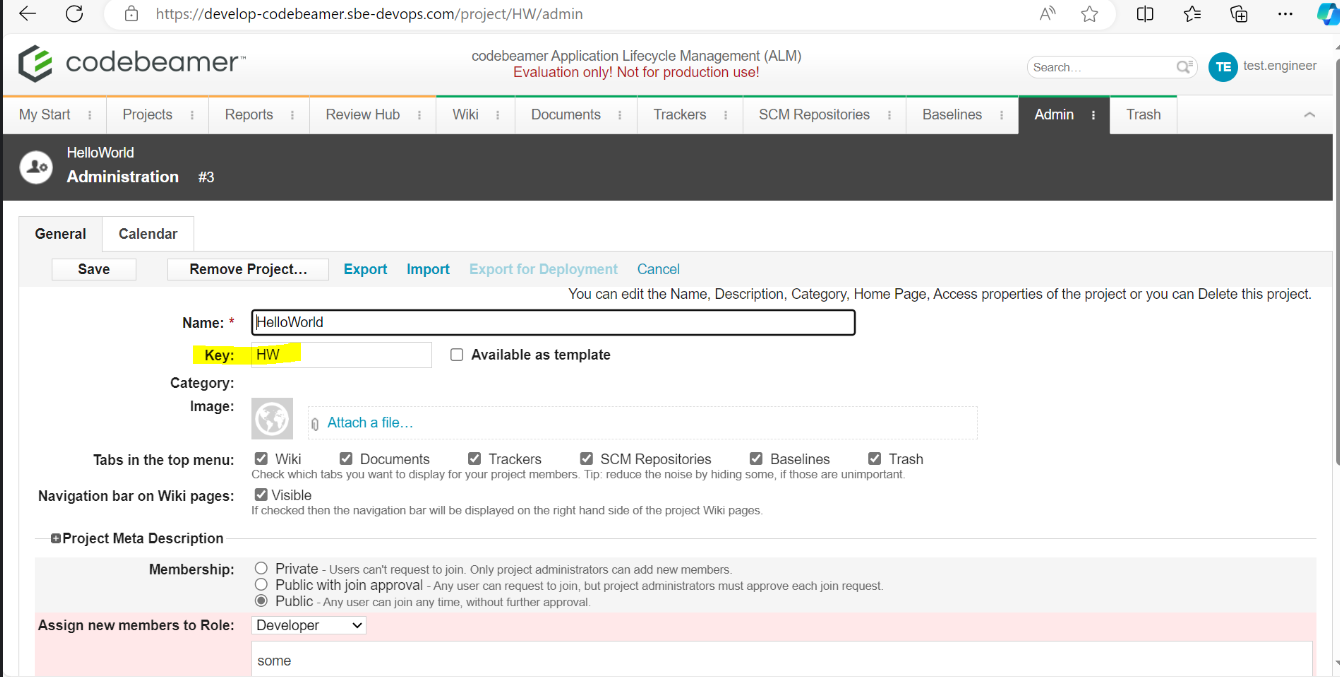
We can also find projectKey from the URL , from the example shown below key : HW.
URL:
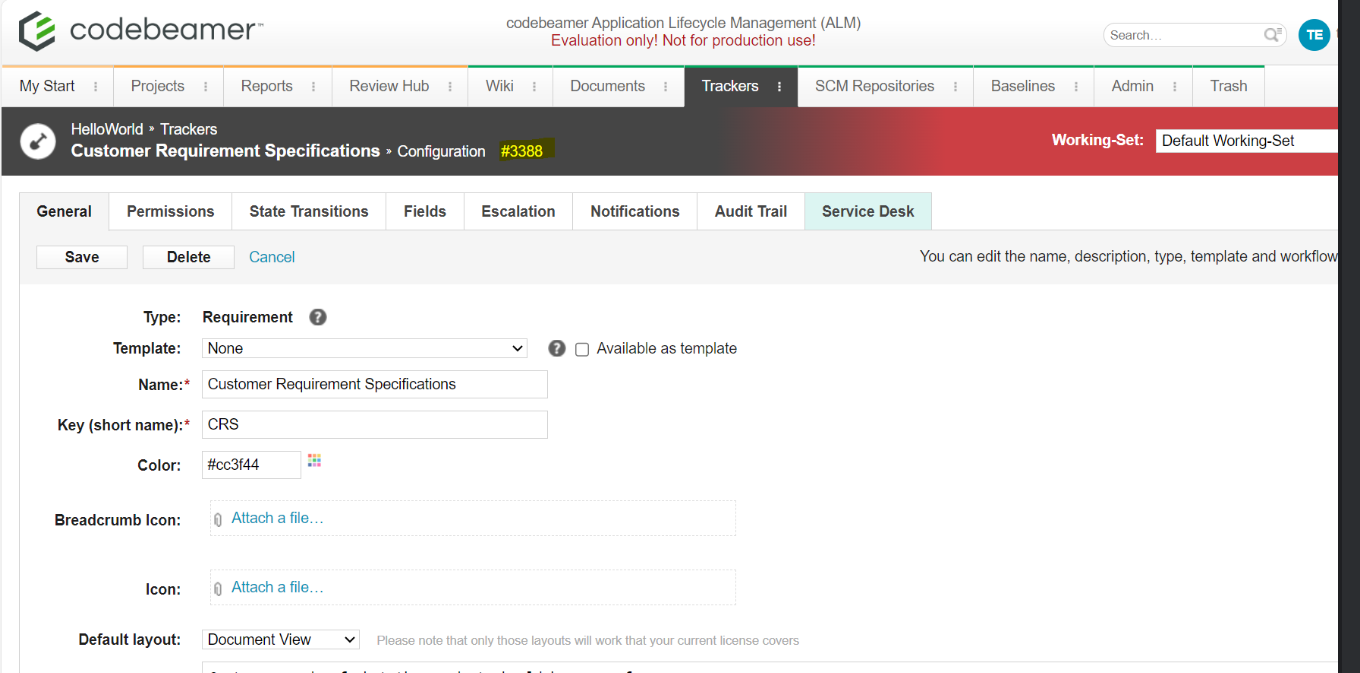
<https://codebeamer.acme/project/HW/admintrackerIdis theIDof aTracker, eg:3388.In the screenshot shown below, we can see
IDof tracker i.e;3388.
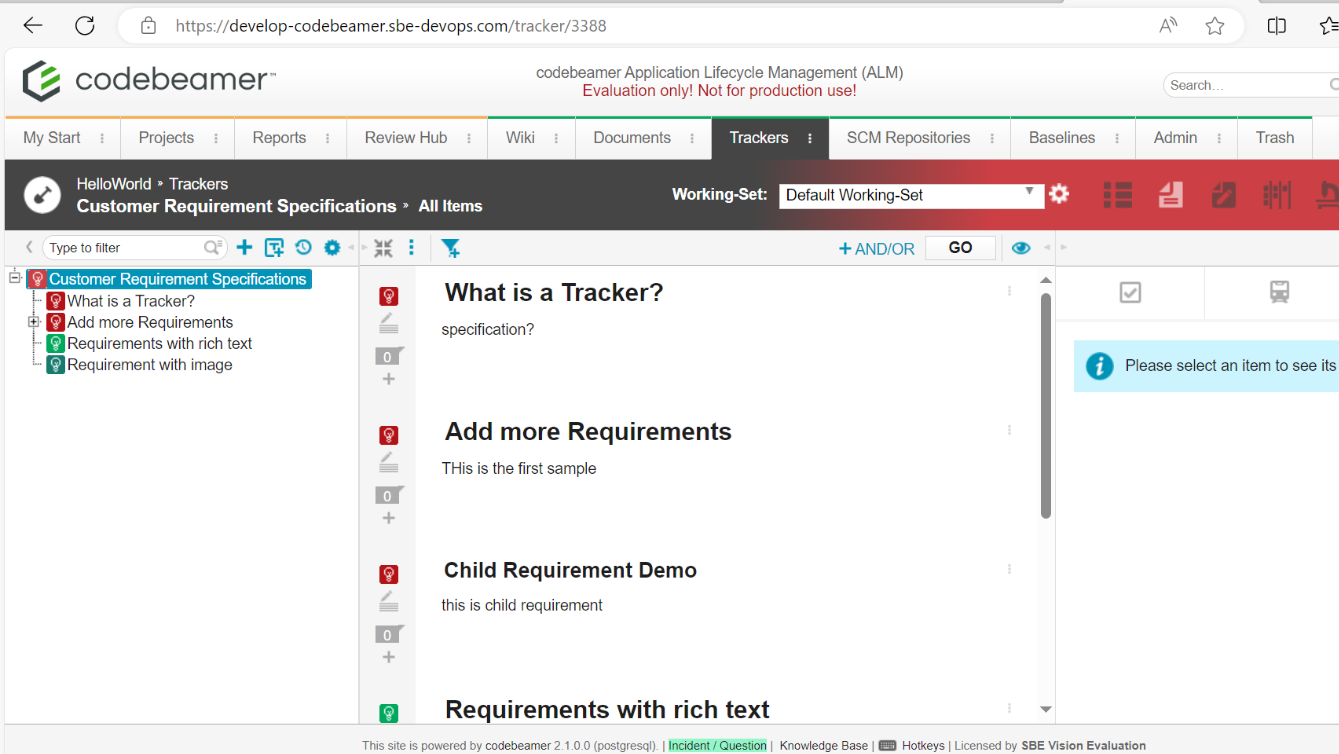
(or) Goto Project-->Trackers-->right click on tracker-->Configure Item
In the screenshot shown below, we can see ID
7.2 Approaches to Mapping
Codebeamer types and properties
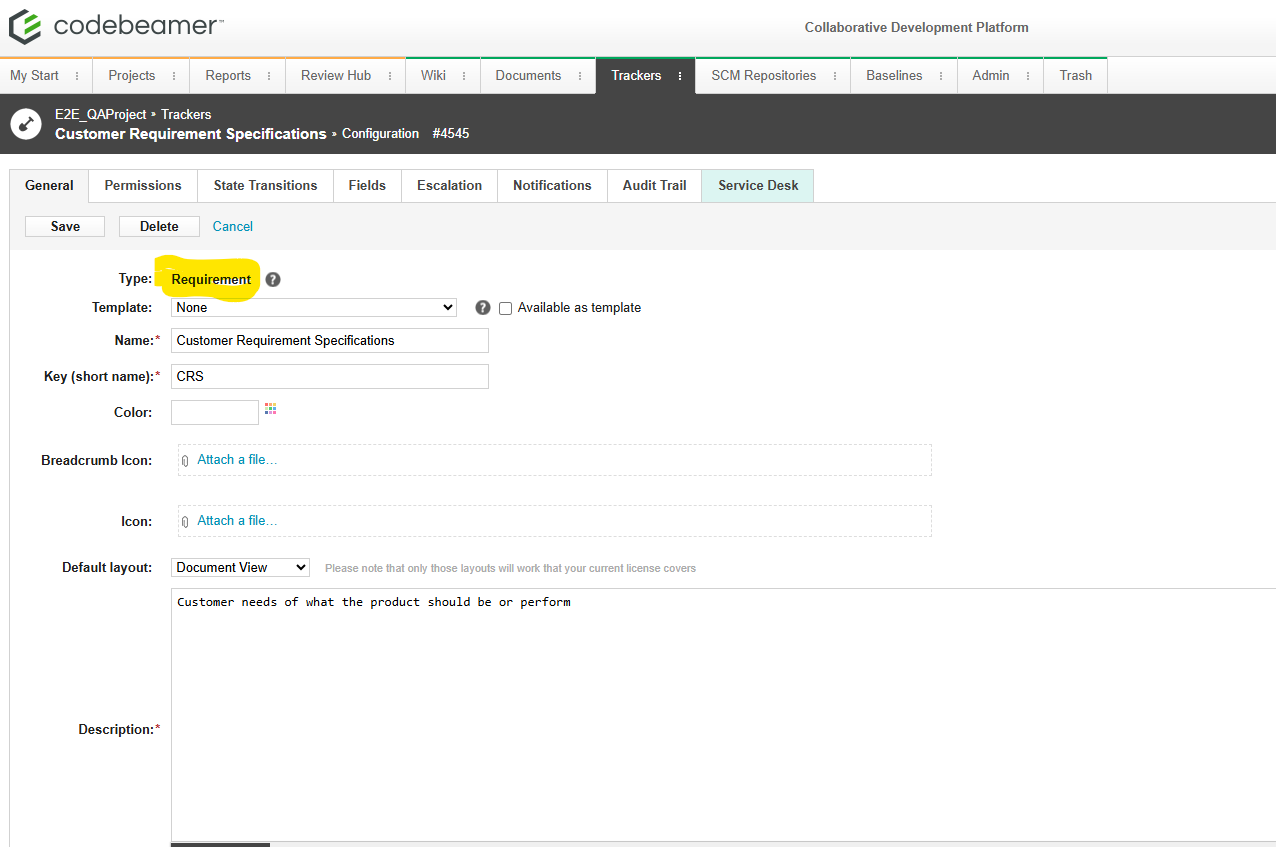
The Shape Idof the Items published from Codebeamer will be the type of the Tracker in Codebeamer .
For example, from the screenshot shown below, Shape Id will beRequirementfor all the items of that type.
8. Security and Access
8.1 Authentication Methods
The Adapter supports Basic authentication which is the only authentication method supported by Codebeamer Rest API
8.2 Authorization and Roles
Rest API access is by default enabled for all Users on Codebeamer
The Adapter assumes the User running
DigitalThreadoperations has necessary Read/Write Permissions on Codebeamer .
8.3 Secure Communication
8.3.1 TLS
The uriSchemaDataSource property defines the protocol http or https used by the adapter.
It is highly recommended the server communication is secured using https
The adapter assumes if customer certificates are used on the server they are wired into SBE deployment (TODO)
8.3.2 Proxy
If the communication to Jama happens through a Proxy server, the adapter needs to be configured accordingly.
The Datasource properties proxyHost, proxyPortneed to be set with the right Proxy server details
9. Release Notes
9.1 Version History
8.5 (Nov 12, 2025)
Fix issue with Verify when tracker is not set
8.4 (Sept 25, 2025)
Merge features from release
7.5to7.7SDK 8.18
Item V7
Use
Connection
8.3 (April 16, 2025)
SDK 8.11
8.2 (Feb 15, 2025)
SDK 8.9
Merge features from release 7.6
8.1 (Jan 8, 2025)
SDK 8.8
Merge features from release 7.4
8.0 (June 3, 2024)
Support SBE 8.0
7.7 (Sept 25, 2025)
SDK 7.50
Show more detailed status of Refresh in tracking UI
Bug fix on verify
7.6 (May 7, 2025)
Implement
VerifyImplement
ResetSDK 7.49
7.5 (Nov 14, 2024)
Support ASOT item-relation delete
SDK 7.44
7.4 (June 27, 2024)
Granular user credential validation
Support default values during refresh
Replace name with id in refreshTrackerConfig channel property
Use single property to store Subscription and Correlation Id’s
Implement ChildOf relation delete for subscribed items
Deprecate
DT-Temp
7.3 (April 19, 2024)
Validate Tracker config on Refresh
Re-create deleted items/relations during hard refresh
7.2 (March 18, 2024)
Support Subscription for
Requirementtype
7.1 (March 7, 2024)
Fix issue with
Publishwhen we have folder in the Project
7.0 (Feb 27, 2024)
Support publishing Project and Tracker and all the items under them.
10. Technical Reference
10.1 Adapter API Endpoints
This adapter not have any custom API
10.2 Identity
Description of external locator or mechanism of identity
Name | Description |
|---|---|
| This is the API id of the item |
10.3 Configuration File Format Reference
All accepted parameters
Required vs optional
Examples and defaults
10.4 Schema Support
Name: Item, Tracker
10.4.1 Metaclass: Item
Note:
The shape of the entities published out of CodeBeamer is the type.
Is Abstract: No
Extends:
Description: This class represents all the properties of items .
Property Name | Data Type | Enum | Req’d | R/O | Description |
|---|---|---|---|---|---|
id | Integer | no | no | yes | Id of the item, eg: 1001 |
name | String | no | yes | yes | Name of the item |
trackerName | String | no | yes | yes | Tracker name of the item |
type | String | yes | no | no | Display Name of the item type |
asotUri | String | no | yes | yes | Direct uri to CodeBeamer Item |
Note:
All the properties defined on the type except comments and tags are published
10.4.1.1 Links
Name | Types | Mult | Description |
|---|---|---|---|
ChildOf | Tracker/Item | 0..1 | Parent of the current Item. Parent can be of type Tracker/Item |
References | \* | 0..* | References link to Tracker Item |
10.4.1.1 Locator
Name | Description |
|---|---|
id | This is the API id of the item |
Note:
Links on Items are published with their respective
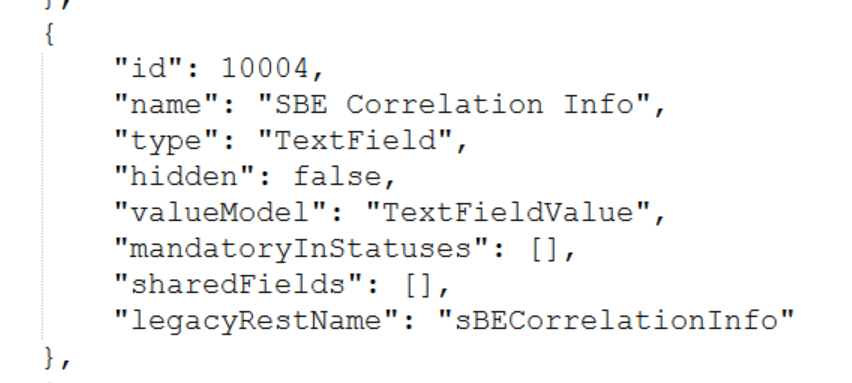
relation nameeg:(depends).For custom field property, we are publishing
nameas internal name.
below image shows custom property schema:
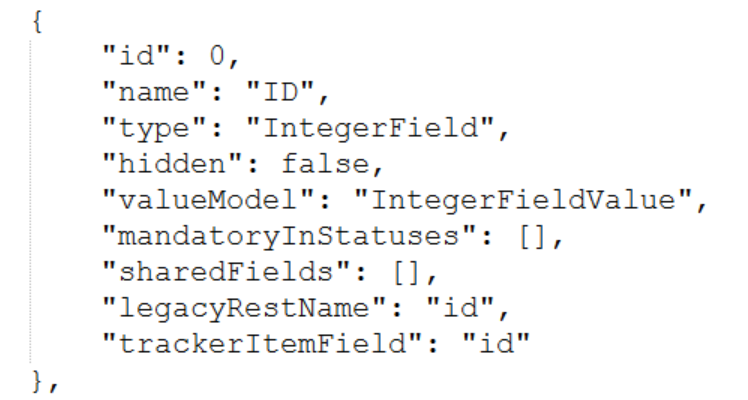
For tracker item field property, we are publishing
trackerItemFieldas internal name.
below image shows tracker item property schema:
10.4.2 Metaclass: Tracker
Is Abstract: No
Extends:
Description: This class represents all the properties of items
Property Name | Data Type | Enum | Req’d | R/O | Description |
|---|---|---|---|---|---|
id | Integer | no | no | yes | Id of the tracker, eg: 3385 |
name | String | no | yes | yes | Name of the tracker, eg: User Stories |
keyName | String | no | no | yes | Key name of the tracker, eg: US |
type | String | no | yes | no | Display Name of the tracker type, eg:User story |
asotUri | String | no | no | yes | Direct uri to CodeBeamer tracker |
project | String | no | yes | yes | Project Id of the tracker |
version | Integer | no | no | yes | Version of the tracker, eg:3 |
The following fields are not supported fields during refresh
Property Name | Data Type |
|---|---|
mitigates | Choice |
assignedTo | Members |
accruedMillis | Duration |
estimatedMillis | Duration |
endDate | Date |
startDate | Date |
spentMillis | Duration |
spentEstimatedHours | Duration |
resolution | Choice |
release | Choice |
owner | Members |
versions | Choice |
teams | Choice |
Custom choice field for multiple choice is not supported during refresh
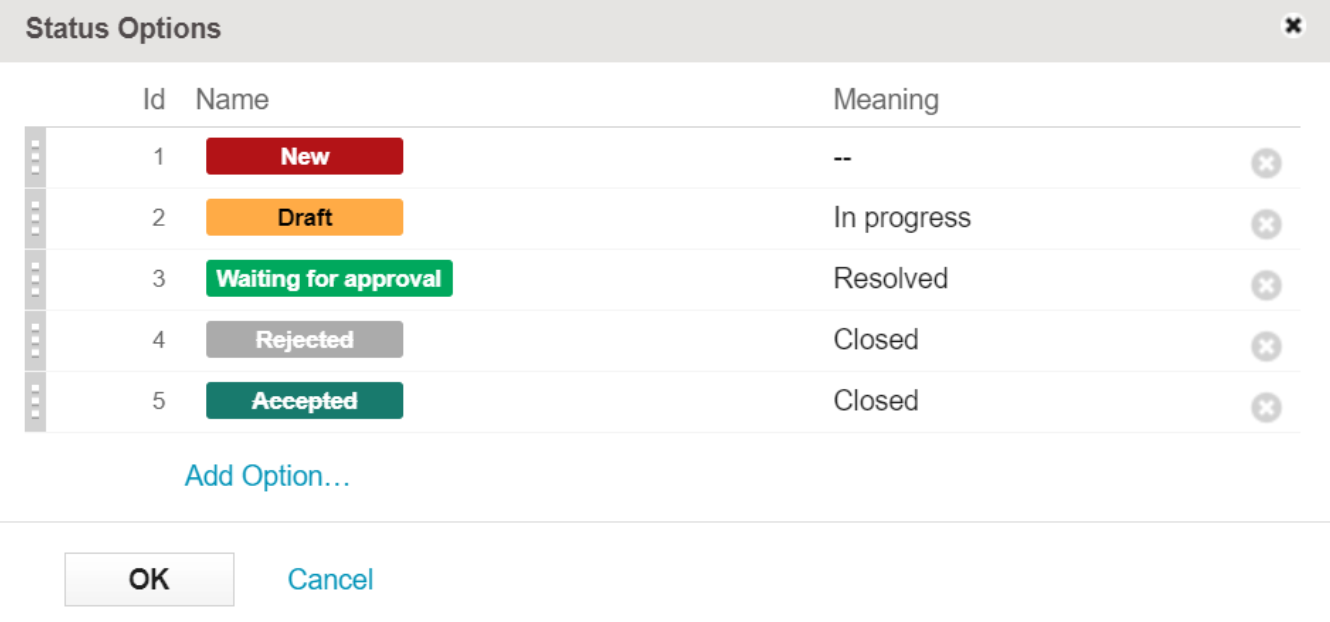
When setting the default values, index(Id) of 1 is considered the starting state, if none found at
1, index 0 (Un-Set) is used
10.4.3 SBE Fields
Custom fields needed for supporting Subscription
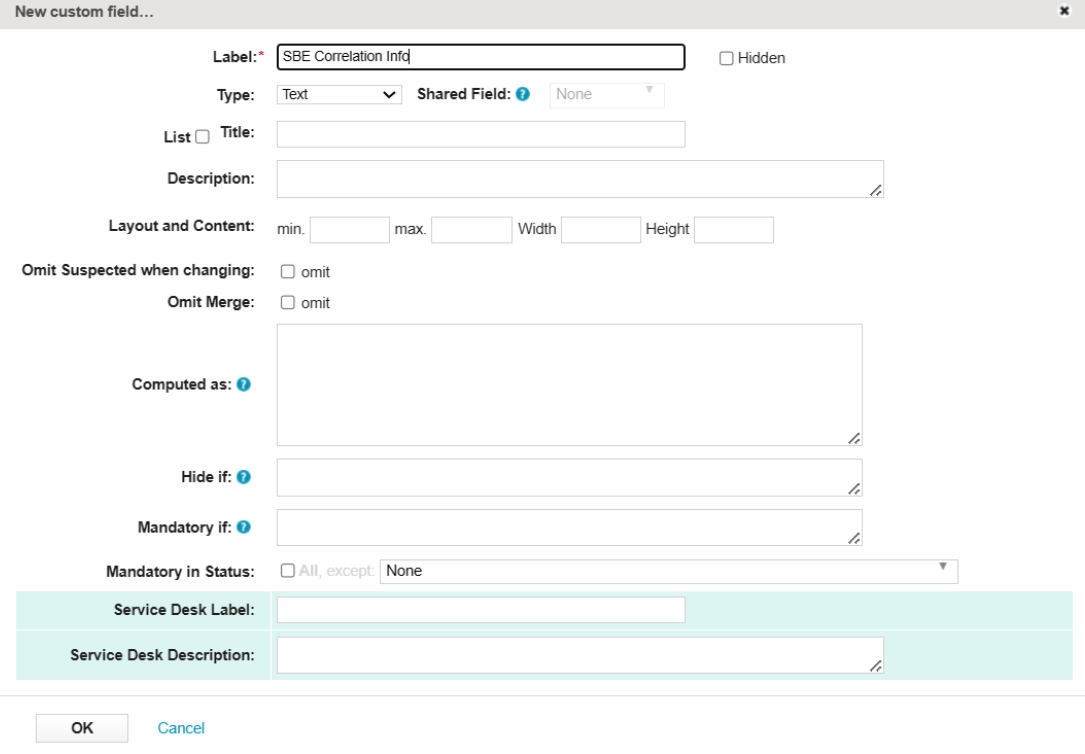
New Field can be added from:Project-->Trackers-->right click on tracker-->Configure Item-->Fields-->More Fields-->Click on New Custom Field:
Custom property SBE Correlation Info must be added to all types that are subscribed into Codebeamer
10.5 Glossary of Terms
Tracker - All the workitems in the project are Trackers
Tracker items - All the items under tracker are Tracker items
10.6 Compliance and Certification
ITAR, DoD, or cybersecurity compliance info (if applicable)
Adapter Maturity Model ratings
11 Upgrade
11.1 Migrate from SBE 7.x to SBE 8.x
This section will cover the guide to upgrade from your SBE 7.x to SBE 8.x