
Mentor Capital Adapter
SBE Mentor Capital Plugin Documentation Template
1. Getting Started: Using the Adapter
1.1 Operations Overview
Attach
Publish
Refresh - Soft/Hard
Verify
Reset Commit
1.2 Accessing the Adapter
1.2.1 Digital Thread Menu
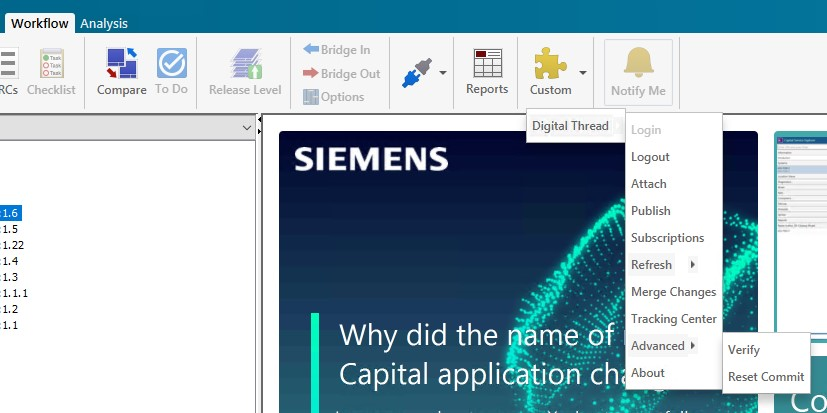
The
Digital Threadmenu options can be found underWorkflow->Custom
(TODO add latest image)
1.3 Attaching
The following channel property is needed for creating a channel.
Name | Mandatory | Description |
|---|---|---|
projectName | Y | Name of the project |
projectId | Y | Internal ID of the project |
1.3.1 Attach
To attach a project, the user must click the Attach button from the Digital Thread menu. This opens a window (as shown below), where the user needs to provide the necessary information such as selecting or creating a valid partition and branch and then proceed to create the channel.
When clicking on Attach from within the Adapter, the channel properties are automatically populated in the Attach screen.
(TODO add image)
1.4 Publishing Items
The following components are published
LogicalDesign
TopologicalDesign
LogicalDiagram
Devices
Pin
Net
Wire
Conductor
Connectors
Ring Terminal
Splice
Slot
Harness
Bundle
Highway
Shield
Hole
Node
1.5 Refreshing Items (Including Subscribed Items)
The following types are supported for Refresh
Device
Pin
Wire
Net
1.5.1 Refresh Procedure
1.5.1.1 Steps to Perform Refresh
Make sure
Capital Integration Serveris running.Create Subscription from Capital Logic.
For
Refresh, select aLogical Designand clickWorkflow -> Digital Thread -> RefreshThe Refresh process generates the Design file with all the components that were subscribed.

Note: Before Importing file, select
Capital->Project->Project Preferences->General->Uncheck "Purge unplaced objects on Save"
Click menu option
Capital->Files->Import Connectivity, SelectAuto- Generate Diagramoption, select the xml file saved in previous step.Once the new version of the design has been imported, save the project and do a
Publish.
1.5.1.2 Permissions
The following permissions are needed to perform Refresh operation
Capital Integration Servershould be up and runningUser must have access to
Capital Integration ServerAbility to export the Design (through
Capital Integration Server)Ability to
Import Connectivity(from App)
1.5.2 Types of Refresh
1.5.2.1 Hard Refresh
In a hard refresh, the plugin retrieves the entire published data from the SBE. A complete refresh is performed on all items received, ensuring that the local model is fully synchronized with the server.
1.5.2.2 Soft Refresh
In a soft refresh, the entire dataset is not retrieved. Priority is given to locally modified data that has not yet been published. This allows users to continue making changes locally without the risk of those changes being overwritten. Only data that has not been modified locally and has been updated in SBE is received and refreshed during this operation.
1.6 Verify
The verify operation refrains from making any modifications to the external system. Instead, it focuses on comparing the items in the external system with those received from the SBE platform.
During this process, the adapters evaluate the metadata, properties, and relationships. They also check for any missing or extra items.
1.7 Advanced Operations
1.7.1 Reset
The Reset operation clears the local metadata for the current channel.
2. Document Overview
2.1 Document Overview
This document provides essential information for using, configuring, and supporting the SBE Vision adapters for Mentor Capital. It covers multiple adapter products, each supporting different versions of the external tool.
2.2 Document Orientation
This document is designed to inform users with various roles:
End Users should begin with Section 1 to understand how to access and operate the adapter, and Section 5 for issues pertaining to the setup, configuration, and use of the digital tool itself.
Digital Thread Specialists should focus on Section 1, and also consult Sections 3, 4, and 5 for deployment and semantic mapping. Section 11 contains details related to mapping items from this tool into a semantic ontology.
Administrators should refer to Section 6 and beyond for setup, security, support, and version management.
3. Adapter Use Cases
3.1 Adapter Overview
The purpose of this adapter is to allow the data contained within instances of Mentor Capital to connect with the SBE Digital Thread platform. Given that Mentor Capital is a rich-client tool, the usage of this adapter is governed by end users operating that tool on the desktop of their workstation. This adapter was built using the SBE Java Pro-SDK product.
4. Supported Versions
4.1 Supported Adapter Products
This document covers all the version of adapter that support SBE 7.x (Woburn) and SBE 8.x(Melrose)
4.2 External Tool Versions Supported
Mentor Capital Logic (with Topology) Version 2207.
4.3 Differences Across Tool Versions
Functionality remains consistent across versions
4.4 Supported Plug-Ins and Add-Ons
No plug-ins or add-ons are currently supported
5. Digital Tool Best Practices
5.1 Tool Configuration Considerations
There is no separate configuration needed for the Mentor capital plugin. Installing it with the built-in plugin installer handles most of the required setup. The only configurations needed are for the HostName and log settings. Please refer to section 6.2 for instructions on configuring the hostname and logs.
6. Installation
6.1 Installation Instructions
Supported OS: Windows server 2019, 2016, 2022, Windows 10
Java: 11
6.1.1 Installation package
Download the mentor-capital-plugin-X.X.X.zip, extract the zip file, it should contain 2 directories,
install and binaries.
Install directory will contain config and log4j2 files. The binaries directory will contain jar files.
mentor-capital-plugin-x.x.x.jar
mentor-capital-plugin-x.x.x-with-dependencies.jar
Logging configuration, "log4j2.xml"
A json file with config used by the plugin "config.json"
6.1.2 Installation
Create a directory,
sbe, under $CAPITAL_HOME/plugins and create a sub-directoryextras
undersbeCopy the
mentor-capital-plugin-x.x.x.jarto thesbedirectory created in previous step and
copymentor-capital-plugin-x.x.x-with-dependencies.jartoextrassub directory.Create the following directory $USER_HOME/SBE/mentor and copy the config.json and log4j2.xml
Configure the plugin as shown in Configuration section.
6.1.3 Logging
The logging can be configured by updating the log4j2.xml, the location of the xml must
be $USER_HOME\\SBE\\mentor\\. If no logging config is added, the default location of the log file
is $TEMP
6.1.4 Verifying the Installation
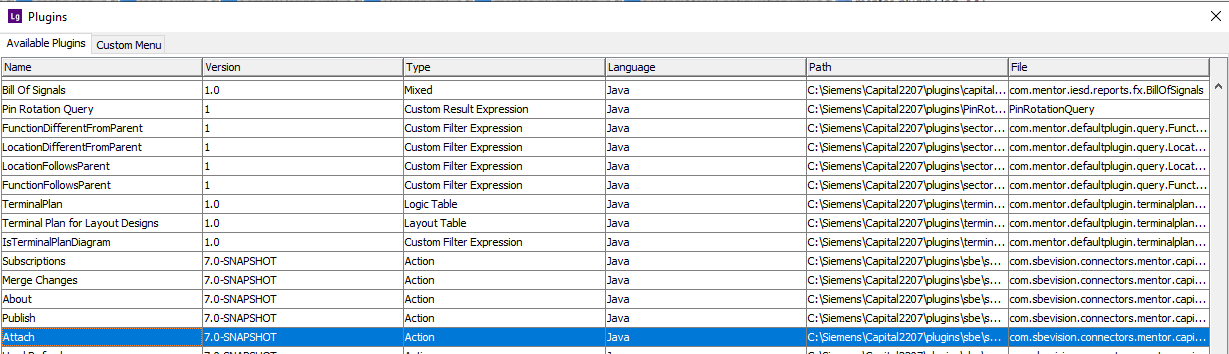
Open Capital Logic, click on System->Plugins, we should see Attachand Publish with the version of plugin we have installed.
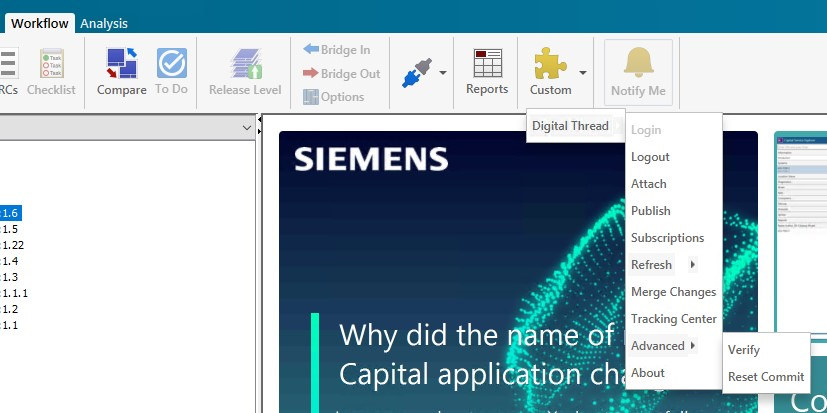
Goto the Workflow tab and under the Custom menu, we should be able to see the following menu items.
6.1.5 Importing the Digital Thread Menu
To import the Digital Thread menu options, pick the CustomMenuConfiguration file from install directory and copy the file under $CAPITAL_HOME/plugins.
Capital - > System - > Plugins → Custom Menu
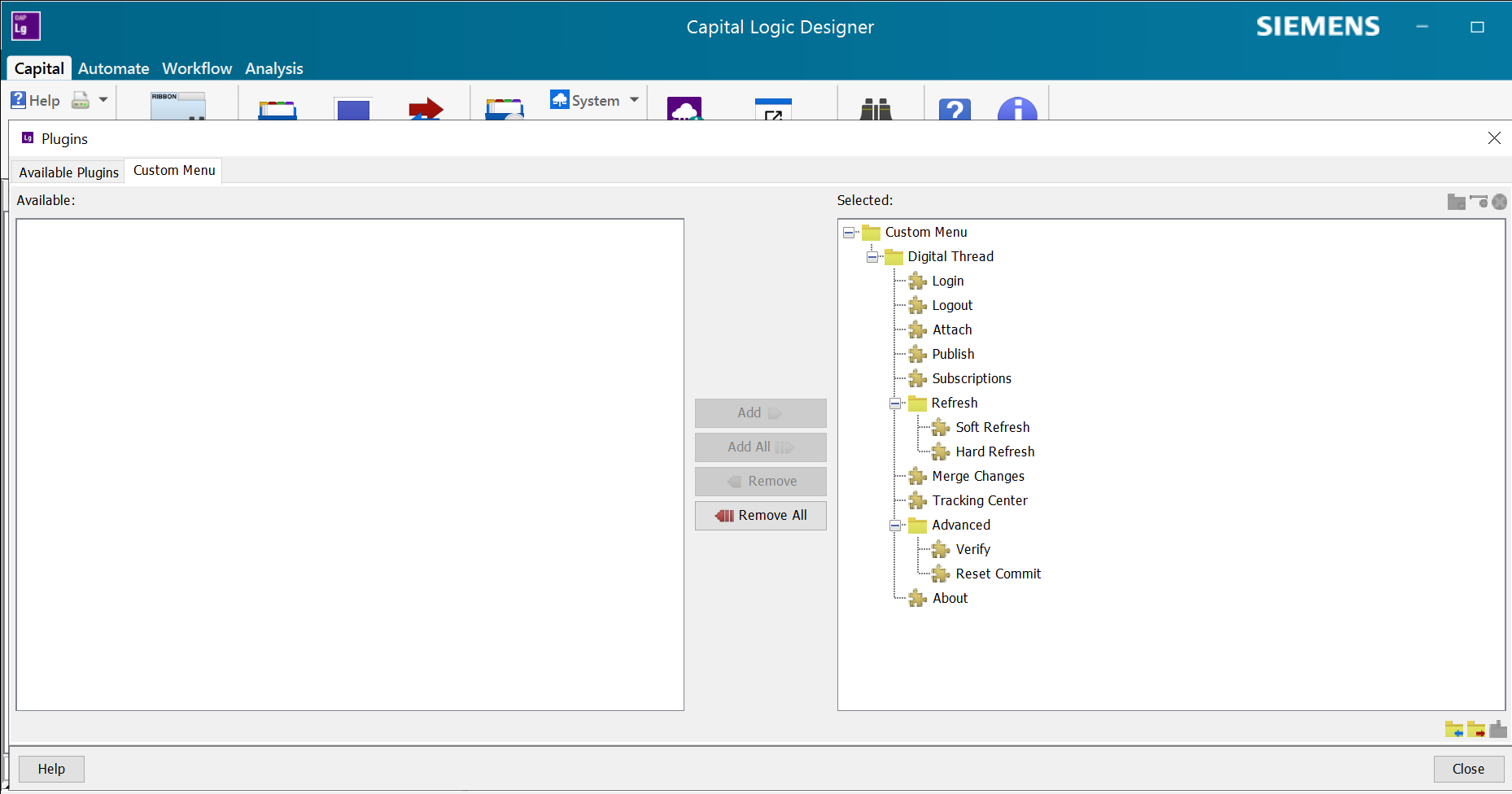
Custom Menu
6.1.6 Troubleshooting the Installation
Make sure the mentor-capital-plugin-x.x.x-with-dependencies.jar was copied to extras sub
directory. The full path would be $CAPITAL_HOME/plugins/sbe/extras/mentor-capital-plugin-x.x.x-with-dependencies.jar
6.1.7 Uninstall
Remove the following directories.
$CAPITAL_HOME/plugins/SBE
$USER_HOME/SBE/mentor
6.2 Configuration
Copy the config.json to $USER_HOME/SBE/mentor/config.json
Update the fields as shown below: -
Property | Description |
|---|---|
restEndPoint | SBE Endpoint. e.g.: https://sbe.acme.com |
certFilePath | When using self-signed certs, set the path of root cert. eg: |
Note: The certificate must be in a human readable format, like pem
6.3 Data Source Type Definition
The data source type for Mentor Capital in SBE is CAPITALLOGIC.
The data source definition must contain the following properties.
Name | Description |
|---|---|
cisHost | Host name of the Integration Server |
cisPort | Port Number of the Integration Server (49901) |
cisContext | CIS Context, default value ("/chs/cis/") |
uriScheme | Uri Scheme of the Integration Server ("http") |
7. Channels and Mappings
7.1 Channel Definition
Name | Mandatory | Description |
|---|---|---|
projectName | Y | Name of the project |
projectId | Y | Internal ID of the project |
7.2 Approaches to Mapping
Mappings should be created based on the shapes of the items being published.
Refer to Schema section for more information
e.g.: Device,Pin
8. Security and Access
8.1 Authorization and Roles
The adapter assumes user has necessary read permissions on the items for Publishing a Channel
Similarly, adapter assumes user has necessary write permissions on the items (Device, Pin, Wire, Net) to run any type of Refresh Operation
8.2 Secure Communication
The adapter communicated with SBE server using https and grpc, the necessary ports must be opened on the firewall for the adapter.
The port 443 is needed for https communication
Protocols in Use
gRPC: For fast, bidirectional, binary communication between systems.
HTTPS: For browser-based access and RESTful services.
9. Release Notes
9.1 Version History
8.0 (Jan 08,2025)
SDK 8.8
7.0 (Dec 20,2024)
SDK 7.45
First version of the Adapter
10. Technical Reference
10.1 Identity
The following are the locators for respective types
LogicalDesign
Name | Description |
|---|---|
id | Unique Id of the Logical Design |
LogicalDiagram
Name | Description |
|---|---|
id | Unique Id of the Logical Diagram |
Device
Name | Description |
|---|---|
id | Unique Id of the Device |
Pin
Name | Description |
|---|---|
id | Unique Id of the pin |
Net
Name | Description |
|---|---|
id | Unique Id of the Net |
Wire
Name | Description |
|---|---|
id | Unique Id of the Wire |
RingTerminal
Name | Description |
|---|---|
id | Unique Id of the RingTerminal |
Splice
Name | Description |
|---|---|
id | Unique Id of the Splice |
TopologicalDesign
Name | Description |
|---|---|
id | Unique Id of the Topological Design |
Connector
Name | Description |
|---|---|
id | Unique Id of the Connector |
MultiCore
Name | Description |
|---|---|
id | Unique Id of the MultiCore |
Slot
Name | Description |
|---|---|
id | Unique Id of the Slot |
Harness
Name | Description |
|---|---|
id | Unique Id of the Harness |
Bundle
Name | Description |
|---|---|
id | Unique Id of the Bundle |
Highway
Name | Description |
|---|---|
id | Unique Id of the Highway |
Shield
Name | Description |
|---|---|
id | Unique Id of the Shield |
Hole
Name | Description |
|---|---|
id | Unique Id of the Hole |
Node
Name | Description |
|---|---|
id | Unique Id of the Node |
StackedPin
Name | Description |
|---|---|
id | Unique Id of the StackedPin |
10.2 Schema Support
The following classes are currently supported:
10.2.1 LogicalDesign
Property Name | Data Type | Req’d | R/O | Description |
|---|---|---|---|---|
id | String | Yes | no | Identifier of the Design |
name | String | Yes | no | Module Name |
short | String | no | no | |
description | String | no | no | Description of the Design |
revision | String | no | no | Revision of the Design |
releaseLevel | String | no | no | |
domain | String | no | no | |
abstraction | String | no | no |
Links
Relation Name | Type | Mult. | Description |
|---|---|---|---|
diagrams | ASSOCIATION | 0..\* | Hold all the Diagrams in the Design |
10.2.2 LogicalDiagram
Property Name | Data Type | Req’d | R/O | Description |
|---|---|---|---|---|
name | String | Yes | no | Diagram Name |
id | String | Yes | no | Unique Identifier |
Links
Relation Name | Type | Mult. | Description |
|---|---|---|---|
devices | ASSOCIATION | 0..\* | Hold all the Devices on the Diagram |
10.2.3 Device
Property Name | Data Type | Req’d | R/O | Description |
|---|---|---|---|---|
id | String | Yes | no | Identifier of the Device |
name | String | Yes | no | Device Name |
shortDesc | String | no | no | |
architecturalCost | Float | no | no | |
bomId | String | no | no | |
analysisModel | String | no | no | |
customerName | String | no | no | |
customerPartNumber | String | no | no | |
includeOnBOM | Boolean | no | no | |
partNumber | String | no | no | |
partRevision | String | no | no | |
partDescription | String | no | no | |
supplierName | String | no | no | |
supplierPartNumber | String | no | no | |
typeCode | String | no | no | |
uom | String | no | no | Unit of Measure |
weight | Float | no | no |
Links
Relation Name | Related Type | Type | Mult. | Description |
|---|---|---|---|---|
Pins | Pin | ASSOCIATION | 0..\* | Hold all the pins on device |
Connectors | Connector | ASSOCIATION | 0..\* | Hold all the connectors on device |
RingTerminal | RingTerminal | ASSOCIATION | 0..\* | Hold all the ring terminals on device |
FunctionalDevices | Device | ASSOCIATION | 0..\* | Hold all the Devices on device |
10.2.4 Pin
Property Name | Data Type | Req’d | R/O | Description |
|---|---|---|---|---|
name | String | Yes | no | Pin Name |
analysisModel | String | no | no | |
assembly | Float | no | no | |
connectorCavity | String | no | no | |
connectorGroup | String | no | no | |
contactMaterial | String | no | no | |
iMax | Float | no | no | |
iMin | Float | no | no | |
iNominal | Float | no | no | |
minWireCSA | Float | no | no | |
optionExpression | String | no | no | |
partAssigned | String | no | no | |
pinGroup | String | no | no | |
pinType | String | no | no | |
shortDescription | String | no | no | |
tIMax | Float | no | no | |
vMin | Float | no | no | |
vNominal | Float | no | no |
10.2.5 Net
Property Name | Data Type | Req’d | R/O | Description |
|---|---|---|---|---|
name | String | Yes | no | Name |
analysisModel | String | no | no | |
assembly | String | no | no | |
customerName | String | no | no | |
customerPartNumber | String | no | no | |
groupName | String | no | no | |
materialDescription | String | no | no | |
partDescription | String | no | no | |
partAssigned | Boolean | |||
partNumber | String | no | no | |
partRevision | String | no | no | |
shortDescription | String | no | no | |
supplierName | String | no | no | |
supplierPartNumber | String | no | no | |
typeCode | String | no | no | |
uom | String | no | no | Unit of Measure |
weight | Float | no | no |
Links
Relation Name | Related Type | Type | Mult. | Description |
|---|---|---|---|---|
Pins | Pin | ASSOCIATION | 1….1 | All the linked pins |
10.2.6 Wire
Property Name | Data Type | Req’d | R/O | Description |
|---|---|---|---|---|
name | String | Yes | no | Name |
analysisModel | String | no | no | |
assembly | String | no | no | |
customerName | String | no | no | |
customerPartNumber | String | no | no | |
groupName | String | no | no | |
materialDescription | String | no | no | |
partDescription | String | no | no | |
partAssigned | Boolean | |||
partNumber | String | no | no | |
partRevision | String | no | no | |
shortDescription | String | no | no | |
supplierName | String | no | no | |
supplierPartNumber | String | no | no | |
typeCode | String | no | no | |
uom | String | no | no | Unit of Measure |
weight | Float | no | no | |
wireCSA | Float | no | no | |
wireColor | Float | no | no | |
wireMaterial | String | no | no | |
wireSpec | String | no | no | |
outsideDiameter | Float | no | no | |
customerWireNumber | String | no | no | |
lengthChangeType | String | no | no | |
lengthChangeValue | Float | no | no | |
mCadID | String | no | no | |
shieldWire | Boolean | no | no | |
terminalMaterial | String | no | no | |
wireLength | Float | no | no | |
wireNote | String | no | no |
Links
Relation Name | Related Type | Type | Mult. | Description |
|---|---|---|---|---|
End1 | Pin | ASSOCIATION | 1….1 | All the linked pins |
End2 | Pin | ASSOCIATION | 1….1 | All the linked pins |
10.2.7 RingTermina
Property Name | Data Type | Req’d | R/O | Description |
|---|---|---|---|---|
name | String | Yes | no | Name |
design | String | no | no | |
derivedFootprintType | String | no | no | |
designAbstraction | String | no | no | |
footprintDescription | String | no | no | |
function | String | no | no | |
genFunctionalModuleCodesExpression | String | no | no | |
genProdModuleCodesExpression | String | no | no | |
generatedName | Boolean | |||
greaseRequired | String | no | no | |
groupName | String | no | no | |
harness | String | no | no | |
includeOnBOM | Boolean | no | no | |
location | String | no | no | |
materialCode | String | no | no | |
materialDescription | String | no | no | |
nameOverridden | Boolean | no | no | |
optionExpression | String | no | no | |
partAssigned | Boolean | no | no | |
partDescription | String | no | no | |
partNumber | String | no | no | |
partRevision | String | no | no | |
shortDescription | String | no | no | |
supplierName | String | no | no | |
supplierPartNumber | String | no | no | |
typeCode | String | no | no | |
typeDescription | String | no | no | |
weight | Float | no | no | |
uom | String | no | no | |
datum | String | no | no | |
defaultTerminalMaterial | String | no | no | |
elevatedKeywayOrientation | String | no | no | |
IDC | Boolean | no | no | |
inline | Boolean | no | no | |
mCadID | String | no | no | |
plug | String | no | no | |
plugsRequired | String | no | no | |
pokeHome | String | no | no | |
quantity | Float | no | no |
Links
Relation Name | Related Type | Type | Mult. | Description |
|---|---|---|---|---|
Pins | Pin | ASSOCIATION | 0..\* | All the linked pins |
DeviceConnectors | Connector | ASSOCIATION | 0..\* | All the linked DeviceConnector |
10.2.8 Splice
Property Name | Data Type | Req’d | R/O | Description |
|---|---|---|---|---|
name | String | Yes | no | Name |
design | String | no | no | |
designAbstraction | String | no | no | |
groupName | String | no | no | |
harness | String | no | no | |
includeOnBOM | Boolean | no | no | |
materialDescription | String | no | no | |
optionExpression | String | no | no | |
partDescription | String | no | no | |
partAssigned | Boolean | |||
partNumber | String | no | no | |
partRevision | String | no | no | |
supplierName | String | no | no | |
supplierPartNumber | String | no | no | |
typeCode | String | no | no | |
typeDescription | String | no | no | |
uom | String | no | no | Unit of Measure |
weight | Float | no | no |
Links
Relation Name | Related Type | Type | Mult. | Description |
|---|---|---|---|---|
Pins | Pin | ASSOCIATION | 0..\* | All the linked pins |
10.2.9 Topological Design
Property Name | Data Type | Req’d | R/O | Description |
|---|---|---|---|---|
id | String | Yes | no | Identifier of the Design |
name | String | Yes | no | Module Name |
short | String | no | no | |
description | String | no | no | Description of the Design |
revision | String | no | no | Revision of the Design |
releaseLevel | String | no | no | |
domain | String | no | no | |
abstraction | String | no | no |
10.2.10 Connector
Property Name | Data Type | Req’d | R/O | Description |
|---|---|---|---|---|
name | String | Yes | no | Name |
design | String | no | no | |
derivedFootprintType | String | no | no | |
designAbstraction | String | no | no | |
footprintDescription | String | no | no | |
function | String | no | no | |
genFunctionalModuleCodesExpression | String | no | no | |
genProdModuleCodesExpression | String | no | no | |
generatedName | Boolean | |||
greaseRequired | String | no | no | |
groupName | String | no | no | |
harness | String | no | no | |
includeOnBOM | Boolean | no | no | |
location | String | no | no | |
materialCode | String | no | no | |
materialDescription | String | no | no | |
nameOverridden | Boolean | no | no | |
optionExpression | String | no | no | |
partAssigned | Boolean | no | no | |
partDescription | String | no | no | |
partNumber | String | no | no | |
partRevision | String | no | no | |
shortDescription | String | no | no | |
supplierName | String | no | no | |
supplierPartNumber | String | no | no | |
typeCode | String | no | no | |
typeDescription | String | no | no | |
weight | Float | no | no | |
uom | String | no | no | |
datum | String | no | no | |
defaultTerminalMaterial | String | no | no | |
elevatedKeywayOrientation | String | no | no | |
IDC | Boolean | no | no | |
inline | Boolean | no | no | |
mCadID | String | no | no | |
plug | String | no | no | |
plugsRequired | String | no | no | |
pokeHome | String | no | no | |
quantity | Float | no | no |
Links
Relation Name | Related Type | Type | Mult. | Description |
|---|---|---|---|---|
Pins | Pin | ASSOCIATION | 0..\* | All the linked pins |
DeviceConnectors | Connector | ASSOCIATION | 0..\* | All the linked DeviceConnector |
10.2.11 MultiCore
Property Name | Data Type | Req’d | R/O | Description |
|---|---|---|---|---|
name | String | Yes | no | Name |
design | String | no | no | |
designAbstraction | String | no | no | |
groupName | String | no | no | |
harness | String | no | no | |
includeOnBOM | Boolean | no | no | |
location | String | no | no | |
materialDescription | String | no | no | |
optionExpression | String | no | no | |
partAssigned | Boolean | no | no | |
partDescription | String | no | no | |
partNumber | String | no | no | |
partRevision | String | no | no | |
shortDescription | String | no | no | |
supplierName | String | no | no | |
supplierPartNumber | String | no | no | |
typeCode | String | no | no | |
typeDescription | String | no | no | |
weight | Float | no | no | |
uom | String | no | no |
Links
Relation Name | Related Type | Type | Mult. | Description |
|---|---|---|---|---|
Wires | Wire | ASSOCIATION | 0..\* | All the linked wires |
Nets | Net | ASSOCIATION | 0..\* | All the linked nets |
Shield Conductor | Shield | ASSOCIATION | 0..\* | All the linked Shield Connector |
MultiCore | MultiCore | ASSOCIATION | 0..\* | All the linked MultiCore |
10.2.12 Slot
Property Name | Data Type | Req’d | R/O | Description |
|---|---|---|---|---|
name | String | Yes | no | Name |
design | String | no | no | |
generatedName | Boolean | no | no | |
groupName | String | no | no | |
harness | String | no | no | |
materialCode | String | no | no | |
colorCode | String | no | no | |
materialDescription | String | no | no | |
optionExpression | String | no | no | |
partAssigned | Boolean | no | no | |
partDescription | String | no | no | |
partNumber | String | no | no | |
partRevision | String | no | no | |
shortDescription | String | no | no | |
typeCode | String | no | no | |
typeDescription | String | no | no | |
weight | Float | no | no | |
uom | String | no | no | |
architecturalCost | String | no | no | |
colorDescription | String | no | no | |
nameOverridden | Boolean | no | no | |
mCadID | String | no | no |
Links
Relation Name | Related Type | Type | Mult. | Description |
|---|---|---|---|---|
Connectors | Connector | ASSOCIATION | 0..\* | All the linked Connectors |
Hole | Hole | ASSOCIATION | 0..\* | All the linked Hole |
RingTerminal | RingTerminal | ASSOCIATION | 0..\* | All the linked RingTerminal |
10.2.13 Harness
Property Name | Data Type | Req’d | R/O | Description |
|---|---|---|---|---|
name | String | Yes | no | Name |
fullMetricType | String | no | no | |
generatedName | Boolean | no | no | |
fullLevelCount | Integer | no | no | |
fullMetricValue | Float | no | no | |
manageModules | Boolean | no | no | |
numActiveHarnessLevels | Integer | no | no | |
numActiveModuleCodes | Integer | no | no | |
numHarnessLevels | Integer | no | no | |
numInlineConnectors | Integer | no | no | |
numModuleCodes | Integer | no | no | |
numInterfaceConnectors | Integer | no | no | |
numOptions | Integer | no | no | |
optimizedLevelCount | Integer | no | no | |
optimizedMetricType | String | no | no | |
optimizedMetricValue | Float | no | no | |
project | String | no | no | |
superordinate | String | no | no | |
nameOverridden | Boolean | no | no | |
mCadID | String | no | no |
Links
Relation Name | Related Type | Type | Mult. | Description |
|---|---|---|---|---|
Bundle | Bundle | ASSOCIATION | 0..\* | All the linked Bundle |
Connectors | Connector | ASSOCIATION | 0..\* | All the linked Connectors |
Node | Node | ASSOCIATION | 0..\* | All the linked Node |
RingTerminal | RingTerminal | ASSOCIATION | 0..\* | All the linked RingTerminal |
Wires | Wire | ASSOCIATION | 0..\* | All the linked wires |
10.2.14 Bundle
Property Name | Data Type | Req’d | R/O | Description |
|---|---|---|---|---|
name | String | Yes | no | Name |
design | String | no | no | |
defaultName | String | no | no | |
groupName | String | no | no | |
harness | String | no | no | |
mCadId | Boolean | no | no | |
nameOverridden | Boolean | no | no | |
endNode | String | no | no | |
markerNode | String | no | no | |
maxBundleWidth | Float | no | no | |
minBendRadius | Float | no | no | |
minimumLength | Float | no | no | |
numBundleDevices | Integer | no | no | |
numBundleRegions | Integer | no | no | |
numReferenceNodes | Integer | no | no | |
numSplices | Integer | no | no | |
startNode | String | no | no | |
superordinate | String | no | no | |
variant | Boolean | no | no | |
variantMinimumLength | Float | no | no |
10.2.15 Highway
Property Name | Data Type | Req’d | R/O | Description |
|---|---|---|---|---|
name | String | Yes | no | Name |
Links
Relation Name | Related Type | Type | Mult. | Description |
|---|---|---|---|---|
Nets | Net | ASSOCIATION | 0..\* | All the linked nets |
Wires | Wire | ASSOCIATION | 0..\* | All the linked wires |
10.2.16 Shield
Property Name | Data Type | Req’d | R/O | Description |
|---|---|---|---|---|
name | String | Yes | no | Name |
analysisModel | String | no | no | |
assembly | String | no | no | |
customerName | String | no | no | |
customerPartNumber | String | no | no | |
groupName | String | no | no | |
materialDescription | String | no | no | |
partDescription | String | no | no | |
partAssigned | Boolean | |||
partNumber | String | no | no | |
partRevision | String | no | no | |
shortDescription | String | no | no | |
supplierName | String | no | no | |
supplierPartNumber | String | no | no | |
typeCode | String | no | no | |
uom | String | no | no | Unit of Measure |
weight | Float | no | no | |
shieldBody | String | no | no | |
outsideDiameter | Float | no | no |
Links
Relation Name | Related Type | Type | Mult. | Description |
|---|---|---|---|---|
Pins | Pin | ASSOCIATION | 0..\* | All the linked pins |
10.2.17 Hole
Property Name | Data Type | Req’d | R/O | Description |
|---|---|---|---|---|
name | String | Yes | no | Name |
design | String | no | no | |
defaultName | String | no | no | |
generatedName | Boolean | no | no | |
harness | String | no | no | |
mCadId | Boolean | no | no | |
nameOverridden | Boolean | no | no | |
partAssigned | Boolean | no | no | |
slot | String | no | no | |
placedDeviceAssociated | Boolean | no | no | |
superordinate | String | no | no |
10.2.18 Node
Property Name | Data Type | Req’d | R/O | Description |
|---|---|---|---|---|
name | String | Yes | no | Name |
design | String | no | no | |
defaultName | String | no | no | |
generatedName | Boolean | no | no | |
harness | String | no | no | |
nameOverridden | Boolean | no | no | |
clip | String | no | no | |
grommet | String | no | no | |
harnessConnector | String | no | no | |
logicalDevice | String | no | no | |
logicalSplice | String | no | no | |
marker | Boolean | no | no | |
merged | Boolean | no | no | |
numAnchoredNodes | Integer | no | no | |
numBundleRegions | Integer | no | no | |
numBundles | Integer | no | no | |
numExtraComponents | Integer | no | no | |
numberOfMulticores | Integer | no | no | |
numberOfWires | Float | no | no | |
pokeHome | Boolean | no | no | |
routeCode | String | no | no | |
superordinate | String | no | no | |
shortName | String | no | no |
10.2.19 StackedPin
Property Name | Data Type | Req’d | R/O | Description |
|---|---|---|---|---|
id | String | Yes | no | Id |
Links
Relation Name | Related Type | Type | Mult. | Description |
|---|---|---|---|---|
Pins | Pin | ASSOCIATION | 0..\* | All the linked pins |
Highway | Highway | ASSOCIATION | 0..\* | All the linked highways |
12. Upgrade
12.1 Migrate from SBE 6.x to SBE 7.x
This section covers the guide to upgrade from your SBE 6.x to SBE 7.x
For
Migrate, select aLogical Designand clickWorkflow-> Digital Thread -> MigrateThe Migrate process generates the Design file with all the components that were subscribed.
Click menu option
Workflow->Bridge In, Selectoption, select the xml file saved in previous step.Once the new version of the design has been imported, save the project and do a
Publish.
12.2 Migrate from SBE 7.x to SBE 8.x
This section will cover the guide to upgrade from your SBE 7.x to SBE 8.x