
Jira Documentation
SBE Jira Documentation
1. Getting Started: Using the Adapter
This adapter is a server-based SBE adapter that helps users to publish and refresh data in Jira. This makes data easier to manage, improves interoperability, and supports efficient integration across platform.
This adapter also creates/extracts the links created by the Digital Thread Jira plugin. The SBE Jira plugin supports both Jira server and cloud environments.
Publish a whole Project or a single container(component/release) in a Project
Bring in Items from
Digital Threadinto Jira.
1.1 Operations Overview
Publish
Refresh - Soft/Hard
Verify
Reset
1.2 Accessing the Adapter
Jira adapter is a server-based adapter.
Digital Thread operations are run from the SBE’s Embedded web applications.
For performing Refresh operation, the user needs to have write permissions on the items in the
Channel
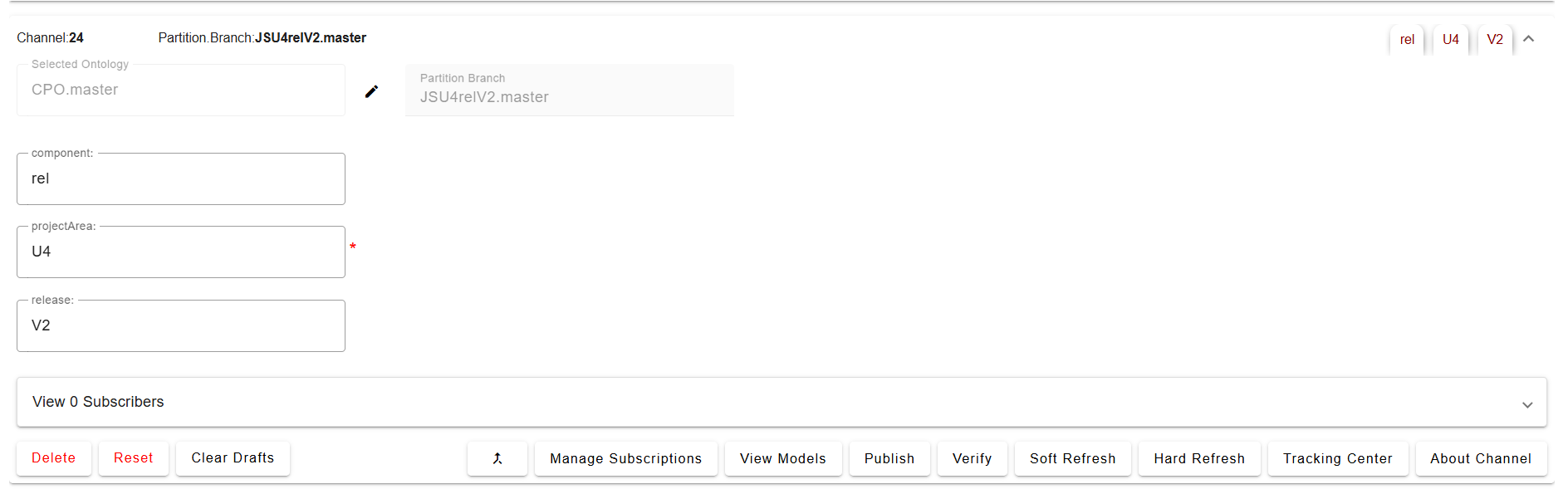
Channel Manager
1.3 Attaching & Connecting
Before carrying out any publish or refresh actions, the project must be attached in order to create a channel. To create a channel, you must have the following properties.
Channel properties
Property | Mandatory | Description |
|---|---|---|
| Yes | The key of the project (e.g., for project name |
| No | Only issues associated with the given release will be published. (Value is case-sensitive) |
| No | Only issues associated with the given component will be published. (Value is case-sensitive) |
The following valid combinations can be used:
|
|
|
|---|---|---|
✅ | ❌ | ❌ |
✅ | ✅ | ❌ |
✅ | ❌ | ✅ |
✅ | ✅ | ✅ |
Note: projectArea must always be provided. release and component can be optionally included in any combination.
1.4 Publishing Items
All items within the Channel scope, including their links, are published.
Links to items outside the Channel scope are not published.
Any links created in the Plugin will also be published.
1.5 Refreshing Items (Including Subscribed Items)
Subscriptions need to be created to bring in items from Digital Thread,performing a Refresh will:
Create new items in the target system for the subscribed content.
Update existing items if changes are detected in the SBE source.
Behavior of Refreshed Items
The created/updated items:
Include subscribed properties and relations from SBE.
Contains a special property:
SBE Correlation Info, which helps to distinguish between:Items created natively in the target system (real items)
Items created via subscription from another source (subscribed item
1.5.1 Hard Refresh
During a hard refresh, the adapter retrieves all published and subscribed data from the SBE. It fully refreshes all received items; this action will overwrite any unpublished changes. If we want to preserve the local changes, it is recommended to use Soft Refresh
1.5.2 Soft Refresh
A soft refresh does not update the entire dataset. It prioritizes locally changes that are unpublished, allowing users to continue local changes without risk of losing their work. Only data unmodified locally but updated in SBE is updated during this operation.
1.6 Verify
Performs a validation check to ensure that the items published from SBE exist in the target system (e.g., JIRA) and are consistent.
What does Verify check?
The
Verifyoperation compares each item present in both the SBE and the target/source system.It ensures that:
All properties (e.g., Summary, Status, Priority)
All relations (e.g., Linked issues)
All metadata (e.g., Subscription Info)
are accurately synchronized and consistent between the systems.
This helps ensure that no item is missing, degraded, or out-of-sync after publishing.
1.7 Advanced Operations
1.7.1 Force Publish
Force Publish performs a complete publishing of all available data, rather than using the standard incremental (delta) process that sends only the records modified since the previous publish. By intentionally bypassing the delta logic, it ensures that the entire dataset is transmitted to the target system, regardless of whether individual items have changed. Force Publish provides a reliable way to restore alignment between systems and eliminate any potential gaps or discrepancies in the published dataset. It also useful incase of data consistency.
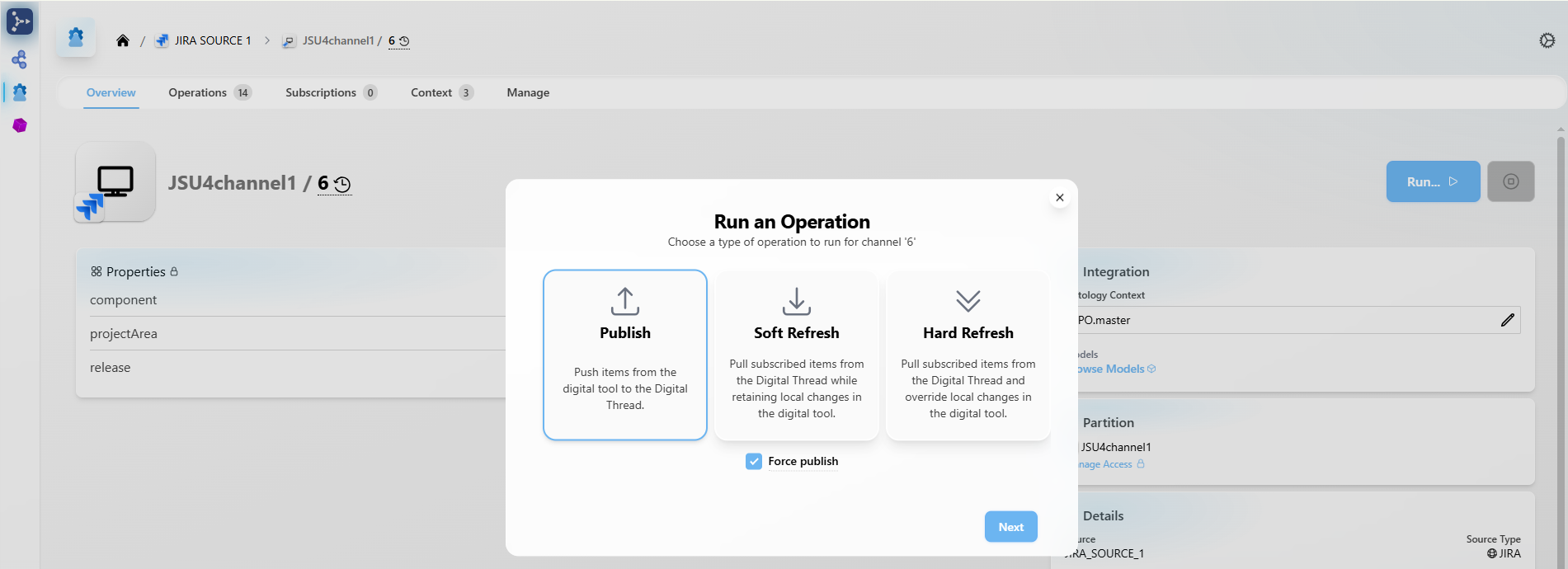
This feature is available starting from version 8.x.
1.7.2 Force Refresh
Force Refresh initiates a complete retrieval of data from the source, bypassing the usual delta process. Instead of updating only the items that have changed since the last refresh, it pulls the entire dataset to ensure the local or client system is fully aligned with the source. This is especially useful for resolving synchronization issues or whenever you need to guarantee that the client has the most accurate, up-to-date, and complete set of data.
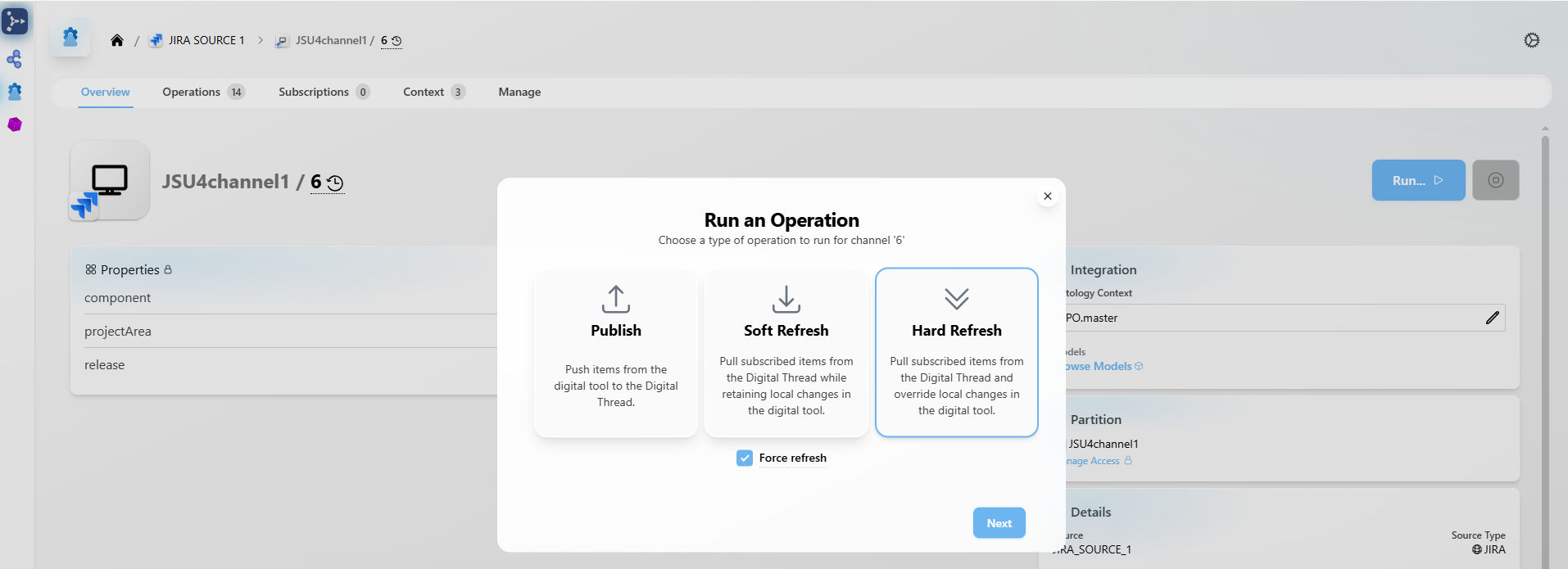
This feature is available starting from version 8.x.
1.7.3 Reset
Deletes any degraded or invalid items from the specified channel in Jira.
1.7.4 Subscriptions
Subscribes to items from a source system to bring them into SBE for publishing or further action.
1.8 Troubleshooting for End Users
Failed to Publish
This may occur due to the following reasons:
Incorrect Mappings
Ensure all required mappings are correctly configured. Refer to the Mappings Configuration section for guidance.Invalid Authentication
The authentication may be outdated or incorrect. Please reconfigure it as explained in the Authentication Setup section.Publishing with Stale Data
To resolve this, reset the channel; this operation will clear up the stale.
2. Document Overview
2.1 Document Overview
This document provides essential information for using, configuring, and supporting the SBE Vision adapters for Jira.
This document also covers the SBE Jira cloud and server plugins
2.2 Document Orientation
This document is designed to inform users with various roles:
End Users should begin with Section 1 to understand how to access and operate the adapter, and Section 5 for issues pertaining to the setup, configuration, and use of the digital tool itself.
Digital Thread Specialists should focus on Section 1, and also consult Sections 3, 4, and 5 for deployment and semantic mapping. Section 11 contains details related to mapping items from this tool into a semantic ontology.
Administrators should refer to Section 6 and beyond for setup, security, support, and version management.
3. Adapter Use Cases
3.1 Adapter Overview
The purpose of this adapter is to allow the data contained within Jira to connect with the SBE Digital Thread platform. This adapter was built using the SBE Java Pro-SDK product.
This document also provides an overview of the Jira plugin.
4. Supported Versions
4.1 Supported Adapter Products
This document covers all the version of adapter that support SBE 7.x (woburn) and 8.x (melrose)
4.2 External Tool Versions Supported
Jira Server 9.x
Jira Cloud
5. Digital Tool Best Practices
5.1 Tool Configuration Considerations
Required modules or optional configurations
For Jira Server configuration, refer to the server configuration section
For Jira Cloud plugin configuration, refer to the cloud configuration section
5.2 Usage Tips & Gotchas
Common user mistakes
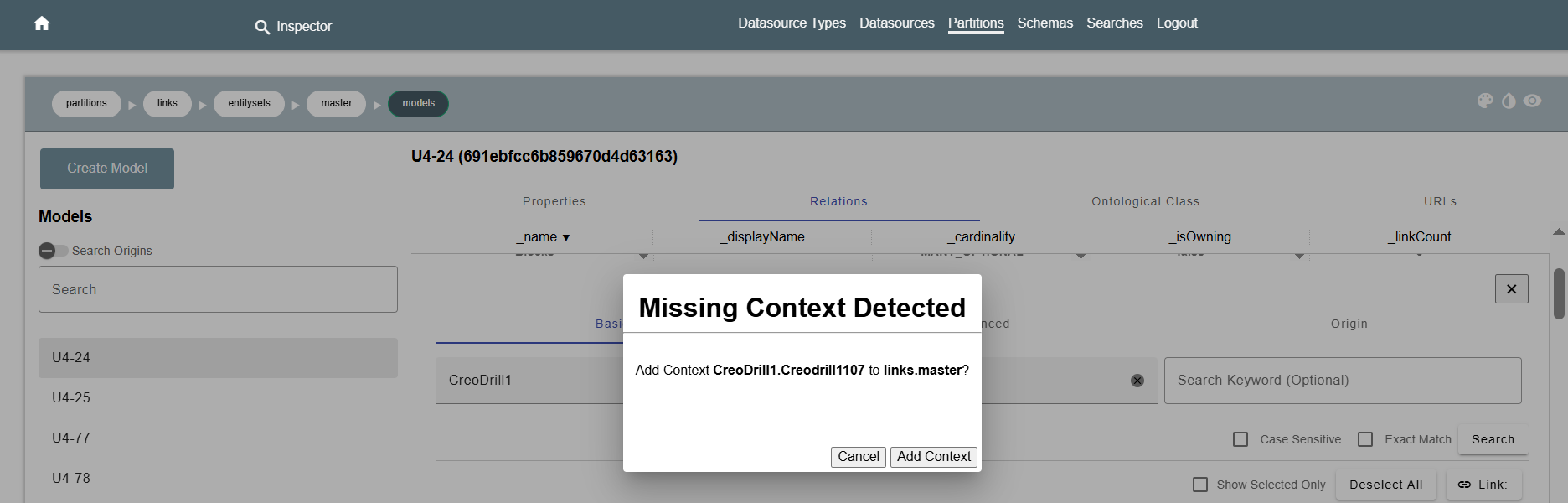
Creating ASOT Links without adding the required mappings and context.
Solution
Before creating an ASOT Link, ensure that all necessary mappings have been fully configured.
Additionally, verify that the required context is present. When creating the link from SBE, the system will automatically detect any missing context and prompt you with an option to add the required information. This ensures the link is created correctly and prevents configuration issues.
5.3 Tool Limitations and Workarounds
Adapter does not currently support images, tables and other complex content in Description of an Issue
To use the adapter on Jira cloud the user needs to generate an API token, please look at config section for more details
6. Installation
6.1 Installation Instructions
As per the official SBE platform installation guide
6.1.1 Jira Server plugin
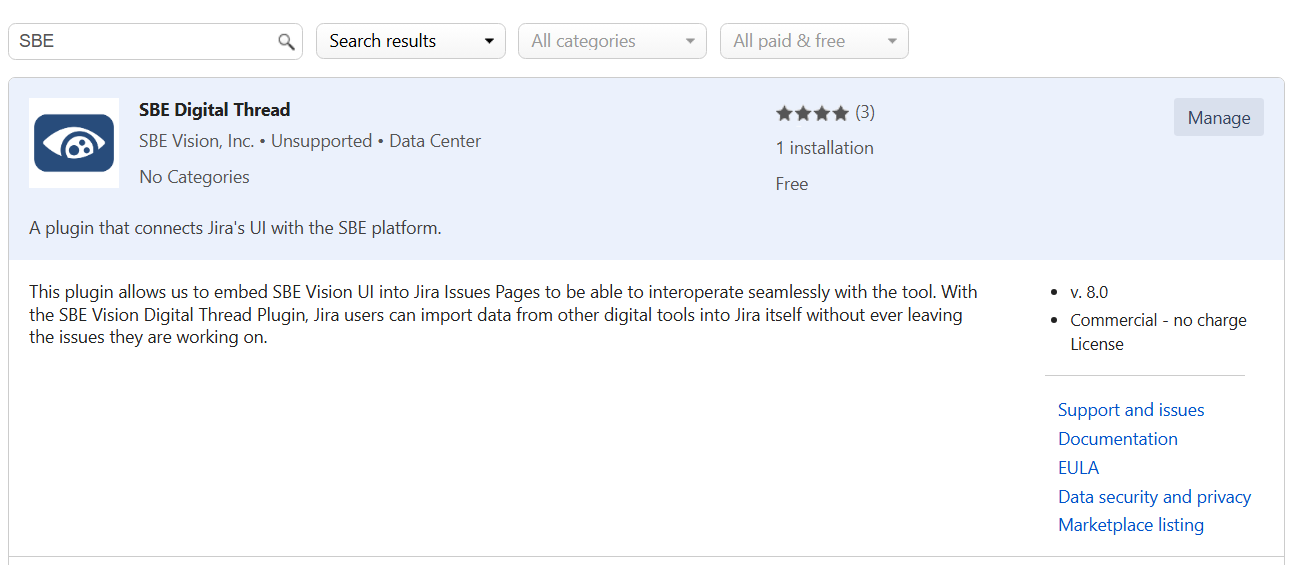
To install the SBE plugin, navigate to System -> Manage apps
Search for SBE in the market place and install the SBE Digital Thread plugin
6.2 Configuration
6.2.1 Jira Server plugin
Configuration for the Jira Server Digital Thread plugin is done from the Configuration page under System -> Apps -> Digital Thread
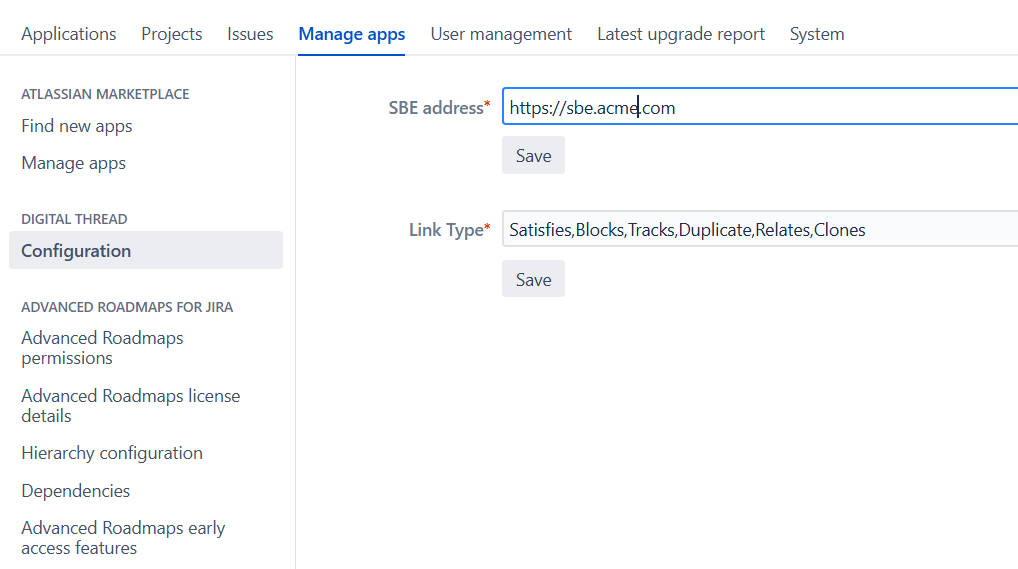
Set the SBE instance hostname (e.g.,
https://sbe.acme.com)Link types that can be created in the SBE plugin, configured using comma separated values (e.g.:
Satisfies, Traces)
6.2.2 Jira Cloud Plugin
To configure the Jira cloud plugin, perform the following steps.
Navigate to Site settings → Connected Apps → SBE Digital Thread
Expand the three dots menu icon on the right side menu and Click Configure.

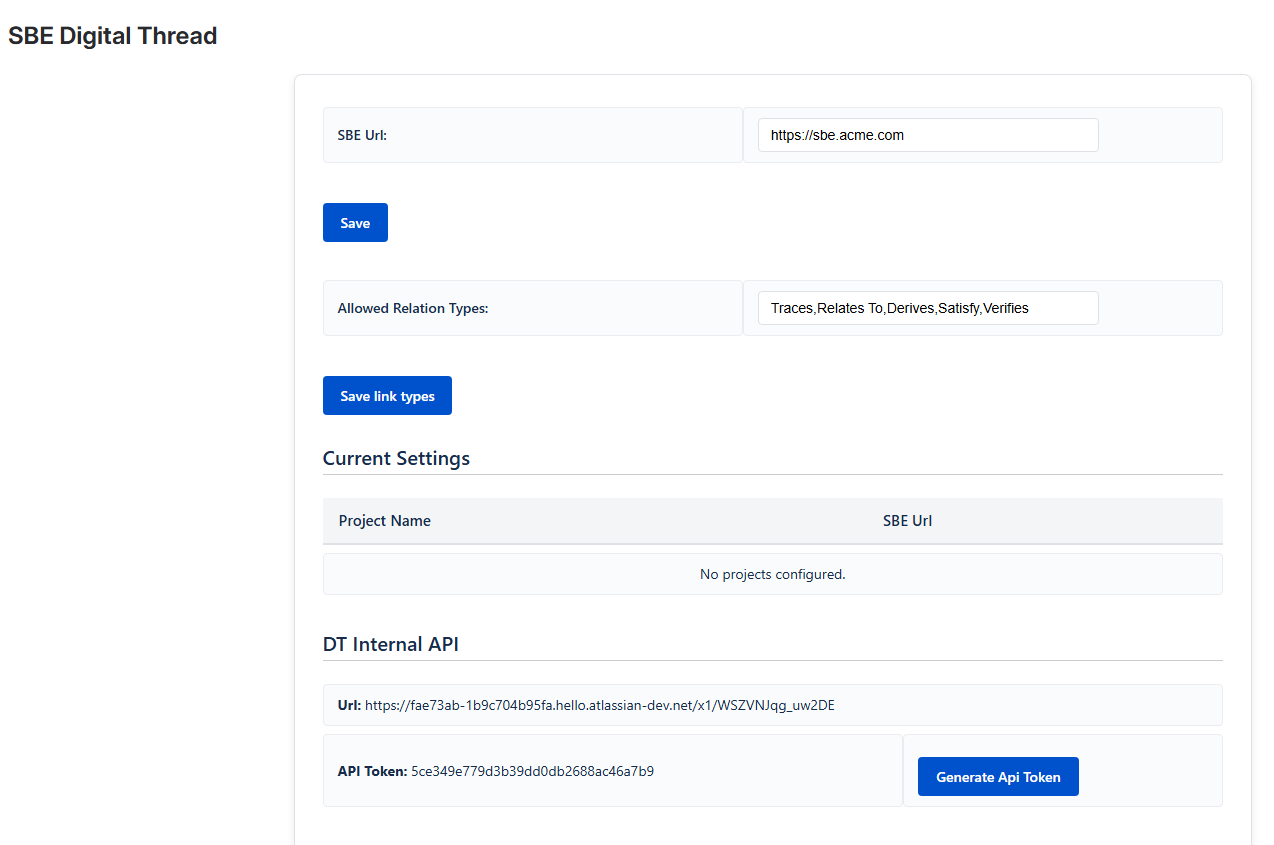
In the Config page, fill the
SBE Url- the SBE instance hostname (e.g., https://sbe.acme.com)
Allowed Relation Types - Link types that can be created in the SBE plugin, configured using comma separated values (e.g.: Satisfies, Traces)
To Publish the link created in the plugin, the adapter needs to have access to the Datasource fields: apiUrl and apiToken which are set from the DT Internal APIsection
6.3 Data Source Type Definition
Data source definition contains the following properties
Property | Description |
|---|---|
| Hostname of the Jira instance. |
| Port at which the Jira instance runs (e.g., |
| Protocol used – either |
| Authentication type. Valid values are |
| Hostname of the proxy server (if applicable). |
| Port number of the proxy server. |
| Plugin API token (required for Jira Cloud authentication). |
| Plugin API URL (applicable to Jira Cloud). |
| Used to customize the display name. Valid values: |
7. Channels and Mappings
7.1 Channel Definition
Property | Required | Description |
|---|---|---|
| Y | The key of the project. Example: Project Name – Note: |
| N | Only issues linked to the specified release will be published. |
| N | Only issues linked to the specified component will be published. This value is case-sensitive. |
7.2 Approaches to Mapping
All shapes published from Jira are considered issues. The
METACLASSused for these is alwaysIssue.The exact Jira issue type (like Story, Epic, Task, Bug) is captured using a
STEREOTYPEshape on top of theMETACLASSshape.For example, to map an Epic:
Use
Issueas the METACLASS .Use
Epicas the STEREOTYPE in the inherited ontology class.
Map custom links to respective relations on the METACLASS.
The issue type is determined by this combination:
shapeId = Issue,type = METACLASSshapeId = Story/Epic/etc.,type = STEREOTYPE
Mapper Considerations
The required properties (
summary,issueType,key, etc.) must be mapped for data to flow between systems.When customizing the mapping or modifying ontology classes, maintain the integrity of
METACLASSandSTEREOTYPEstructures to avoid type mismatches.Incorrect or missing stereotype mappings can cause subscription and sync failures.
8. Security and Access
8.1 Authentication Methods
The Adapter supports Basic authentication which is the only authentication method supported by Jira Rest API.
Jira cloud needs the users to create a Auth token to run the SBE operations
8.1.1 Jira Cloud
To generate an API token:
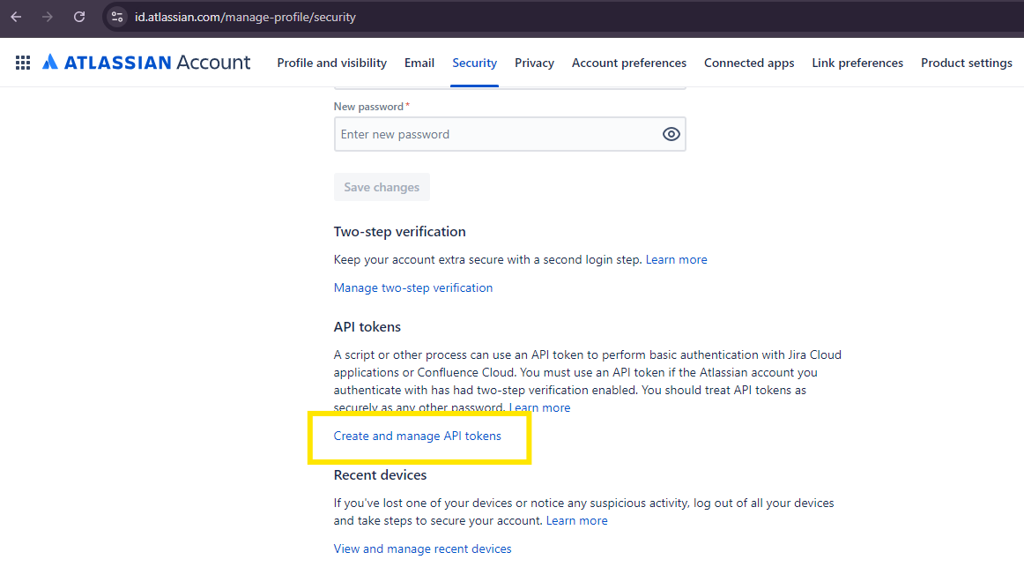
Click on the Manage Account button from the top right user profile. This will take you to your profile page.
Go to the Security page, and under the
API tokensection, click onCreate and manage API tokens.Click on the
Create API tokenbutton to generate a new token. Make sure to save the token in a safe place, as it cannot be retrieved again once generated.
8.2 Authorization and Roles
REST API access is enabled by default for all users on Jira.
This means any authenticated user can perform standard API operations like GET and POST based on their Jira permissions.DELETE API calls are permission-restricted and depend on the user's role and project-level permissions.
8.3 Secure Communication
TLS configuration
The
uriSchemaDataSource property defines the protocol http or https used by the adapter.It is highly recommended that the server communication is secured using https
Proxy
If the communication to Jira happens through a Proxy server, the adapter needs to be configured accordingly.
The
DatasourcepropertiesproxyHost,proxyPortneed to be set with the right Proxy server details
9. Release Notes
9.1 Version History
8.7 ( 12 Nov 2025)
SDK 8.18
Support ADF on Jira Cloud
Show more metrics in tracking for Refresh
8.6 (19 Aug 2025)
SDK 8.17
Support ASOT linking
Support
Force PublishandForce RefreshItem V7
8.5 (4 July 2025)
SDK 8.15
8.4 (19 April 2025)
SDK 8.11
Support Reset
Breaking Change: Replace Locator properties, Url with ID
8.3 (17 Feb 2025)
Use
Stereotypeshape to determine Issue typeRename shape types from
META_CLASStoMETACLASSandSTEREO_TYPEtoSTEREOTYPESDK 8.9
8.2 (7 July 2025)
SDK 8.8
Bug fixes on Delta Publish
Support custom field type - URL
Bug fixes
8.1 (15 Aug 2024)
SDK 8.3
Bug fixes
Support custom field type - Option, Date and Datetime
Verify custom properties
8.0 (5 Jun 2024)
Delta Publish
Support SBE 8.0
7.19 (24 Nov 2025)
SDK 7.51
7.18 (12 Nov 2025)
Support ADF on Jira cloud
Show more metrics in tracking for Refresh
7.17 (18 July 2025)
SDK 7.50
7.16 (11 April 2025)
Support Reset
Breaking Change: Replace Locator properties, Url with ID
SDK 7.48
7.15 (13 March 2025)
Validate channel item count in Readiness
SDK 7.47
7.14 (31 Jan 2025)
Use
Stereotypeshape to determine Issue typeRename shape types from
META_CLASStoMETACLASSandSTEREO_TYPEtoSTEREOTYPE
7.13 (20 Jan 2025)
Added Datasource property
displayNamePropertyProcess relation locator
7.12 (18 Dec 2024)
Support multi channel upgrade
SDK 7.45
7.11 (28 Oct 2024)
Updated Integration tests
SDK 7.44
7.10 (7 Oct 2024)
Support custom field type - URL
Bug fixes
SDK 7.42
7.9 (13 Sep 2024)
Bug fixes
Support custom field type - Option, Date and Datetime
Verify custom properties
SDK 7.39
7.8 (26 July 2024)
Added more Integration tests
ChildOf relation delete for sub-task
Support component and release with spaces
Support Jira Labels Field
Support ASOT delete
Store correlation on real recreated items
Support custom field type - Array
7.7 (12 June 2024)
SDK 7.33
Fix Cert injection
7.6 (10 June 2024)
Better messages on User validation in Readiness
Use single property to store Subscription and Correlation Id's
Bug fixes
Implement
Verify
7.5 (17 April 2024)
Deprecate isCloud Data Source property
Delete only subscribed relations
Fix documentation
7.4 (13 March 2024)
Fix issue with Refresh, Process Stops when it encounters invalid shape.
Support Jira team managed project
Support relation deletion
Jira Link Migration
Bug fixes
7.3 (20 Feb 2024)
Support recreation of relations for deleted items
Upgrade one channel at a time
Support for Jira data center version 9
7.2 (12 Jan 2024)
Added support for delete during refresh
Direction on relation between Issue/Epic and children changed from
ContainstoChildOfValidate channel properties
7.1 (4 Dec 2023)
Added support for Html description
Storing correlation information on Jira
Support Rebase
Bug Fixes
7.0 (3 Nov 2023)
Added support for Issue links
Added support for Issues in Epic
Bug Fixes
Added more Integration tests
Added Adapter Readiness
Deprecated Resource DTO
Support Refresh
Support Upgrade
Multi Request processing
SDK storage
Deprecated Subscription store
New Project versioning
10. Technical Reference
10.1 Adapter API Endpoints
Internal APIs

Important:
All APIs listed below are internal and designed to be used only by the Jira Adapter.
They are not public APIs and must not be invoked directly. Doing so may result in unexpected behavior or data corruption.
Base Path: {jira-server-url}/rest/dt/1.0
All URIs listed below should be prefixed with the base path.
1. POST /links/save
Purpose:
Create one or more Digital Thread links from Jira issues to external systems (e.g., SBE).
Used In:
Issue View plugin – on "Add Link" action.
Payload Example:
[
  {
    "targetFqn": "string",
    "targetName": "string",
    "dtUri": "string",
    "asotUri": "string",
    "issueId": "number",
    "linkType": "string",
    "projectKey": "string",
    "issueKey": "string",
    "channel": "string",
    "dataSourceType": "string",
    "dataSource": "string",
    "externalLocator": "string",
    "properties": {}
  }
]
Returns:
200 OKon success500 Internal Server Errorwith an error message on failure
2. DELETE /links/delete?linkId={linkId}
Purpose:
Delete a specific Digital Thread link by its linkId.
Used In:
Issue View plugin – on "Delete" link button click.
Response:
200 OKon success500 Internal Server Erroron failure
3. GET /config/url
Purpose:
Fetch the base SBE URL used in the embedded iframe.
Used In:
Issue View plugin – to construct iframe URL.
4. GET /config/props
Purpose:
Retrieve metadata property names required for link creation.
Used In:
Issue View plugin – for metadata form generation before iframe display.
5. GET /links?projectKey={projectKey}
Purpose:
Fetch all links for a given Jira project.
Validate newly added issue links via DT Internal API.
Use this API to validate the addition of new links within the Digital Thread (DT) system.
Used In:
Project Admin plugin – to display the total number of existing links.
Required Header
dt-api-key: Authentication token.
→ This can be retrieved from the App Admin page.
Required Body
{ "projectId": "<project-key>" } Response:
An array of link objects:
[
   {
        "id": "494",
        "targetFqn": "6895ab8dc0f.689.68",
        "targetName": "U4-332",
        "linkType": "Satisfies",
        "issueId": "35959",
        "issueKey": "U4-352",
        "projectKey": "U4",
        "channel": "155",
        "externalLocator": "{\"__sbe_type\":\"item\",\"id\":\"30624\",\"__sbe_item_type\":\"Issue\"}",
        "properties": {},
        "dataSourceType": "JIRA",
        "dataSource": "JIRA_SOURCE_1"
    },
    {
        "id": "516",
        "targetFqn": "689dace0.689dacf1d29e2.689dad2488c",
        "targetName": "U4-337",
        "linkType": "Blocks",
        "issueId": "31575",
        "issueKey": "U4-344",
        "projectKey": "U4",
        "channel": "183",
        "externalLocator": "{\"__sbe_type\":\"item\",\"id\":\"31171\",\"__sbe_item_type\":\"Issue\"}",
        "properties": {},
        "dataSourceType": "JIRA",
        "dataSource": "JIRA_SOURCE_1"
    }
]
6. DELETE /links/delete/project?projectKey={projectKey}
Purpose:
Delete all links associated with a specific project key.
Used In:
Project Admin plugin – triggered after the user confirms deletion via dialog.
Response:
200 OKon success500 Internal Server Erroron failure
11.2 Identity
Issue
Name | Description |
|---|---|
| This is the API id of the issue |
11. Upgrade
11.1 Migrate from SBE 6.x to SBE 7.x
This section explains how to upgrade from SBE 6.x (Wakefield) to SBE 7.x (Woburn), including necessary configurations, mappings, and structural changes before and after the upgrade.
something.
11.1.1 Prerequisites
Required Property
Add a custom property named
SBE Correlation Infofor all issue types.
⚠️ Important: Ensure
SBE Correlation Infois created before initiating the upgrade.
Required Mappings
Update the following mappings between Wakefield and Woburn:
Wakefield | Woburn |
|---|---|
Relation - |
|
Property - |
|
Shape Type - |
|
Shape Type - |
|
11.1.2 Pre-Upgrade Structure
Only run this step in SBE 6.x (Wakefield).
This prepares the necessary data for upgrading links.
Use Postman to send a request with the following:
Command Type: pre-upgrade
Used to collect data needed for the SBE 7.x upgrade.
Sample Payload:
{
  "_content": "RESOURCE",
  "_distribution": "direct",
  "_type": "JIRA-CMD",
  "_name": "Jira Publish",
  "_subject": "pre-upgrade",
  "_dataSourceType": "JIRA",
  "_dataSource": "JIRA_SOURCE_1",
  "_channel": "{{channelNumber}}",
  "_credentials": {
    "username": "{{JIRA_username}}",
    "password": "{{JIRA_password}}",
    "authType": "ldap"
  }
}
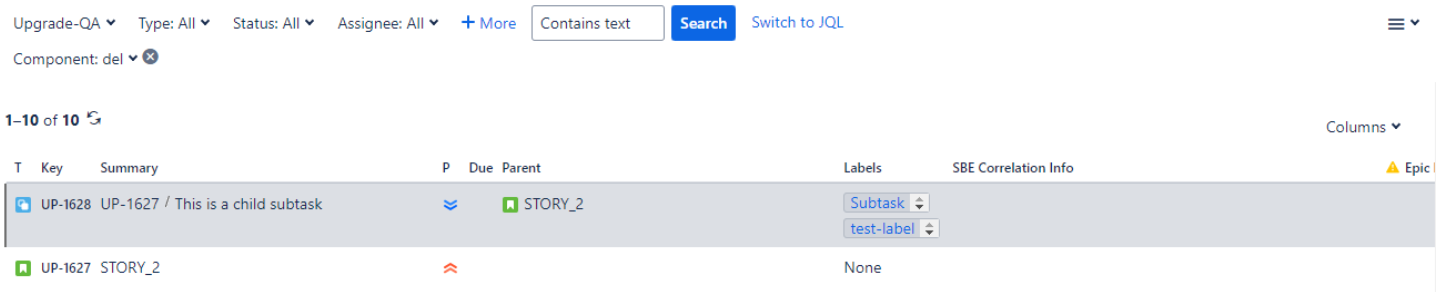
Pre-Upgrade
11.1.3 Post Upgrade Structure
Run the upgrade process.
Ensure the
SBE Correlation Infoproperty is filled for all subscribed issues after the upgrade.

11.2 Migrate from SBE 7.x to SBE 8.x
This section will cover the guide to upgrade from your SBE 7.x to SBE 8.x