
Jena Fuseki Adapter
Apache Jena Fuseki is a SPARQL server that provides a platform for serving RDF data over HTTP using the SPARQL 1.1 protocol. It's part of the Apache Jena project, a popular Java framework for building Semantic Web and Linked Data applications.
Key Features:
SPARQL Endpoint: Fuseki exposes RDF datasets via a SPARQL endpoint, allowing clients to query (SELECT, ASK), update (INSERT, DELETE), and manage RDF data remotely.
RESTful Interface: Fuseki provides REST-style interfaces for interacting with RDF datasets.
Multiple Dataset Support: You can host multiple named datasets in a single Fuseki server instance.
TDB & TDB2 Backend: Can be backed by Jena's TDB or TDB2 storage engines for persistent and scalable RDF storage.
In-Memory or Persistent Storage: Supports in-memory datasets for lightweight use or persistent ones for production use.
Web UI: Comes with a simple user interface for testing queries and managing datasets.
SBE Adapter/Plugin Documentation Template

Adapter & Extension Package Documentation go together
Plugins are Separate
1. Getting Started: Using the Adapter
1.1 Operations Overview
The Fuseki Adapter is a server-based SBE adapter. This allows users to interact with data from Fuseki within the Digital Thread by using the Java libraries provided by Apache Jena .
Publish
Publish establishes a connection to a designated Fuseki host, where it retrieves all RDF triples from the
datasetassociated with the channel. These triples are transformed into SBE Models.The classes are identified using the
rdf:typeproperty and subsequently converted into shapes. Object properties are translated into relations or links, while datatype properties are converted into properties of the respective class.
Refresh
Refresh establishes a connection to a designated Fuseki host, then converts all models in the associated entity sets (subscriptions/partitions) of the channel into RDF triples.
These triples are written to the
datasetof the channel. Mapped shape IDs are translated tordf:typestatements for each shape ID. Relations or links are converted to object property statements. Properties of each model are converted into datatype properties with Literal values.
1.4 Publishing Items
Configure an empty datasource type with the following datasource properties – using DST name: “FUSEKI”
Datasource Properties
fuseki_host: the hostname where the Fuseki application is running, (http://localhost)Optionally include the port (http://localhost:3030)
Additionally the datasource type requires one channel property:
dataset
Channel Properties
dataset: Fuseki databases organize their graphs into datasets. The adapter will query for all the triples and statements within the specified dataset.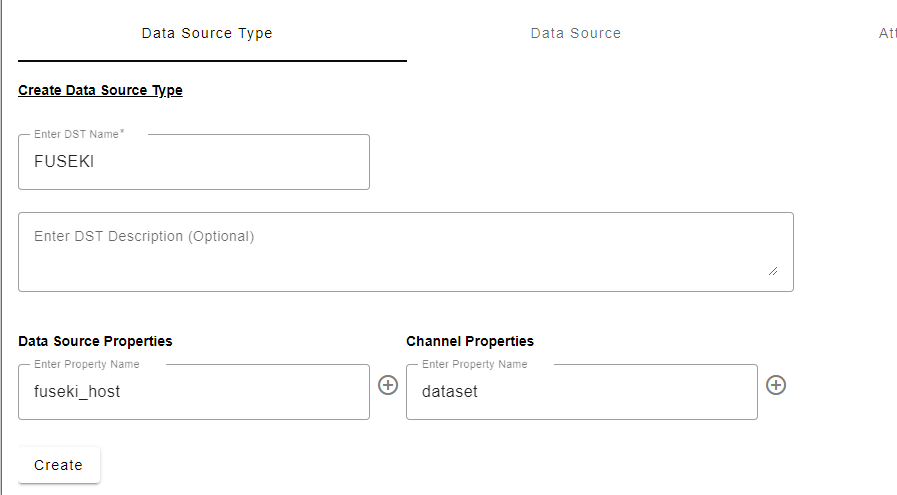
Configure an empty datasource – using any datasource name of your choosing: ex: “fuseki_ds”
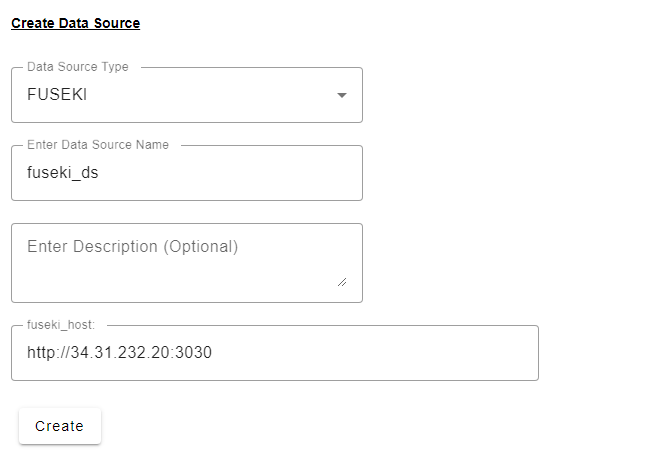
Create a new channel partition
Set the
datasetparameter to the dataset of the Fuseki instance you want to use
Click Publish, provide the credentials of the Fuseki server for this datasource.
1.5 Refreshing Items (Including Subscribed Items)
Configure an empty datasource type with the following datasource properties – using DST name: “FUSEKI”
Datasource Properties
fuseki_host: the hostname where the Fuseki application is running, (http://localhost)Optionally include the port (http://localhost:3030)
Additionally the datasource type requires one channel property:
dataset
Channel Properties
dataset: Fuseki databases organize their graphs into datasets. The adapter will query for all the triples and statements within the specified dataset.
Configure an empty datasource – using any datasource name of your choosing: ex: “fuseki_ds”
Create a new channel partition
Set the
datasetparameter to the dataset of the Fuseki instance you want to use
Click Soft/Hard Refresh, provide the credentials of the Fuseki server for this datasource.
Supported object types/entities (overview in Section 11.3)
All properties listed in the following tables can be mapped to the Digital Thread.
If not specified, the default is
StringBase64values refreshed from SBE will be decoded prior to being written to the Fuseki dataset
Datatype | Jena Java Type | Example | Notes |
|---|---|---|---|
|
|
| Java |
|
|
| Java |
|
|
| Java |
|
|
| Java |
|
|
| Java |
|
|
| Java |
|
|
| Java |
|
|
| Java |
|
|
| Java |
|
|
| Java |
|
|
| Java |
|
|
| Java |
|
|
| Java |
|
|
| Java |
|
|
| Java |
|
|
| Java |
Unqualified string |
|
| Java |
| language-tagged string |
| Java |
1.6 Verify
Compares mapped models in the entity set, subscriptions to the triples in the dataset, failing if any of the matching mapped properties, metadata, and relations fail in comparison.
1.7 Advanced Operations
1.8 Troubleshooting for End Users
2. Document Overview
2.1 Document Overview
This document provides essential information for using, configuring, and supporting the SBE Vision adapters for Fuseki. It covers multiple adapter products, each supporting different versions of the external tool. There is a different version of this document for each major release of the SBE Platform.
2.2 Document Orientation
This document is designed to inform users with various roles:
End Users should begin with Section 1 to understand how to access and operate the adapter, and Section 5 for issues pertaining to the setup, configuration, and use of the digital tool itself.
Digital Thread Specialists should focus on Section 1, and also consult Sections 3, 4, and 5 for deployment and semantic mapping. Section 11 contains details related to mapping items from this tool into a semantic ontology.
Administrators should refer to Section 6 and beyond for setup, security, support, and version management.
3. Adapter Use Cases
3.1 Adapter Overview
The purpose of this adapter is to allow the data contained within instances of Fuseki to connect with the SBE Digital Thread platform. Given that Fuseki is a rich-client tool, the usage of this adapter is governed by end users operating that tool on the desktop of their workstation. This adapter was built using the SBE Java Pro-SDK product.
3.2 Typical Use Cases
A digital thread is essential for modern systems engineering, especially in domains like aerospace, automotive, defense, and complex manufacturing. Fuseki can play a key role by enabling semantic traceability and queryable access to interconnected data across tools and domains.
Using Apache Jena Fuseki to build a digital thread means using it as the semantic backbone—a SPARQL-accessible triplestore—to connect and query all lifecycle artifacts of a system in a machine-readable, traceable, and queryable RDF graph.
This adapter allows users of the SBE Digital Thread to access their models in RDF format. Consequently, users can query their models using SPARQL, enhancing the ability to ask questions and analyze their data, and engage in reasoning processes.
Fuseki can serve as the core query engine and store for a Digital Thread Knowledge Graph (DTKG) that integrates:
Lifecycle Stage | Source Format | RDF Integration Approach |
|---|---|---|
Requirements | DOORS, ReqIF, Excel | RDF export, OSLC-RM, CSV → RDF |
Architecture/Design | SysML, UML (e.g., from Cameo) | XMI → RDF or direct SysML2RDF mapping |
Simulation | FMI/Simulink/Modelica | Model metadata → RDF |
Manufacturing | MBOM, PLM data (e.g., from Teamcenter, Windchill) | CSV → RDF, custom ontologies |
Operations | IoT/sensor streams | Stream → RDF with named graphs |
Maintenance | Logs, support tickets | Text mining → RDF or direct logging |
4. Supported Versions
4.1 Supported Adapter Products
7.x, 8.x, 9.x
4.2 External Tool Versions Supported
Current Stable Release (as of 2025)
Version: 4.9.0 (Released: April 2025) https://jena.apache.org/documentation/fuseki2/
All 4.x versions supported
Fuseki Server 3.x, 2.x, 1.x are legacy and have been deprecated.
4.3 Differences Across Tool Versions
Fuseki 1.x
Legacy version (pre-2015)
Used TDB1, minimal web UI
Lacked modern config and admin features
Fuseki 2.x
Introduced around 2015
Major rewrite with modular design
Support for TDB1, TDB2, and in-memory datasets
Better web interface and configuration
Uses configuration in Turtle syntax
Fuseki 3.x (Deprecated)
Used with Apache Jena 3.x (2017–2020)
Improved support for TDB2
Docker containers started being supported
Fuseki 4.x (Current)
Released with Apache Jena 4.x (since 2021)
Actively maintained
Better integration with Java 11+
Performance and SPARQL compliance improvements
Support for custom endpoints, shiro authentication, and scripting
4.4 Supported Plug-Ins and Add-Ons
Custom Endpoint Handlers
You can add custom services to Fuseki (e.g.,
/custom) by defining them in aconfig.ttlfile.Write custom Java code to handle requests using Jena's
ActionProcessororSPARQLProcessor.
📄 Docs:
https://jena.apache.org/documentation/fuseki2/fuseki-configuration.html
Authentication and Authorization
Shiro integration (Apache Shiro): Supports:
Basic authentication
Role-based access control
Configured via
shiro.ini
🔐 Shiro Docs:
https://jena.apache.org/documentation/fuseki2/shiro.html
Data Storage Plugins
Fuseki supports various storage backends through Jena:
TDB1 (legacy)
TDB2 (recommended)
In-memory datasets
Custom
DatasetGraphimplementations if you're writing low-level Java code
🗃️ This allows "plugin-like" storage flexibility.
RDF and Ontology Tooling
You can integrate Fuseki with external RDF tools:
✅ Jena Reasoners
RDFS, OWL, and rule-based inference
Can be enabled through configuration
✅ SHACL Validation
Use Jena SHACL engine with Fuseki by writing a custom endpoint or pre-processing logic
📦 Fuseki doesn’t include SHACL validation natively at the endpoint level, but Jena supports it.
5. Digital Tool Best Practices
Source: Existing Info & Knowledge
5.1 Tool Configuration Considerations
Tool settings that affect adapter behavior
Required modules or optional configurations
5.2 Usage Tips & Gotchas
Common user mistakes
Recommended practices
5.3 Tool Limitations and Workarounds
Known tool-side issues
SBE-recommended solutions
6. Installation
6.1 Installation Instructions
Fuseki requires a standalone server follow the instructions found here https://jena.apache.org/documentation/fuseki2/fuseki-server.html
Development / Testing
Component | Recommended |
|---|---|
CPU | 2 cores (modern x86_64 or ARM) |
RAM | 4–8 GB |
Disk | SSD preferred (10+ GB free) |
JVM | Java 11 or 17 |
Dataset Size | <1 million triples |
Suitable for local testing, ontology validation, low-throughput apps.
Memory-backed or small TDB2 storage.
Small to Medium Production
Component | Recommended |
|---|---|
CPU | 4–8 cores |
RAM | 16–32 GB |
Disk | SSD (100–500 GB, based on data) |
JVM | Java 17 (tuned heap: 8–16 GB) |
Dataset Size | 10M–100M triples |
Network | 1 Gbps (if accessed remotely) |
For internal APIs, linked data services, or knowledge graph apps.
Use TDB2 for persistent, transactional RDF store.
Use separate named graphs to partition large datasets.
Large-scale / Enterprise Deployment
Component | Recommended |
|---|---|
CPU | 16+ cores (Intel Xeon or AMD EPYC) |
RAM | 64–256 GB+ |
Disk | High-speed NVMe SSDs, RAID optional |
JVM | Java 17, tuned with G1GC or ZGC |
Dataset Size | 100M–5B+ triples |
Network | 10 Gbps for external SPARQL access |
Use dedicated servers or cloud VMs (e.g., AWS EC2, GCP Compute Engine).
Ideal for large digital threads, knowledge graphs, or public SPARQL endpoints.
Consider read replicas, query caching, or sharding (though Fuseki itself is single-node).
For high-concurrency: front Fuseki with reverse proxy (e.g., Nginx).
Server Requirements
Apache Jena Fuseki is lightweight and scalable, and its hardware requirements depend on your use case—specifically the dataset size, concurrency, and query complexity.
Below are guidelines for hardware requirements based on three deployment scenarios:
6.2 Configuration
Add the Client with client id “fuseki-adapter” to keycloak
6.3 DataSource Type Definition
Configure the DataSource type “TESTRAIL”
Datasource Properties
hostname: the hostname of the TestRail server, (https://testrail-develop.com/)
Optionally include the port (https://testrail-develop.com:3030)
Additionally the datasource type requires three channel properties: dataset
Channel Properties
project_id: (Optional) Provide the project id containing the TestRail items you want to utilize on the digital thread, this is typically an integer i.e. “1”, “2”, “3”. If no project_id is provided the adapter will publish all test cases on the testrail server.
suite_id: (Optional), Project ID must not be empty if provided. If suite_id is provided, the adapter will publish Test Cases of specified project and suite.
include_test_result (Optional) When set to “true”, includes Runs, associated Tests, and Results.

7. Channels and Mappings
7.1 Channel Definition
Channel Properties
project_id: (Optional) Provide the project id containing the TestRail items you want to utilize on the Digital Thread, this is typically an integer i.e.
“1”,“2”,“3”. If noproject_idis provided the adapter will publish all test cases on the testrail server.suite_id: (Optional), Project ID must not be empty if provided. If
suite_idis provided, the adapter will publish Test Cases of specified project and suite.include_test_result (Optional) When set to
“true”, includes Runs, associated Tests, and Test Results.
7.2 Approaches to Mapping
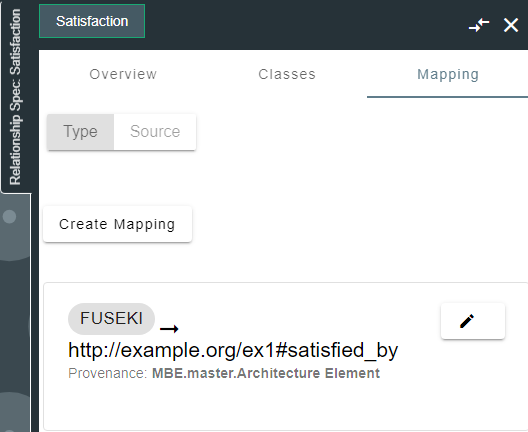
The flexiblity of RDF and Graph enables us to choose our own URI schemas as long as the mappings contain valid URIs, you can decide on any convention for publishing your data to the Digital Thread.
Create mappings for classes, properties, relations
https://sbevision.com/shapeID#http://sbevision.com/shapeID#https://example.com/shapeID/
Map the class, selecting the Fuseki datasource or datasource type and providing any valid URI as the shapeID
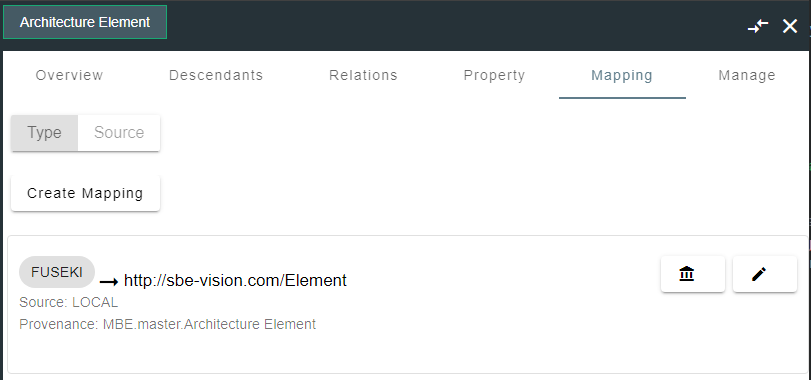
Map the property, selecting the Fuseki datasource or datasource type and providing any valid URI as the shapeID
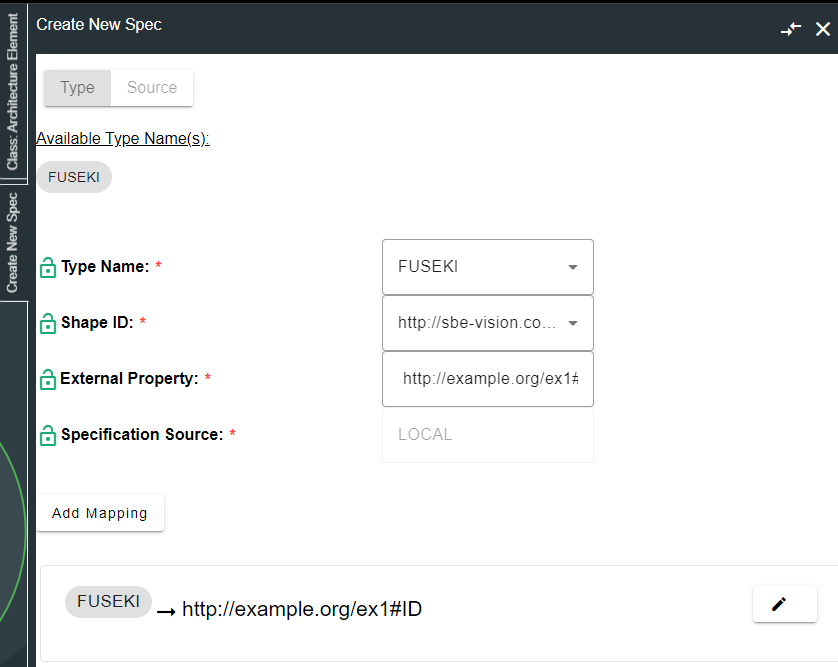
Map the relation, selecting the Fuseki datasource or datasource type and providing any valid URI as the shapeID
8. Security and Access
8.1 Authentication Methods
See RFC 006 - Authentication & Authorization for the standard on how to authenticate to use SBE and adapter services.
For REST API Endpoints
Supply credentials to token end point, receive an Auth token to invoke Publish, Refresh
For SBE Platform Services
Login to SBE Platform
Fuseki uses Apache Shiro for authentication, see https://jena.apache.org/documentation/fuseki2/fuseki-security.html
Basic Auth is enabled by default
LDAP/SSO can be configured through
shiro.inihttps://shiro.apache.org/realm.html
8.2 Authorization and Roles
Authentication Methods:
Built-in Authentication: Standard username/password login.
SSO (Single Sign-On): Enterprise versions may support SSO via SAML or other identity providers.
Fuseki + Shiro can control access to endpoints or actions based on roles.
Example (
shiro.ini):CODE[urls] /ds/update = authc, roles[admin] /ds/query = authc, roles[reader] /ds/data = authc, roles[editor]
8.3 Secure Communication
All communication between clients (browsers, API consumers) and the Fuseki server should be over HTTPS.
This ensures encryption in transit, protecting:
Login credentials
Test case content
Attachments and file uploads
API requests/responses
8.4 Identity Integration
Integrating identity management with Apache Jena Fuseki involves connecting it to an external identity provider (IdP) for authentication and authorization. Since Fuseki uses Apache Shiro for security, your options depend on whether you're sticking with Shiro or placing Fuseki behind a reverse proxy.
Apache Shiro supports:
LDAP / Active Directory
Custom realms (for OAuth2/JWT/etc., but require coding)
Use
shiro.inito configure LDAP authentication.
Example:
[main]
ldapRealm = org.apache.shiro.realm.ldap.JndiLdapRealm
ldapRealm.userDnTemplate = uid={0},ou=users,dc=example,dc=com
ldapRealm.contextFactory.url = ldap://ldap.example.com:389
ldapRealm.contextFactory.authenticationMechanism = simple
securityManager.realms = $ldapRealm

[urls]
/ds/* = authc
9. Troubleshooting
Fuseki pod i.e
fuseki-adapter-5b8998d6df-6w9lcFuseki Admin UI
The web UI (usually at
http://$FUSEKI_HOST:3030/) has:A server status page (for errors/warnings)
SPARQL query log (if enabled)
Fuseki uses Log4j2 for logging. You can configure logging via:
CODE$FUSEKI_BASE/log4j2.properties # Or $FUSEKI_HOME/log4j2.properties
Example log4j2.properties
status = error
appender.console.type = Console
appender.console.name = STDOUT
appender.console.layout.type = PatternLayout
appender.console.layout.pattern = %d{ISO8601} [%t] %-5p %c - %m%n

rootLogger.level = info
rootLogger.appenderRefs = stdout
rootLogger.appenderRef.stdout.ref = STDOUT

logger.fuseki.name = org.apache.jena.fuseki
logger.fuseki.level = debug
If you're using Apache Shiro, authentication-related events may appear in the same main log stream.
To log Shiro events, you can add:
logger.shiro.name = org.apache.shiro
logger.shiro.level = debug
10. Release Notes
Woburn
7.19
ASOT Linking support, upgrade standard pom7.18
Fixed issue during verify where property from SBE wasn't recognized7.17
Upgrade sdk to 7.457.16
Upgrade SDK Version 7.447.15
Upgrade sdk version to 7.437.14
Add locator to envelope on refresh/rebase7.13
Update logic to add https to redirect url, fix envelope locator7.12
Update SDK to 7.36, fixes for correlation id, endpoint to reset cache7.11
** Ldap bugfix, clear cache endpoint
* Bugfix for LDAP, add reset cache endpoint
7.10
* Fix Trust Store configuration7.9
** LDAP Auth support
* Attempts to retrieve cookie if user is redirected from accessing fuseki host using input credentials from SBE
* Saves cookie per pub/refresh request
7.8
** LDAP Auth support
* Attempts to retrieve cookie if user is redirected from accessing fuseki host using input credentials from SBE
* Saves cookie per pub/refresh request
7.7
* Remove Repository pattern when refreshing/publishing
Use Native Items Updater to handle CRUD on refresh
Use Native Items Provider to publish items
Remove SBEServicesFactory and separate business from controlller logic in event handler.
7.6
* Support verify, remove outdated code and update to sdk 7.187.5
** Fixes issues where refresh did not object corresponding objects in Fuseki from SBE
** Adds ability to trigger rebase.
7.4
** Official Woburn release
* Fixes & dependency updates
7.3
** Add updates for parsing header, update sdk version and maven dependencies** HTTP Auth, Handshake and bugfixesWakefield
1.0.4
** Removed Fuseki Data Store object, remove SBEResource and use BaseModel as primary DTO.1.0.3
** Enable using credentials from SBE UI to access fuseki1.0.2
** Migration to shared services pattern1.0.1
** Publish & Synchronize
* Publishing to the Digital Thread
- After determining the mappings and setting up your datasource/types
- Navigate to the channel and click Publish
* Refreshing to Fuseki
- After determining the mappings and setting up your datasource/types
- Navigate to the channel and click Refresh
- Ensure that the dataset specified in the channel property exists, and has write-access enabled.
Melrose
8.12
** Fix issues refreshing and publishing blankNodes.
* Support backslashes in datasource hostname property if provided.
* Upgrade SDK to 8.18
8.11
** Update SDK to 8.178.10
** Fix delta refresh bugs8.9
** Support ItemV78.8
** Update SDK to 8.158.7
** Update SDK to 8.148.6
** Update SDK to 8.138.5
** Enhance Integration tests8.4
ASOT Linking support, upgrade standard pom8.3
Update sdk to 8.98.2
Upgrade sdk version 8.88.1
Enhancements for LDAP, clearing cache8.0
Initial Melrose Release11. Technical Reference
11.1 Adapter API Endpoints
Apache Jena Fuseki provides a set of RESTful SPARQL API endpoints that you can use to interact with RDF data. These endpoints allow querying, updating, managing datasets, and accessing the graph store.
Endpoint Type | Path Format | Method | Purpose |
|---|---|---|---|
Query |
| GET/POST | SPARQL query |
Update |
| POST | SPARQL update |
Graph Store |
| GET/PUT/POST/DELETE | RDF graph operations |
List Datasets |
| GET | Admin: list datasets |
Create Dataset |
| POST | Admin: create new dataset |
Delete Dataset |
| DELETE | Admin: remove dataset |
Reload Dataset |
| POST | Admin: reload dataset config |
Server Info |
| GET | Server version and status info |
11.2 Identity
RDF utilizes URIs to identify unique objects, ensuring that each URI is distinct for every individual object. The external locator relies solely on the item's URI within its locator.
11.3 Configuration File Format Reference
11.4 Schema Support
All subjects with at least one
rdf:typestatement- CODE
<http://sbe-vision.com/PersonURI> rdf:type <http://sbe-vision.com/Class#Person> .
All object properties must have their related targets mapped and published.
- CODE
<http://sbe-vision.com/Alice> rdf:type <http://sbe-vision.com/Class#Person> .
<http://sbe-vision.com/Bob> rdf:type <http://sbe-vision.com/Class#Person> .
<http://sbe-vision.com/Bob> <http://sbe-vision.com/relation#isFriendOf>
<http://sbe-vision.com/Alice> .
All properties listed in the following tables can be mapped to the Digital Thread.
If not specified, the default is
StringBase64values refreshed from SBE will be decoded prior to being written to the Fuseki dataset
Datatype | Jena Java Type | Example | Notes |
|---|---|---|---|
|
|
| Java |
|
|
| Java |
|
|
| Java |
|
|
| Java |
|
|
| Java |
|
|
| Java |
|
|
| Java |
|
|
| Java |
|
|
| Java |
|
|
| Java |
|
|
| Java |
|
|
| Java |
|
|
| Java |
|
|
| Java |
|
|
| Java |
|
|
| Java |
Unqualified string |
|
| Java |
| language-tagged string |
| Java |
Directionality: bi-directional
11.5 Glossary of Terms
Common technical terms across tools/adapters
11.6 Compliance and Certification
ITAR, DoD, or cybersecurity compliance info (if applicable)
Adapter Maturity Model ratings