
Jama Adapter
Jama Adapter Documentation
1. Getting Started: Using the Adapter
The Digital Thread Jama plugin is a server-based SBE adapter that helps users to publish and refresh data. This makes data easier to manage, improves interoperability, and supports efficient integration across platform.
1.1 Operations Overview
Publish a whole Project or single container in a Project
Bring in Items from
Digital Threadinto Jama
1.2 Accessing the Adapter
Jama is a Server adapter, the
Digital Threadoperations are run from the SBE’s Embedded web applications
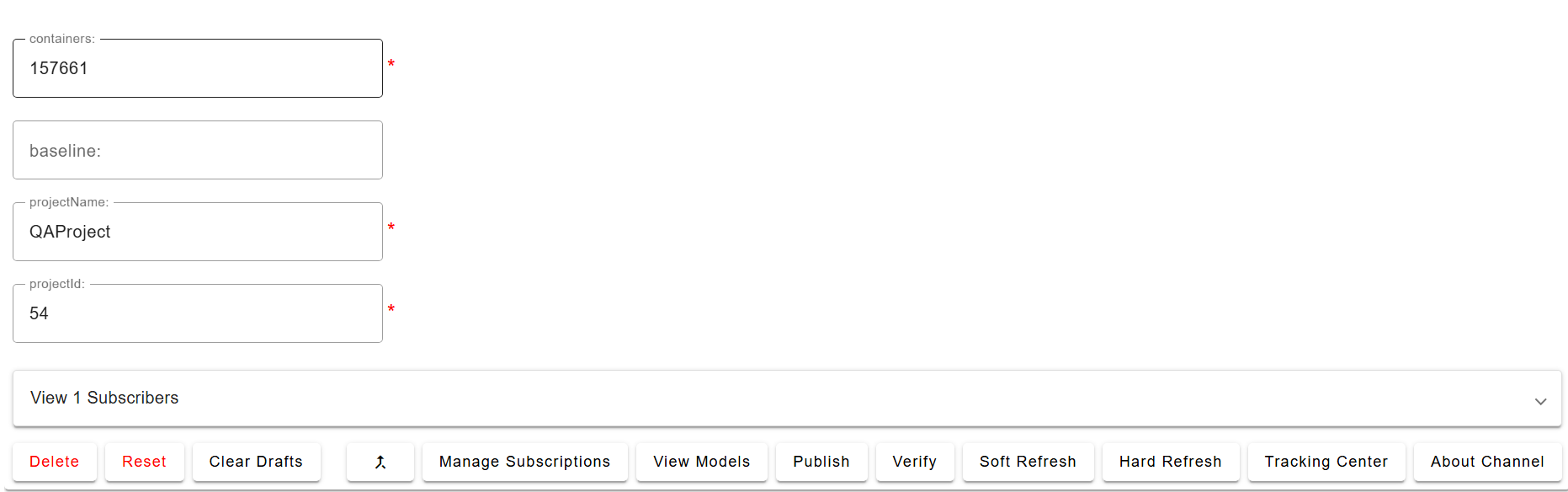
1.3 Attaching & Connecting
Name | Mandatory | Description |
|---|---|---|
projectName | Y | The name of the project |
projectId | Y | Internal/API ID of the project |
containers | N | ID of container (container type must be a |
baseline | N | Baseline ID |
There are 3 types of Channels that can be created in Jama
Project Based
Baselined
Container Based
It is recommended to use Container based channels for a better Digital Thread experience
Detailed Channel Configuration can be found in Section 7.1
1.4 Publishing Items
All the Items with links in the
Channelare publishedLinks to Items outside the scope of the
Channelare also publishedPlease note that on all the types we want to subscribe into Jama, we need to add a property
SBE Correlation Info, please look at section SBE Fields for more details
1.5 Refreshing Items (Including Subscribed Items)
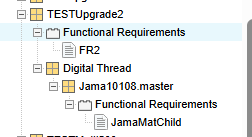
The Subscribed items are created under the Component Digital Thread, the location of Digital Threadvaries based on the type of Channel
For a Project based channel, it is created under Project Root
For a Container based channel, it will be created under the Container
1.5.1 Supported
Item with links creation is supported during Refresh
Any Item of type
Componentor types defined in Jama are supported
1.5.2 Not supported
Please note that subscriptions to type
Setare not supportedSubscriptions are not supported for
Baselinechannel

Moving items out/in of the container (in the Channel), will affect the Channel and it is highly recommended to Publish before running a Sync/Refresh operation.
1.6 Verify
The verify operation refrains from making any modifications to the external system. Instead, it focuses on comparing the items in the external system with those received from the SBE platform. During this process, the adapters evaluate the metadata (such as correlation ID, subscription ID, etc.), properties, and relationships. They also check for any missing or extra items.
1.7 Advanced Operations
Verify: Checks that the items published from SBE exist in the target system and are consistent.
Reset: Deletes any degraded or invalid items from the specified channel in SBE.
Force Publish: Force Publish triggers a full publish of data, regardless of whether only a subset of data has changed since the last operation. It bypasses the usual "delta" mechanism, which would otherwise only send changes since the last publish. This is useful when you want to ensure that all data is sent to the target system, even if some data hasn't changed or if previous publishes may have missed something.
This feature is available starting from version 8.x.
Force Refresh: Force Refresh triggers a full refresh of data from the source, again bypassing the delta mechanism. It ensures that the local or client system is completely updated with the latest data from the source, not just the changes since the last refresh. This is helpful for resolving sync issues or when you want to guarantee that the client has the most up-to-date and complete data
This feature is available starting from version 8.x.
Clear Drafts: The Clear Drafts action in the SBE platform is an advanced operation available in the Digital Thread adapter menu. This action is designed to remove or clear any "draft" data or unpublished changes that are stored locally for a given channel or project. Drafts typically accumulate when you make changes but haven't yet published them to the SBE server.
2. Document Overview
2.1 Document Overview
This document provides essential information for using, configuring, and supporting the SBE Vision adapters for Jama. This adapter covers different versions of Jama.
2.2 Document Orientation
This document is designed to inform users with various roles:
End Users should begin with Section 1 to understand how to access and operate the adapter, and Section 5 for issues pertaining to the setup, configuration, and use of the digital tool itself.
Digital Thread Specialists should focus on Section 1, and also consult Sections 3, 4, and 5 for deployment and semantic mapping. Section 7 contains details related to mapping items from this tool into a semantic ontology.
Administrators should refer to Section 6 and beyond for setup, security, support, and version management.
3. Adapter Use Cases
3.1 Adapter Overview
The purpose of this adapter is to allow the data contained within instances of Jama to connect with the SBE Digital Thread platform. This adapter was built using the SBE Java Pro-SDK product.
4. Supported Versions
4.1 Supported Adapter Products
This document covers all the version of adapter that support SBE 7.x (woburn) and 8.x (melrose)
4.2 External Tool Versions Supported
The Adapter was tested on
Jama Connect 9.29.0
Jama Connect 9.27.0
Jama Connect 9.22.0
Jama Connect 9.20.0
5. Digital Tool Best Practices
5.1 Tool Configuration Considerations
The adapter relies on Rest API of the Jama server; necessary permissions need to be allocated to users running
Digital Threadoperations on Jama
5.2 Usage Tips & Gotchas
5.2.1 Performance Improvement
The adapter uses the Jama Rest API for running any operations and for a Container Based Channel to improve performance of the adapter it is highly recommended to create a filter for the container used in the Channel
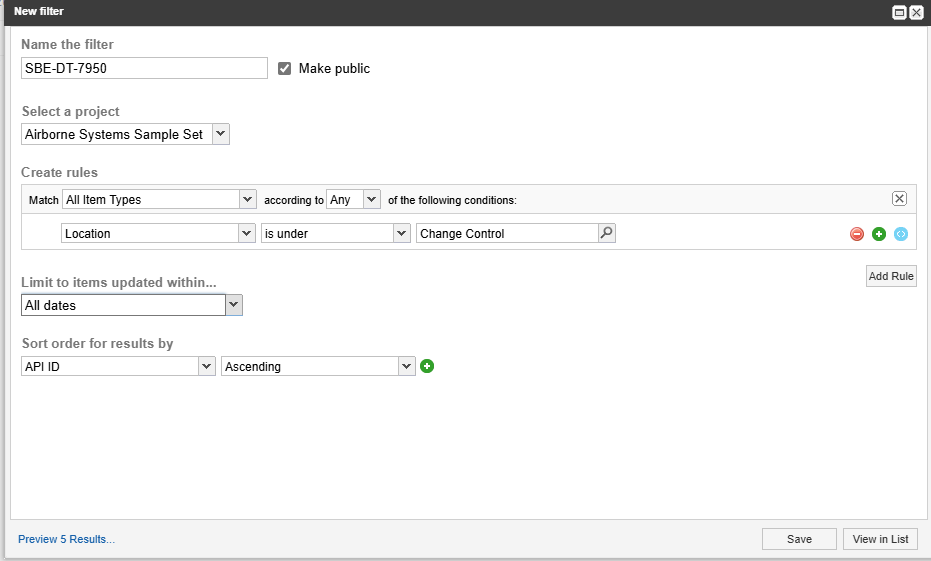
Steps to create a channel filter:
The name of the filter must be in the following format
SBE-DT-<containerId>, eg:SBE-DT-61265,
we get the container ID from the url as shown in the above sectionThe filter should be a public filter so that other users working on the Channel can also access the filter.
A Location rule for the given container must be added as shown below
(Optional) Add a ascending sort on API-ID
5.3 Tool Limitations and Workarounds
When deleting/moving large number of Items in Jama it is recommended to wait till the process is finished before running
Digital Threadoperations as the indexing engine which runs in the background rewrites the item locations in the tree which can cause issues with Reading and Writing of data
6. Installation
6.1 Configuration
The adapter uses a configuration file which can be used to pass extra information which will be used during Refresh and for the creation of Components and Sets.
For detailed information look at section Configuration
6.2 Data Source Type Definition
Data source definition contains the following properties
Name | Mandatory | Description |
|---|---|---|
host | Y | Host name of the Jama instance eg: |
port | Y | Port on which Jama Instance is running. eg: 443 |
uriScheme | Y | Http or https |
authType | N | Two Authentication types are supported, |
proxyHost | N | Host name of proxy server |
proxyPort | N | Port number of proxy server |
linkPref | N | Preference for the way links are handled. |
6.2.1 Link Preference
This section explains the linkPrefDatasource Property.
This property defines how the links on an Item in Jama are Published
Name | Description |
|---|---|
OUTBOUND | The Downstream links in Jama are published |
INVERTED | The Upstream links in Jama are published |
BOTH_ENDS | Both Upstream and Downstream links in Jama are published |
7. Channels and Mappings
7.1 Channel Definition
Name | Mandatory | Description |
|---|---|---|
projectName | Y | The name of the project |
projectId | Y | Internal/API ID of the project |
containers | N | ID of container (container type must be a |
baseline | N | Baseline ID |
It is recommended to use Container based channels for a better Digital Thread experience
we can define 3 different types channels for Jama
Project Level: if we want to define a
Channelwhere the whole Project becomes a Channel, we use just theprojectIdandprojectName. eg:projectId:46projectName: Airborne Systems Sample SetContainer Level: If we want to define a
Channelwhere the Container is the scope of theChannel, we use 3 properties,projectId,projectNameandcontainers. eg:projectId:46projectName: Airborne Systems Sample Set,containers: 7950Baselined: If the
Channelshould contain Baselines items in Jama, we use 3 properties,projectId,projectNameandbaseline. e.g.:projectId:46projectName: Airborne Systems Sample Set,baseline: 11
7.1.1 Gathering Channel Properties
The Project Name and the ID can be determined from the Admin -> Projectpage as shown below
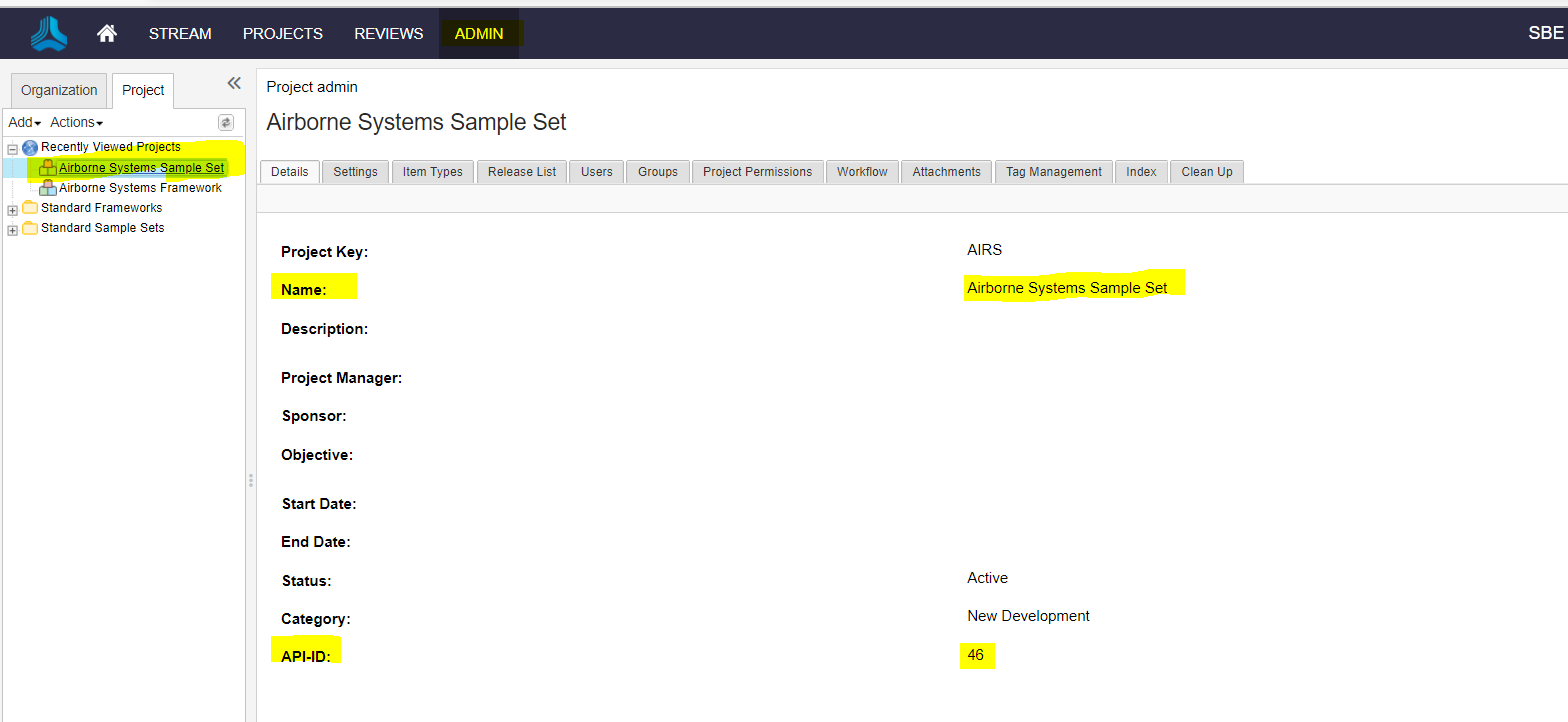
Alternatively we can also determine the projectIdfrom the Url,
Eg: `https://acme.jamacloud.com/perspective.req#/projects/46/dashboard`, the id here is 46
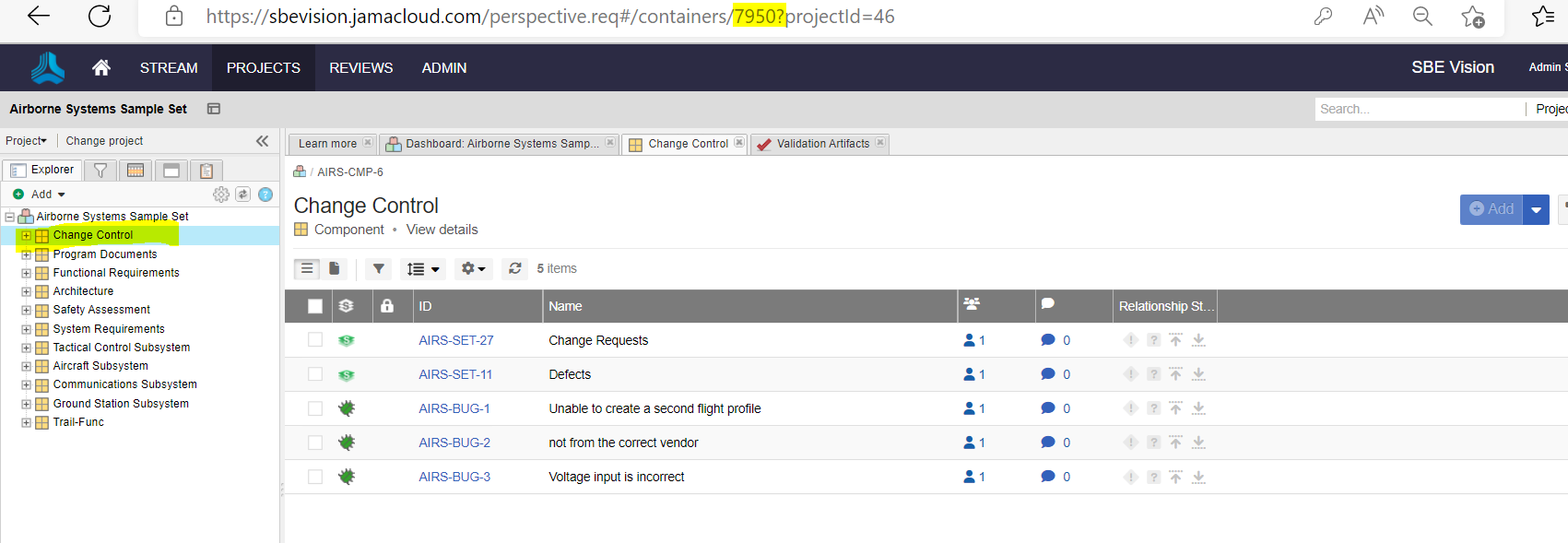
The containers channel property contains the API Id of the Componentin Jama,.
For example, the screenshot below shows the Id of the Component “Change Control”
The Id here is 7950
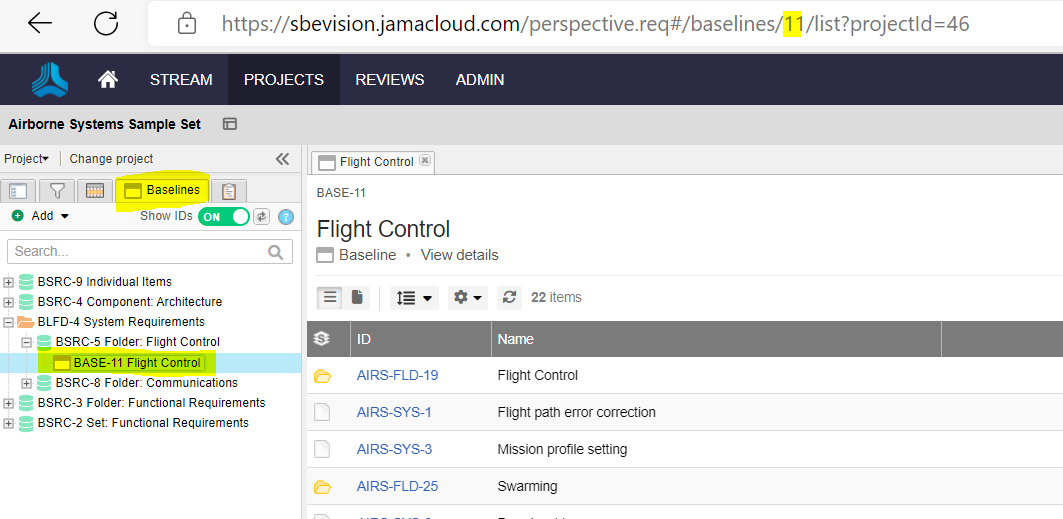
And finally the channel property baselineis also the API Id for a Base line defined in Jama
The screenshot below shows the Baselines tab in Jama and the Baseline BASE-11 Flight Control
Selecting the Baseline will show the Id in the Url as shown, the Id of the Baseline BASE-11 Flight Control is 11
So putting all the pieces together, we can define 3 different types channels with the project information we extracted
Project Level: we use the
projectIdandprojectName. eg:projectId:46projectName: Airborne Systems Sample SetContainer Level: we use 3 properties,
projectId,projectNameandcontainers. eg:projectId:46projectName: Airborne Systems Sample Set,containers: 7950Baselined: we use 3 properties,
projectId,projectNameandbaseline. eg:projectId:46projectName: Airborne Systems Sample Set,baseline: 11
7.2 Approaches to Mapping
Jama types and properties
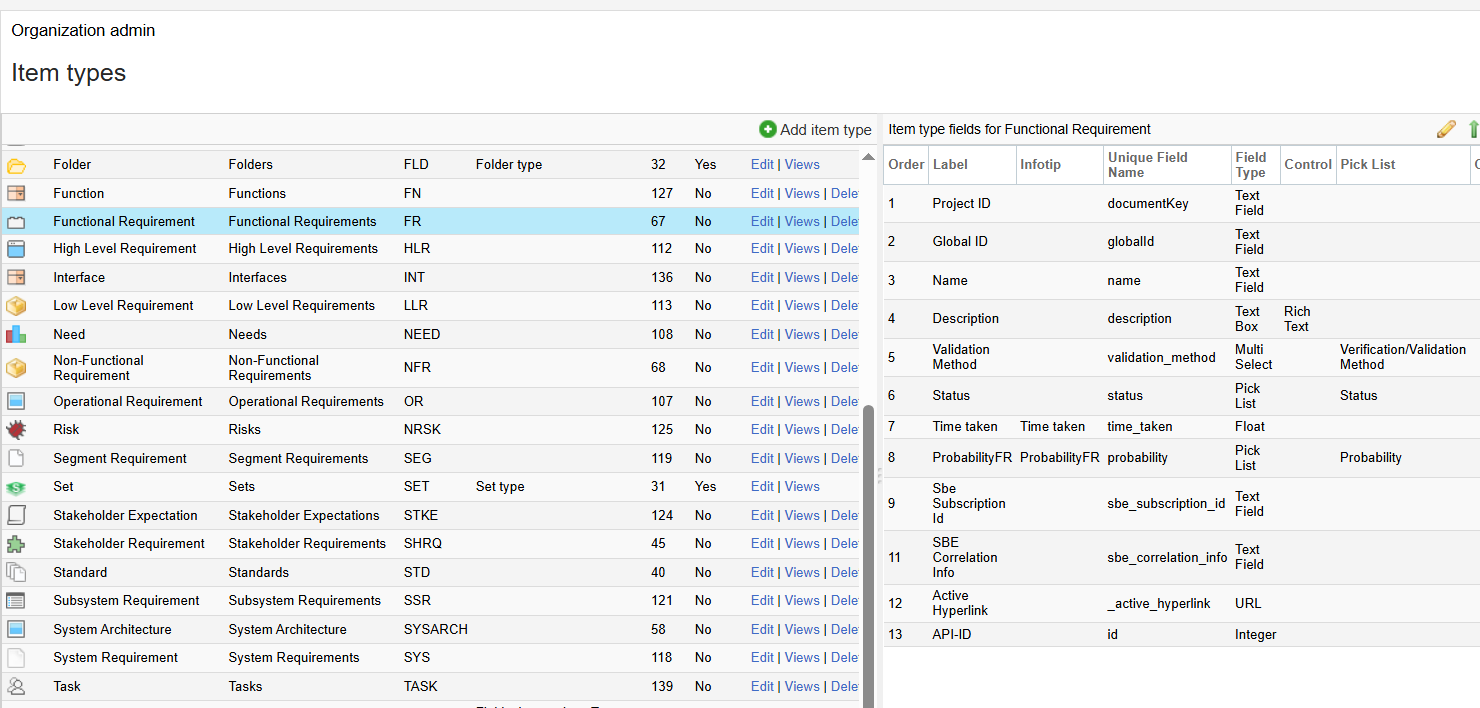
The Shape Idof the Items published from Jama will be the type of the Item in Jama.
For example, from the screenshot shown below, Shape Id will beFunctional Requirementfor all the items of that type.
The property name on the shape will be Labelof the property.
Look at section 10.3 for more details on Schema of the Data published from Jama
8. Security and Access
8.1 Authentication Methods
The adapter currently supports 2 authentication methods which are supported the Jama Rest API
8.1.1 OAuth
This mode of Authentication is recommended by Jama and this requires a user to generate API credentials as shown in the Jama docs here
8.1.2 Basic
Basic is where we pass the Jama user credentials while running any SBE verbs, please note this method is unsuitable for SAML/SSO environments
8.2 Authorization and Roles
Jama Software provides two approaches to accessing REST API:
Allow all members in your organization to access REST API (default).
Use the REST API Access Control feature to limit access to only authorized users and groups.
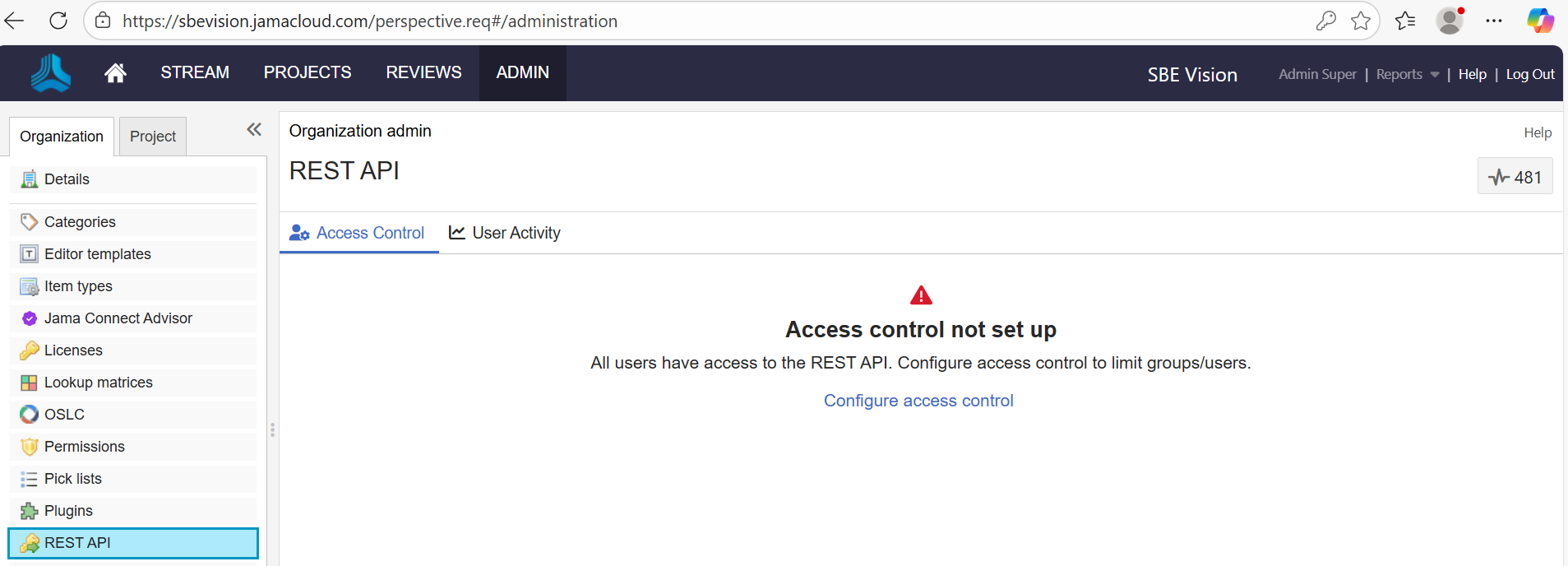
This configuration can be found at Admin -> REST API (under Organization tab).
The users running Digital Threadoperations need to have access to Rest API, follow steps explain how those setting are enabled for user/group
REST API Access Control is optional.
Once Jama Support enables REST API, all users have access. When you opt-in to Access Control, you must manually add users and groups.
To configure REST API access control, select ADMIN->Organization->REST API->then select Configure access control.
Configure Access control
Select Managed access, then select Next.
Select the users or groups you want to add, then use the arrow to add them to the Selected groups/user's column.
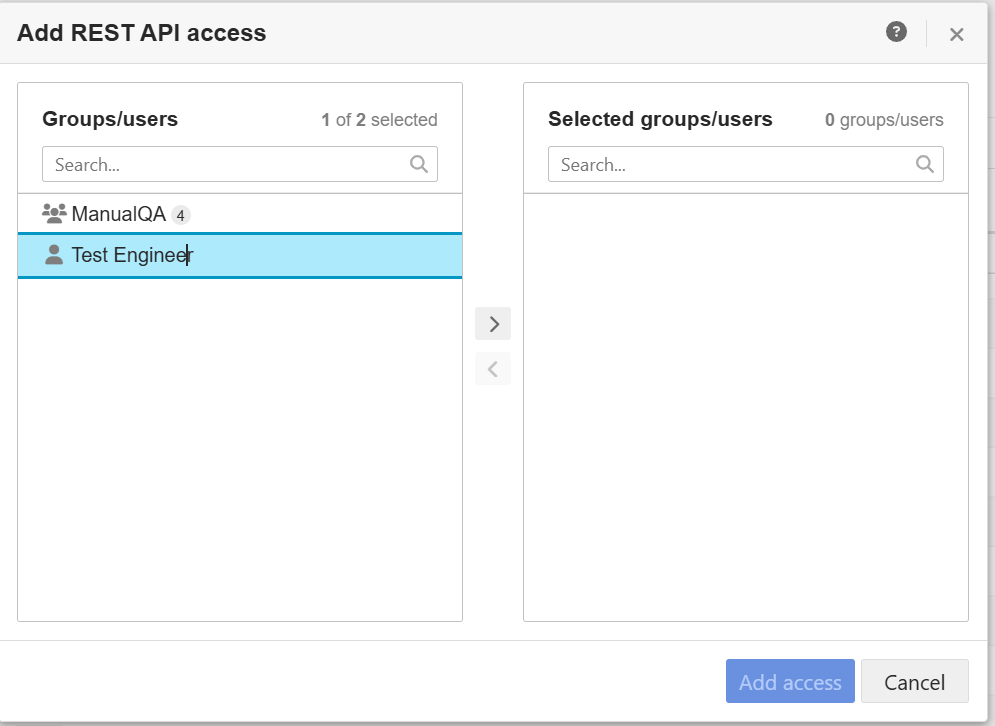
Add User or Group
To disable Access Control, select ADMIN > Organization > Details, then select No next to REST API Managed Access is enabled.
To know more about Configuring REST API access control, refer Jama REST API Access Control Documentation
8.3 Secure Communication
8.3.1 TLS
The uriSchemeDataSource property defines the protocol http or https used by the adapter.
It is highly recommended the server communication is secured using https
The adapter assumes if customer certificates are used on the server they are wired into SBE deployment
8.3.2 Proxy
If the communication to Jama happens through a Proxy server, the adapter needs to be configured accordingly.
The Datasource properties proxyHost, proxyPortneed to be set with the right Proxy server details
9. Release Notes
9.1 Version History
8.10 (Nov 17,2025)
Show more metrics in Tracking dashboard for Refresh
8.9 (Sep 25,2025)
SDK 8.18
8.8 (Aug 13,2025)
SDK 8.16
Refresh improvements
Enable SDK Cache
Item V7
8.7 (Jul 04, 2025)
SDK 8.15
8.6 (Jul 03, 2025)
SDK 8.14
8.5 (Apr 16,2025)
SDK 8.11
Implement
ResetReport granular finish states
8.4 (Feb 15,2025)
SDK 8.9
8.3 (Jan 07,2025)
SDK 8.8
Support multi-channel upgrade
Use
Connection
8.2 (Aug 14,2024)
helm chart retag
8.1 (Aug 14, 2024)
SDK 8.3
Support ASOT deletes
Updated Filter Screenshot in Usage Guide
8.0 (Jun 03, 2024)
SBE 8.x support
Delta Publish
7.21 (Nov 17,2025)
Show more metrics in Tracking dashboard for Refresh
7.20 (Jul 18,2025)
SDK 7.50
Refresh improvements
Enable SDK Cache
7.19 (May 05, 2025)
SDK 7.48
Implement
ResetReport granular finish states
7.18 (Dec 19, 2024)
SDK 7.45
Support multi-channel upgrade
7.17 (Oct 28, 2024)
SDK 7.44
10. Technical Reference
10.1 Identity
The following are the locator properties for any Item published from Jama
Name | Description |
|---|---|
id | API Id of the item |
10.2 Configuration File Format Reference
The adapter uses s configuration file which can be used to pass extra information which will be used during Refresh and for the creation of Components and Sets.
For example, if there are required fields on Component/Set, since the adapter creates Components during Refreshthis configuration is used to fill in the default values.
A sample config can be seen below, Here we are setting default values for
Component: property description
Set: properties description and group
[
  {
    "display": "Component",
    "displayPlural": "Components",
    "fields": [
      {
        "name": "description",
        "label": "Description",
        "fieldType": "TEXT",
        "required": true,
        "defaultValue": "Description of Component",
        "textType": "RICHTEXT"
      }
    ]
  },
  {
    "display": "Set",
    "displayPlural": "Sets",
    "fields": [
      {
        "name": "description",
        "label": "Description",
        "fieldType": "TEXT",
        "required": true,
        "defaultValue": "Description of Set",
        "textType": "RICHTEXT"
      },
      {
        "name": "group",
        "label": "Group",
        "fieldType": "TEXT",
        "required": true,
        "defaultValue": "QA"
      }
    ]
  }
]
10.3 Schema Support
10.3.1 Type: Item
This is type that represents all the Items in Jama.
Properties
All the properties defined on the
typein Jama are published.Any
RICH-TEXTproperty in Jama published asHTMLproperty in SBE.For Baseline items, we publish the property
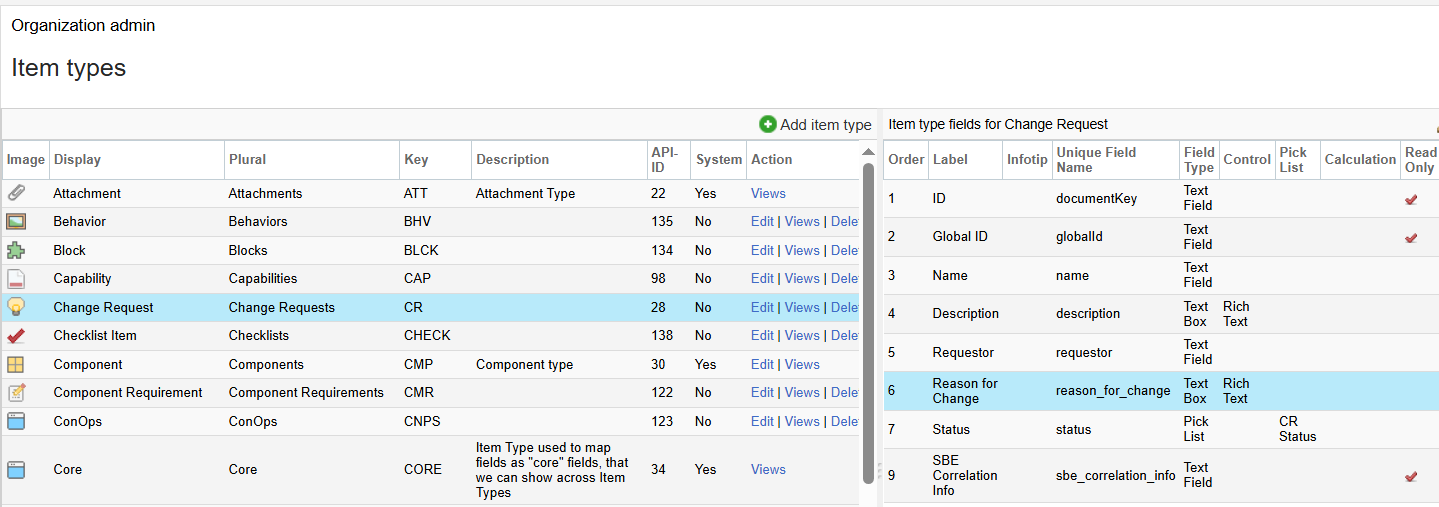
versionalong with the rest of the properties.Any property not defined in the table is published with the
labelsas name (defined in Jama, look at screen show below). eg:Reason for Changeon aChange Requesttype
Property Name | Data Type | Enum | Req’d | R/O | Description |
|---|---|---|---|---|---|
id | Integer | no | no | yes | Id of the item, eg: 7942 |
documentKey | String | no | yes | yes | project Id of the item, eg: AIRS-SET-2 |
globalId | String | no | yes | yes | GlobalId of the item, eg: GID-55685 |
name | String | no | yes | Yes | Title/Name of the item. |
type | String | no | yes | Yes | Display Name of the item type |
asotUri | String | no | yes | Yes | Direct uri to Jama Item |
Links:
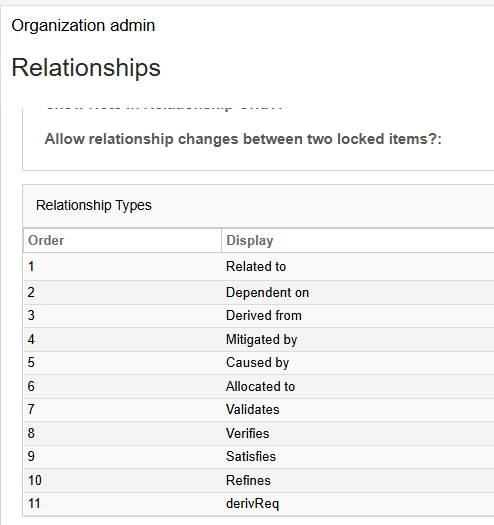
The links names published are the Display Names of Relationships in Jama
Name | Types | Mult | Description |
|---|---|---|---|
ChildOf | 0..* | Parent of the current Item. Parent can be of type Component/Set/Folder/any Item type |
Special Notes
Component, Folder are also part of the
Itemmetaclass.Any property in Jama of type
Useris not supported duringRefresh.Subscription of
Set,Foldertype's is not supported.When publishing Upstream Links (linkPref=
INVERTEDorBOTH_ENDS), Prefix ofINV:is added to
relation name.
e.g.: Relation name=Derives,Upstream Linkrelation name will beINV:Derives.
10.3.2 SBE Fields
To support Subscriptions on a given types in Jama, we need to add the property `SBE Correlation Info`on that type.
The fields can be added
from Admin --> Organization --> ItemTypes --> Click on ItemType --> Add Field :
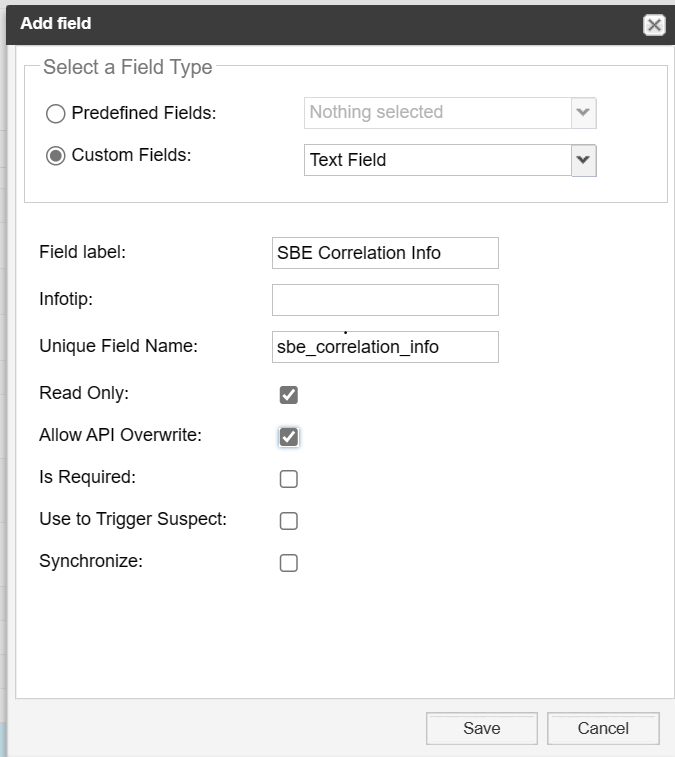
eg: We want to being in High Level Requirementsfrom Digital Thread, before we can Refresh and bring them in, we will add the property as shown above to the type High Level Requirements in Jama
11 Upgrade
11.1 Migrate from SBE 6.x to SBE 7.x
This section covers the guide to upgrade from your SBE 6.x to SBE 7.x
11.1.1 Prerequisites
Make sure
SBE Correlation Infocustom property exists for all Item types. Please refer
to SBE Fields section for more details.
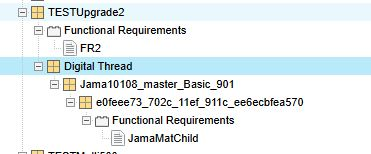
11.1.2 Pre-Upgrade Structure
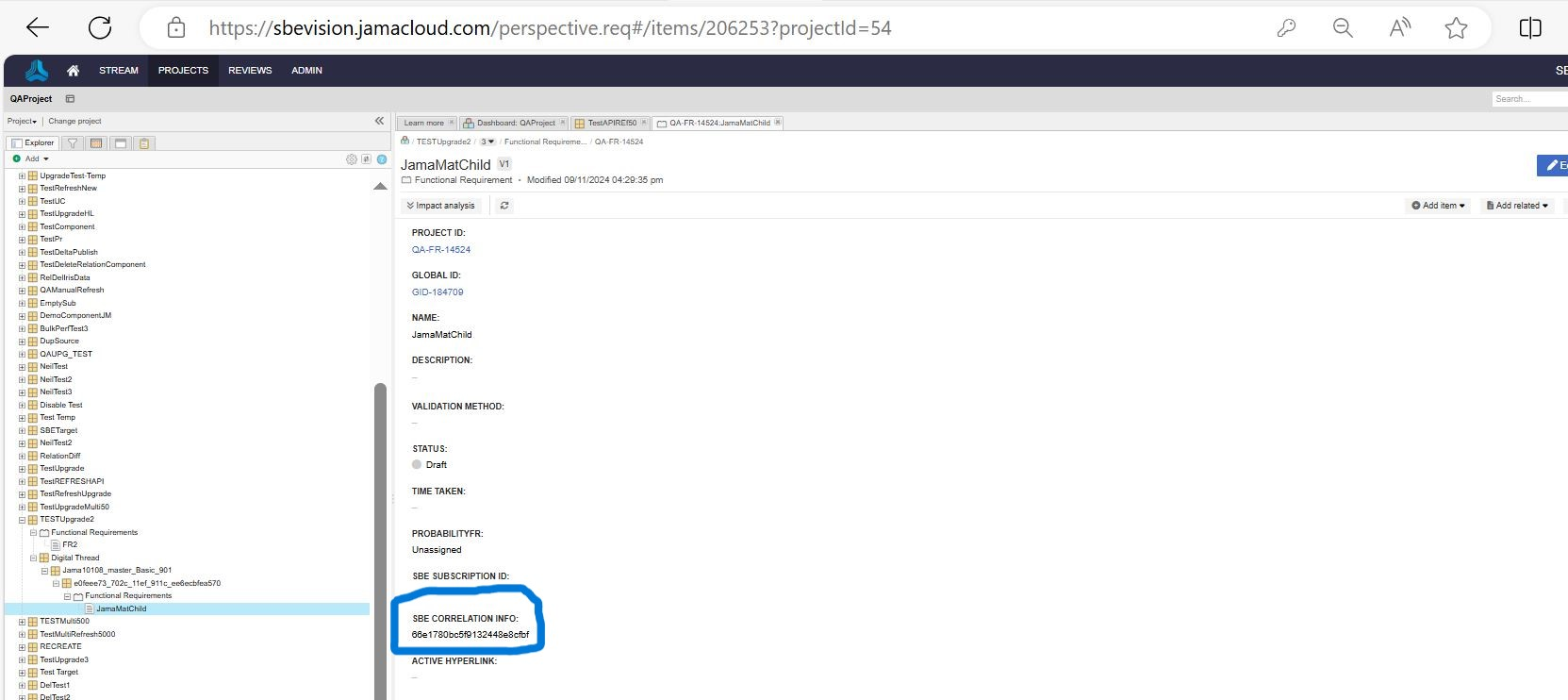
This is the structure of the Digital ThreadComponent before upgrade
The properties on a Subscribed Item before Upgrade
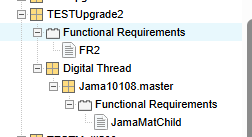
11.1.3 Post Upgrade Structure
Component with Name same as Subscription Name will move under Digital Thread
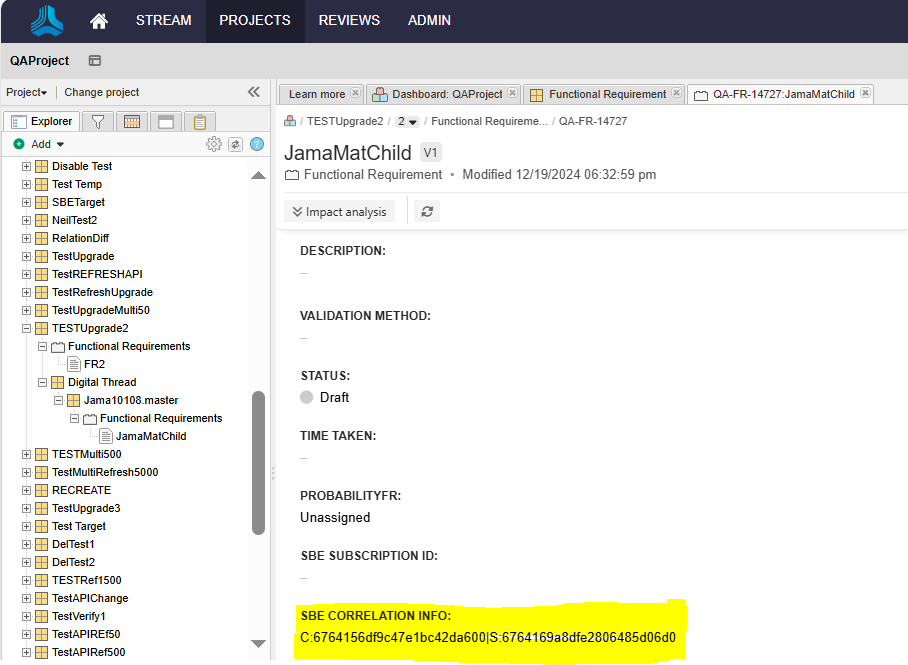
After upgrade SBE Correlation Info is updated with the value which is combination of both Subscription Id and Correlation Idas shown below
11.2 Migrate from SBE 7.x to SBE 8.x
This section will cover the guide to upgrade from your SBE 7.x to SBE 8.x