
IBM Rhapsody Adapter
SBE Rhapsody Plugin Documentation
1. Getting Started: Using the Adapter
The Digital Thread Rhapsody plugin helps connect different software tools by allowing users to publish and refresh data between them. This makes data easier to manage, improves interoperability, and supports efficient integration across platforms.
1.1 Operations Overview
Attach
Publish
Refresh - Soft/Hard
Verify
Reset
1.2 Accessing the Adapter
1.2.1 Digital Thread Menu
Once the plugin installation is done, Digital Thread sub menu is visible under Tools menu in Rhapsody. However, the Digital Thread profile must be imported into the Rhapsody project for the menu to become visible.
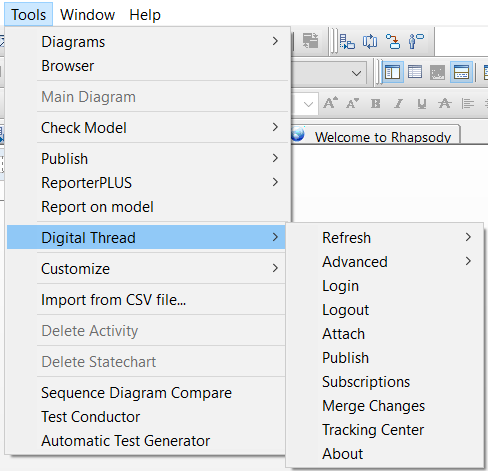
Digital Thread Menu
1.3 Attaching & Connecting
To attach a project, Digital Thread → Attach from the Rhapsody Tools menu.
This opens the attachment window (shown in below image), where you must provide the required details such as selecting or creating a valid partition and branch and then proceed to create the channel. Creating a channel is a core part of the project attachment process.
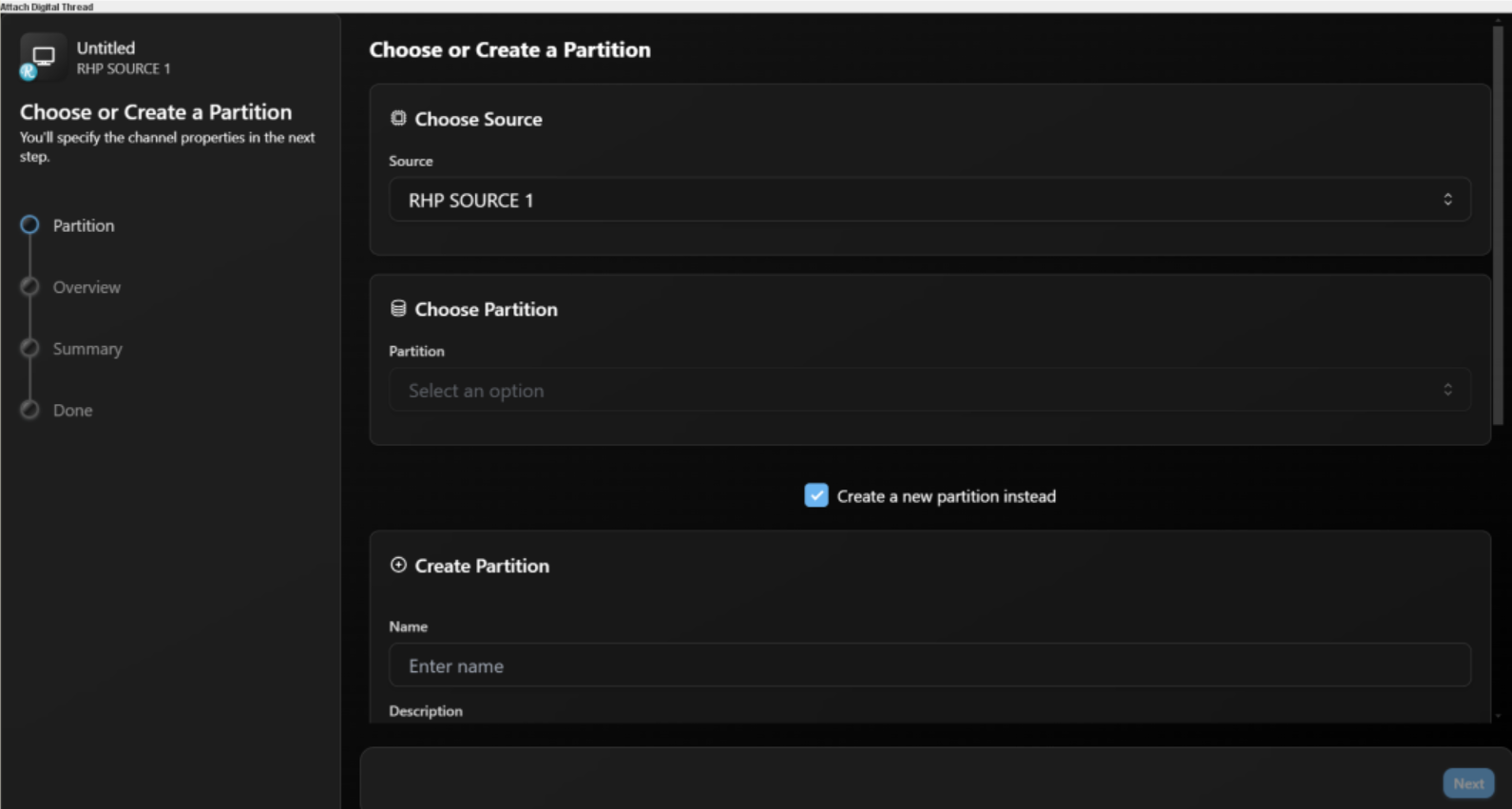
Attach Window
Select the data source type as RHP from dropdown.
It’s important to note that channel properties do not need to be manually filled, as they are automatically populated by the plugin during the attach process.
A project must be successfully attached (with a valid channel) before you can perform any:
Publish operations
Refresh operations
The following channel properties are essential for creating a channel.
Channel Properties
Name | Mandatory | Description |
|---|---|---|
| Y | Name of the Project |
When the message ‘Your new channel has been created. You can now close this window.’ appears, it confirms that the channel has been successfully created and the project is now attached.
1.4 Publishing Items
To publish a items, Digital Thread → Publish from the Rhapsody Tools menu.
The Publish operation includes all supported item types along with their associated links, ensuring that both the elements and their valid relationships are accurately published. During this process, data is ingested into SBE through the adapter. Below dialog (image) confirms items got published.
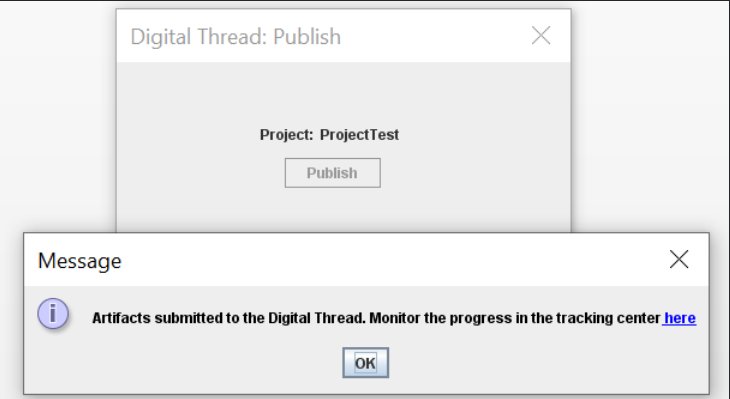
Successfully Publish
The list below highlights the item types supported by the plugin for both Publish and Refresh operations.
The following Meta Classes are currently supported
Class
Requirement
Comment
Attribute
Package
Port
Part (Object)
Link
Dependency
Generalization
Association
Flow
Operation
HyperLink
1.5 Refreshing Items (Including Subscribed Items)
The Digital Thread menu provides two types of refresh operations Soft Refresh and Hard Refresh accessible under the Refresh option.
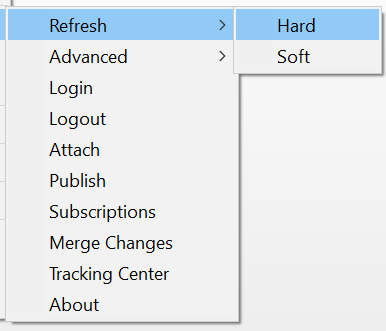
Digital Thread Refresh Actions
The following Meta Classes are currently supported
Class
Requirement
Comment
Attribute
Package
Port
Part (Object)
Link
Dependency
Generalization
Flow
Operation
The following Meta classes are currently not supported
Association
1.5.1 Hard Refresh
Hard refresh performs a full reconstruction of subscribed items based on the latest data from SBE. It updates attributes, relationships, and hierarchy, recreating elements when necessary to ensure complete alignment with the source data.
All subscribed items are created under the Digital Thread package following the mapped hierarchy, along with their associated links.
A custom tag named Subscription ID and Correlation ID is applied to each subscribed item in Rhapsody project. These tags store the item's corresponding Subscription ID and Correlation ID.
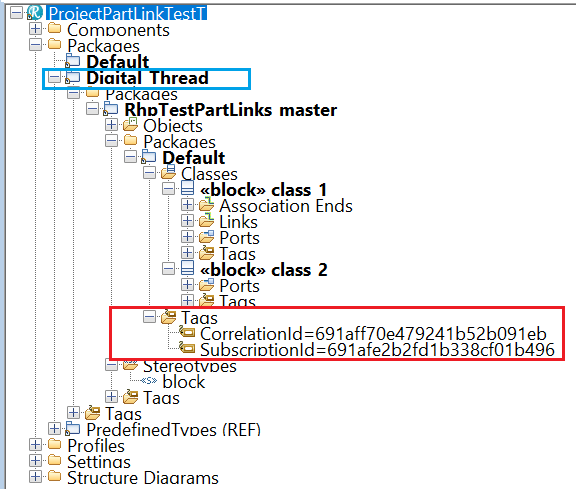
Typical Digital Thread Package after performing Hard Refresh
1.5.2 Soft Refresh
In a soft refresh, the entire dataset is not retrieved. Priority is given to locally modified data that has not yet been published. This allows users to continue making changes locally without the risk of those changes being overwritten. Only data that has not been modified locally and has been updated in SBE is received and refreshed during this operation.
1.6 Advanced Operations
Below are the advanced operations provided by the Digital Thread plugin.
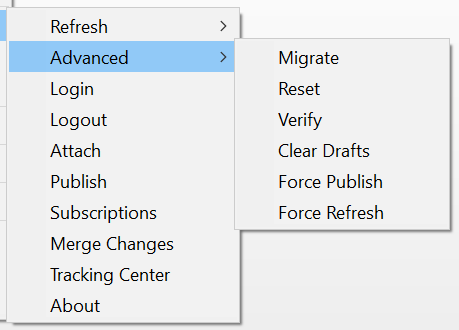
Digital Thread Advanced Menu operations
1.6.1 Migrate
Run Upgrade by clicking the Migrate menu item under Advanced.
Please note that after upgrade, Custom Stereotype SBE_DigitalThread, will be added on
subscribed Elements with a tag value Subscription ID and Correlation ID.
1.6.2 Verify
The verify operation refrains from making any modifications to the external system. Instead, it focuses on comparing the items in the external system with those received from the SBE platform. During this process, the adapters evaluate the metadata (such as correlation ID, subscription ID, etc.), properties, and relationships. They also check for any missing or extra items.
1.6.3 Force Publish
Force Publish triggers a full publish of data, regardless of whether only a subset of data has changed since the last operation. It bypasses the usual "delta" mechanism, which would otherwise only send changes since the last publish. This is useful when you want to ensure that all data is sent to the target system, even if some data hasn't changed or if previous publishes may have missed something.
This feature is available starting from version 8.x.
1.6.4 Force Refresh
Force Refresh triggers a full refresh of data from the source, again bypassing the “delta” mechanism. It ensures that the local or client system is completely updated with the latest data from the source, not just the changes since the last refresh. This is helpful for resolving sync issues or when you want to guarantee that the client has the most up-to-date and complete data
This feature is available starting from version 8.x.
1.6.5 Clear Drafts
The Clear Drafts action in the SBE platform is an advanced operation available in the Digital Thread adapter menu. This action is designed to remove or clear any "draft" data or unpublished changes that are stored locally for a given channel or project. Drafts typically accumulate when you make changes but haven't yet published them to the SBE server.
1.6.6 Reset
The Reset operation clears the local metadata for the current channel and removes stale subscription data from the project. Reset option should be used only when the Channel pointing to the current project was
Deleted and re-attached to a new
ChannelSBE data was cleared
Running this under any other condition can destroy Subscription's on the Channel
It is highly recommended you consult a Digital Thread Admin before running this command
1.7 Troubleshooting for End Users
The recommended Java version’s are 64bit version of JDK 1.8 and JDK 11.
The logs are generated in the %TEMP% directory.
If the Browser startup times are really slow (more than 5 mins) and this started after February 1st
2025, it is possible it this was caused by a Windows Defender update.
Moving to the latest version of plugin (>= 7.11) should fix the issue. Alternatively, if we cannot update to latest plugin, follow the document to fix the slowdown.
The Chromium binaries are typically in location $USER_HOME\\AppData\\Local\\JxBrowser\\7.41.3 where 7.41.3 is browser version
2. Document Overview
2.1 Document Overview
This document provides essential information for using, configuring, and supporting the SBE Vision adapters for IBM Rhapsody. It covers multiple adapter products, each supporting different versions of the external tool.
2.2 Document Orientation
This document is designed to inform users with various roles:
End Users should begin with Section 1 to understand how to access and operate the adapter, and Section 5 for issues pertaining to the setup, configuration, and use of the digital tool itself.
Digital Thread Specialists should focus on Section 1, and also consult Sections 3, 4, and 5 for deployment and semantic mapping. Section 11 contains details related to mapping items from this tool into a semantic ontology.
Administrators should refer to Section 6 and beyond for setup, security, support, and version management.
3. Adapter Use Cases
3.1 Adapter Overview
The purpose of this adapter is to allow the data contained within instances of IBM Rhapsody to connect with the SBE Digital Thread platform. Given that IBM Rhapsody is a rich-client tool, the usage of this adapter is governed by end users operating that tool on the desktop of their workstation. This adapter was built using the SBE Java Pro-SDK product.
4. Supported Versions
4.1 Supported Adapter Products
This document covers all the version of adapter that support SBE 7.x (woburn) and 8.x (melrose)
4.2 External Tool Versions Supported
The Adapter was tested on
Rhapsody 8.3.x
Rhapsody 9.0.x
5. Digital Tool Best Practices
5.1 Tool Configuration Considerations
Tool configurations are needed only for manual installations. When installing manually, ensure that all required tool settings are applied in the
config.jsonfile as described in section 6.2.
5.2 Usage Tips & Gotchas
Common user mistakes
Refreshing without mappings for required properties
Solution: Ensure all mandatory properties are mapped before performing a Refresh operation.
6. Installation
6.1 Installation Instructions
6.1.1 Supported Configurations
The Plugin is Supported only on Windows and supports Rhapsody version 8.3.1 and 9.0.1.
6.1.2 Installation package
Manual Installation – Requires configuring paths and files manually.
Automatic Installation (Recommended) – A guided installer that handles setup for you with minimal effort.
Download the sbe_rhapsody_plugin_X.zip and extract the zip file, it should contain
profiledirectory with profile: "Sbe.sbx", "SBE.hep"jar file
log4j2.xml- Logging configurationconfig.json- template of config file
Install package

SBE Profile
For Automatic installation you need only rhp-dt-plugin-X.X.X.exe.
6.1.3 Manual Installation
Copy the jar file and Profile files to a known directory, eg: c:\SBE
Update the path to the jar in the
hepfile as shown below,SBE.heporSysML-SBE.hep
depending on type of install.Copy the config.json, log4j2.xml to $USER_HOME\SBE\rhp
JavaClassPath1=C:\SBE\rhp\rhapsody-plugin-5.7.0.jar6.1.4 Automatic Installation (Using Installer)
Follow the steps below to install the Digital Thread Rhapsody Plugin using the installer:
Launch the Installer
Locate and open the installer file (with.exeextension).Handle Windows Defender Warning
If Windows Defender displays a warning, click More Info.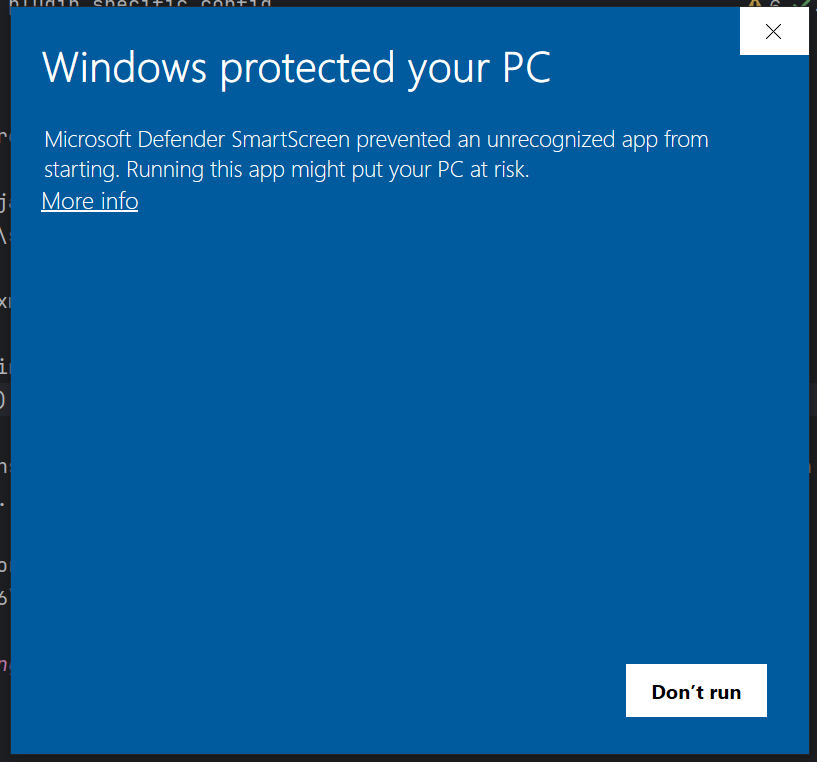
Microsoft Defender Warning
Run Anyway
Click Run Anyway. If a User Account Control (UAC) dialog appears, click Yes.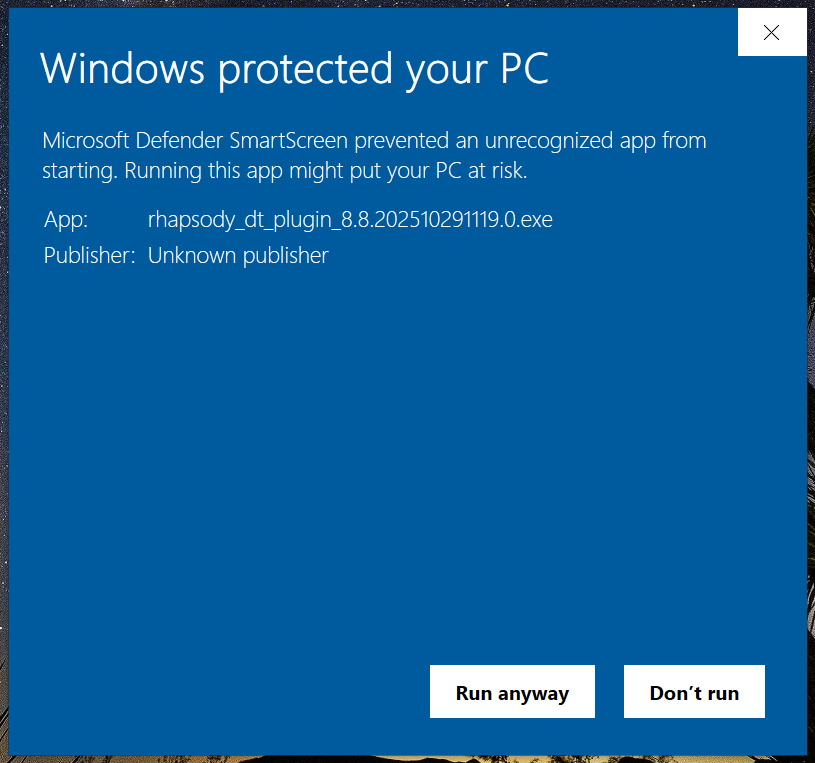
Microsoft defender Warning 2
Welcome Page
The installer will display a welcome screen. Click Next to proceed.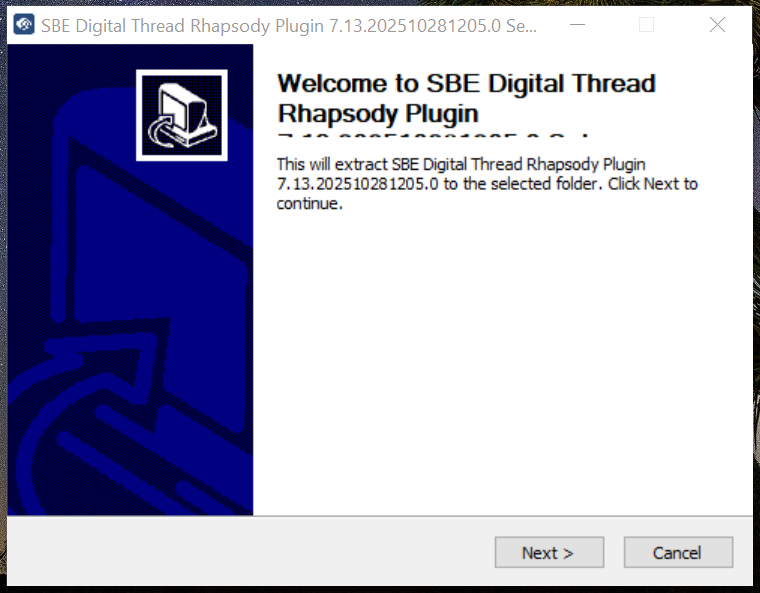
Welcome Screen
Rhapsody Location
Click on Browse and select the rhapsody installation path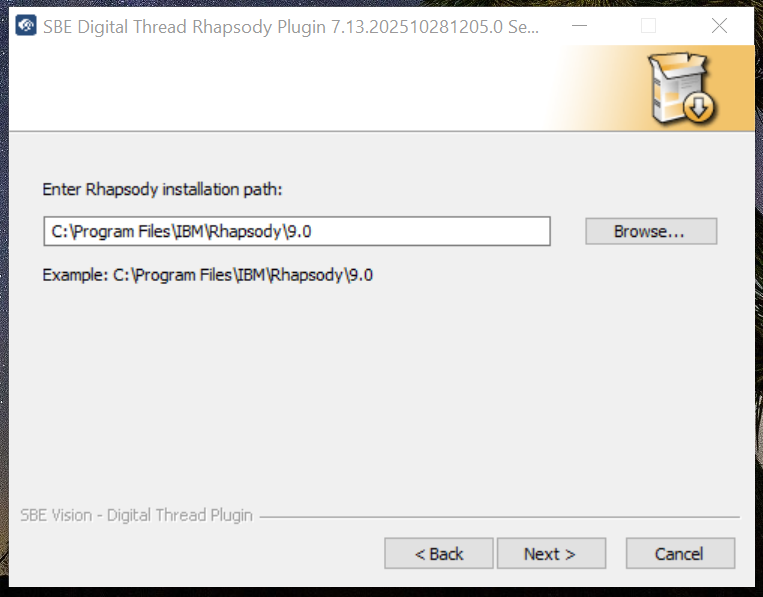
Rhapsody Installation Location
Configure SBE Server Endpoint
Enter your SBE server endpoint (e.g.,<https://sbe.acme.com).>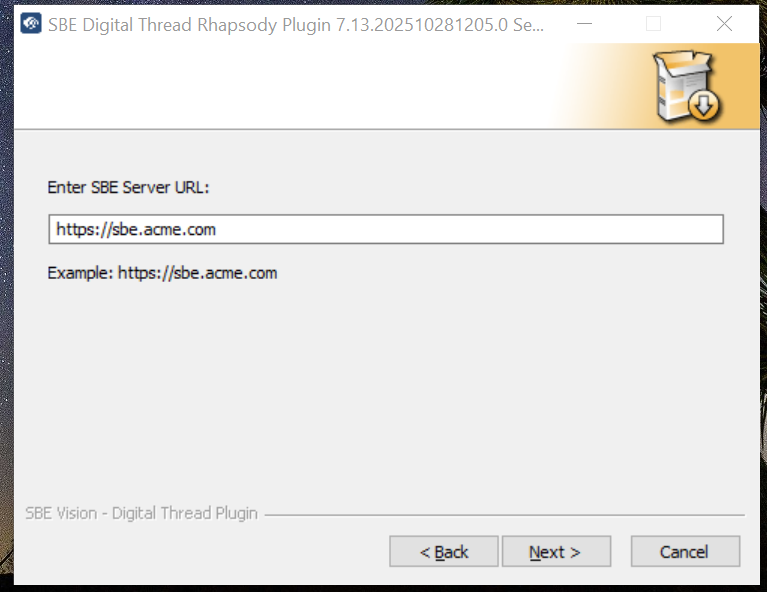
Server Endpoint
Certificate Path
If required, also provide the location of the root cert, please note this should be a pem or equivalent format (human readable).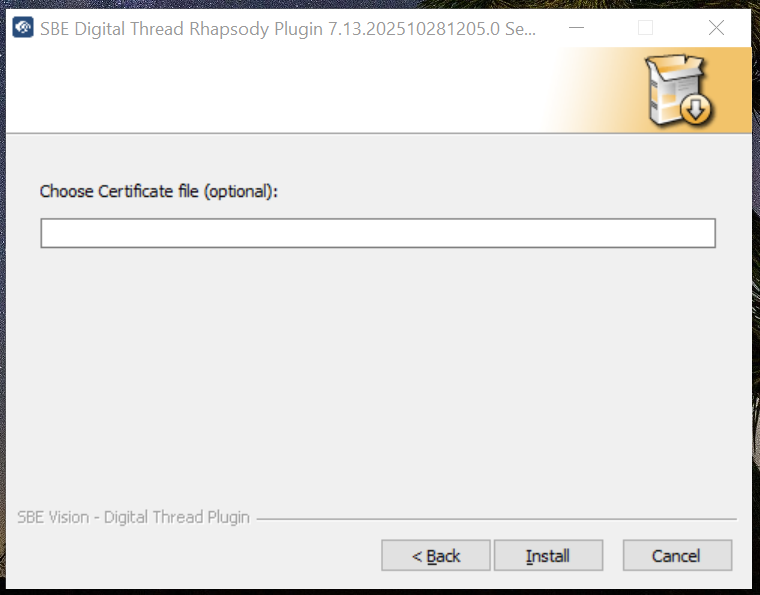
Certificate Path
Installation Complete
Once the process is finished, you will see a confirmation screen.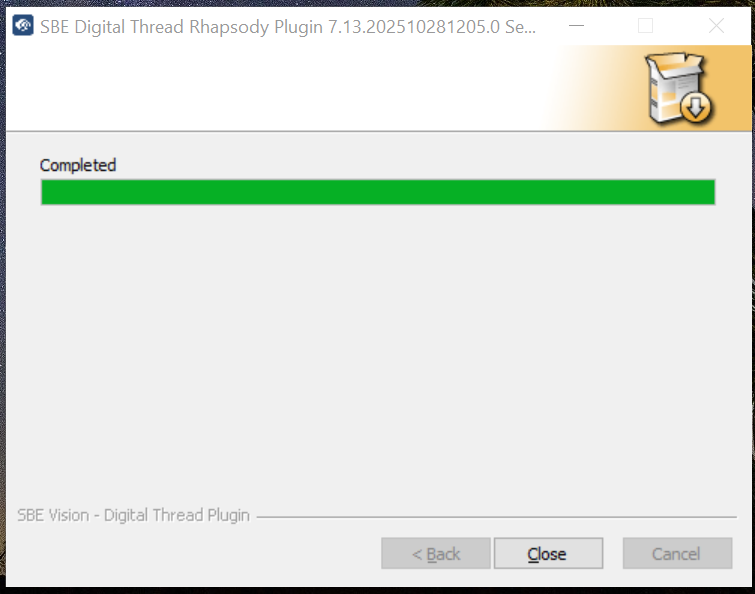
Completion screen
The Digital Thread Rhapsody Plugin is now successfully installed and ready to use.
6.1.5 Add SBE profile to the project
The recommended way of installing the plugin is to add the SBE Rhapsody Profile to the project.
In Rhapsody, Go to the
Filemenu, select menu itemAdd Profile to Model..Browse to the directory where the SBE profile was extracted and select "SBE.sbx" file.
This will add SBE profile to project, this can be confirmed by locating the
SBEunder the
Profiles folder.For automatic installation, profiles path will be
<Rhapsody Location>\Share\Profiles\SBE,Rhapsody Locationselected in step 5 of automatic installation.The current version of the plugin will be displayed in the console log and we can see
theDigital Threadmenu under Tools menu.
6.1.6 Verifying the Installation
If the installation is successful, user the Tools menu, we should see the "Digital Thread" sub menu.
Verify Plugin Installation
When you load the profile or open Rhapsody (depending on the way the plugin was installed), you can see the version of plugin in the console as shown below.
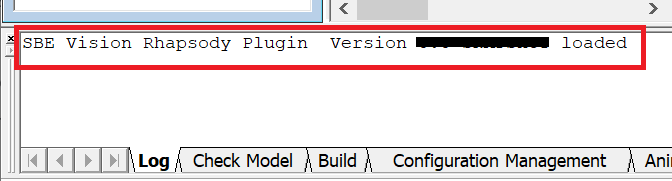
Rhapsody Console Message
6.2 Configuration
open the config.json from $USER_HOME\SBE\rhp
Update the fields as shown below
This step is needed only for Manual installation
Property | Description |
|---|---|
restEndPoint | Authorization Endpoint. eg: https://sbe.acme.com |
certFilePath | if self signed certificates are used on SBE, copy the root certificate full path, eg: c:\\sbe\\root.pem |

Note: The certificate must be in a human-readable format, like pem
6.3 Data Source Type Definition
Property | Description |
|---|---|
metaclassFilter | Filter the Metaclasses that are processed during publish. eg: |
ignoreStereotype | This property is used to ignore some |
Supported Metaclass (default Metaclass) list "Requirement","Class","Attribute","Package", "Comment","Composition","Port","SysMLPort","Dependency","Generalization","Association", "AssociationEnd","Flow","Part","Link","Object"
6.4 Troubleshooting the Installation
6.4.1 Missing Digital Thread Menu
There is no Digital Thread sub menu under Tools Menu. Confirm that the SBE profile under Profiles folder is present.
6.4.2 Digital Thread Window Not Opening
Clicking on the "Digital Thread" sub menu item does not open Login or any other window. Make sure the path in JavaClassPath1 is correctly pointing to the jar file on the machine.
6.5 Uninstall
Remove the SBE Profile from the project.
Delete the SBE menu options in SysML hep file.
7. Channels and Mappings
7.1 Channel Definition
The channel properties are projectArea.
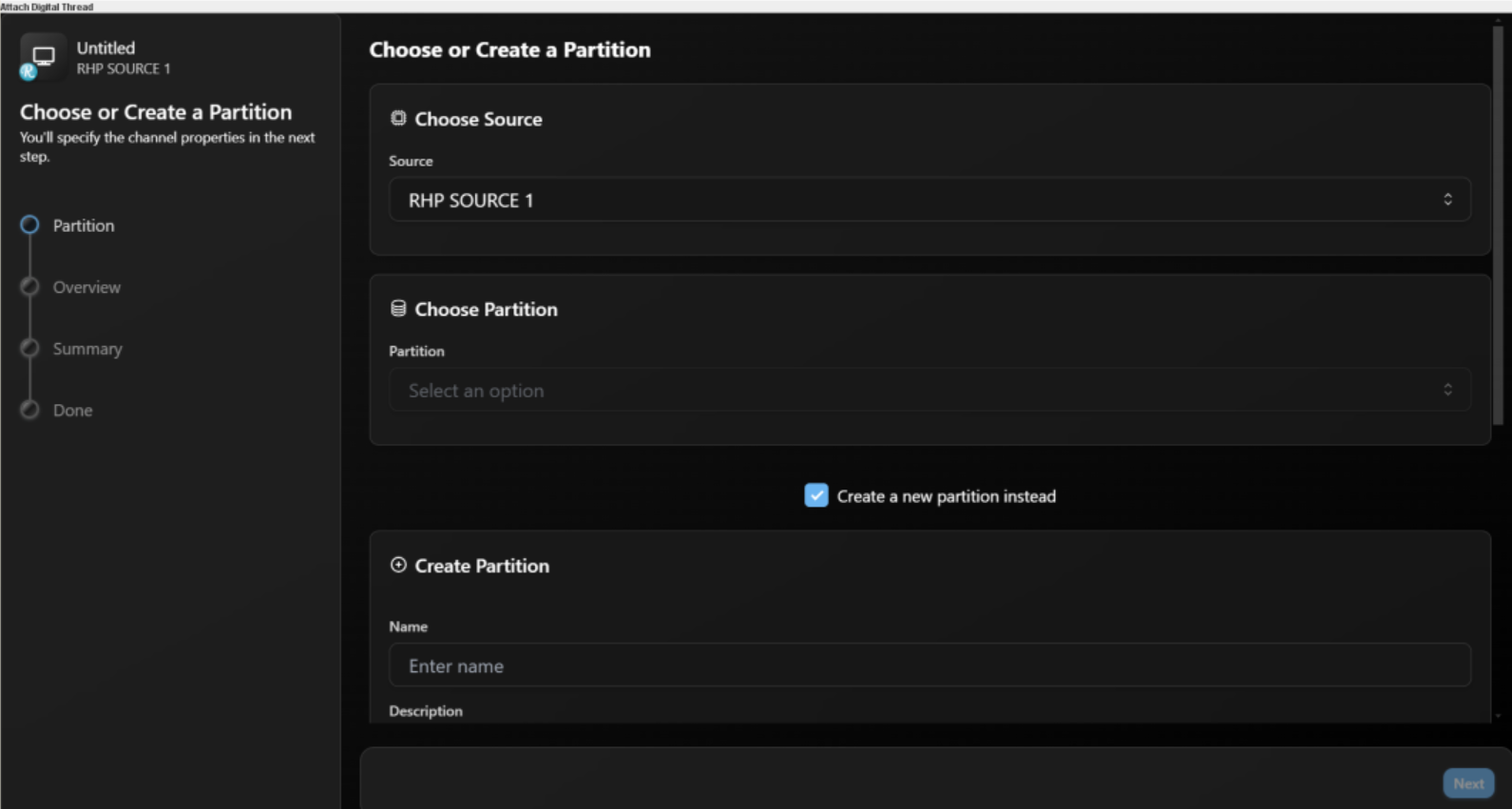
Definition of channel
Name | Mandatory | Description |
|---|---|---|
| Y | Name of the Project |
7.2 Approaches to Mapping
Mappings should be created based on the shapes of the elements being published. Every element has one METACLASSshape (the base shape) and may have multiple STEREOTYPE shapes, especially when custom stereotypes are applied in Rhapsody. For example, a Requirement can have several shapes depending on the applied stereotypes. All these shapes must be mapped in SBE to ensure correct publishing. The shapes can be viewed in logs such as Kibana, where they appear in the element’s JSON data. Each shape can have its own properties and relationships, which also need to be mapped accurately for proper data representation.
Sample JSON Data:
 "shapes": [
          {
            "order": 1,
            "id": "Requirement",
            "type": "METACLASS",
            "attributes": [
              {
                "name": "displayName",
                "value": {
                  "type": "STRING",
                  "format": "STRING",
                  "value": "requirement_2"
                }
              },
              {
                "name": "name",
                "value": {
                  "type": "STRING",
                  "format": "STRING",
                  "value": "requirement_2"
                }
              },
              {
                "name": "guid",
                "value": {
                  "type": "STRING",
                  "format": "STRING",
                  "value": "GUID f21677d6-6700-4865-8dab-9d88ebbb29ad"
                }
              },
              {
                "name": "description",
                "value": {
                  "type": "HTML",
                  "format": "JSON",
                  "value": "{\"mediaType\":\"text/html\",\"charset\":\"UTF-8\",\"encoding\":\"base64\",\"value\":\"\"}"
                }
              },
              {
                "name": "specification",
                "value": {
                  "type": "STRING",
                  "format": "STRING"
                }
              },
              {
                "name": "requirementId",
                "value": {
                  "type": "STRING",
                  "format": "STRING"
                }
              }
            ],
            "links": [
              {
                "name": "OwnedBy",
                "linkLocator": {
                  "__sbe_source_GUID": "GUID f21677d6-6700-4865-8dab-9d88ebbb29ad",
                  "__sbe_target_GUID": "GUID dc26a3dd-fcb6-4891-9f96-9d24bf181fa4",
                  "__sbe_type": "link",
                  "__sbe_target___sbe_item_type": "Package",
                  "source": "GUID f21677d6-6700-4865-8dab-9d88ebbb29ad",
                  "__sbe_source___sbe_item_type": "Requirement",
                  "__sbe_source___sbe_type": "item",
                  "__sbe_relation": "OwnedBy",
                  "__sbe_target___sbe_type": "item",
                  "target": "GUID dc26a3dd-fcb6-4891-9f96-9d24bf181fa4",
                  "__sbe_shape": "Requirement"
                },
                "targetAddress": {
                  "objectType": "REAL",
                  "commonName": "Default",
                  "locator": {
                    "GUID": "GUID dc26a3dd-fcb6-4891-9f96-9d24bf181fa4",
                    "__sbe_type": "item",
                    "__sbe_item_type": "Package"
                  }
                }
              }
            ]
          }
        ]
8. Security and Access
8.1 Authorization and Roles
The adapter assumes user has necessary read permissions on the project and Requirements under the Module for Publishing a Channel
Similarly adapter assumes user has necessary write permissions on the project and Requirements under the Module to run any type of Refresh Operation
8.2 Secure Communication
The adapter communicated with SBE server using https and grpc, the necessary ports must be opened on the firewall for the adapter.
The port 443 is needed for https communication
9. Release Notes
9.1 Version History
8.8 (Sep 25,2025)
SDK 8.18
Fixed issue with double login on embedded SBE UI's
8.7 (Aug 15, 2025)
SDK 8.17
Added New menu options
Clear Drafts,Force PublishandForce RefreshItem V7
8.6 (Jul 4, 2025)
SDK 8.15
8.5 (Jul 4, 2025)
SDK 8.14
Merge features from release
7.12
8.4 (April 17, 2025)
SDK 8.11
Merge features from release
7.11
8.3 (Feb 15, 2025)
SDK 8.9
JX Browser 7.42.0
8.2 (Jan 8, 2025)
SDK 8.8
Merge features from release
7.10
8.1 (Aug 16, 2025)
SDK 8.3
Merge features from release
7.6
8.0 (Jun 4, 2025)
Show SBE host name on the Dialog Title
SBE 8.x support
7.13
Deprecate usage of SDK properties during Refresh
7.12 (July 18, 2025)
SDK 7.50
Show status of Refresh operation
Add new button
Clear Drafts
7.11 (April 17, 2025)
SDK 7.48
JX 7.42.0
Rename tag holding Subscription Id
7.10 (Oct 28, 2024)
SDK 7.44
7.9 (Oct 9, 2024)
SDK 7.43
7.8 (Oct 8, 2024)
SDK 7.42
Move to JX 7.41.3
7.7 (Sep 13, 2024)
Support Refresh of Flow and Operation
SDK 7.39
7.6 (Jul 29, 2024)
Implement Verify
Supported ASOT/SSOT Relation and Item Delete
SDK 7.36
7.5 (June 17, 2024)
Show SBE host name on the Dialog Title
SDK 7.33
7.4 (Apr 17, 2024)
Fix issue with link Subscription tag name
Token timeout extended with refresh token
Store CorrelationId during Migrate
SDK 7.27
7.3 (Mar 4, 2024)
Improved browser config
Rename Datasource properties from
METACLASS_FILTERtometaclassFilterandIGNORE_STEREOTYPEtoignoreStereotype
7.2 (Jan 19, 2024)
Store Correlation Id
Move Metaclass Filter config to DS
7.1 (Dec 6, 2023)
Support Soft Refresh
Support HTML Properties
7.0 (Nov 8, 2023)
Support Migration (6.x to 7.x)
SDK storage
New Project versioning
New and Improved Menu
10. Technical Reference
10.1 Adapter API Endpoints
Adapter API endpoints are not applicable for this tool.
10.2 Identity
The following are the Locator properties
Name | Description |
|---|---|
|
|
10.3 Configuration File Format Reference
This tool does not require or use configuration files.
10.4 Schema Support
The following are the meta classes that are supported.
Tags on any element are published as a property on shape.
The following link types are currently supported.
Dependency
Generalization
AssociationEnd
Containment / OwnedBy
Metaclass: Class
Is Abstract: No
Description: SysML Class meta class
Name | Datatype | Enum | Req’d | R/O | Description |
|---|---|---|---|---|---|
name | String | no | yes | no | Name |
description | String | no | no | no | Description |
displayName | String | no | no | no | Display Name or Label |
isAbstract | Boolean | no | no | no |
|
isActive | Boolean | no | no | no |
|
isBehaviorOveridden | Boolean | no | no | no |
|
isFinal | Boolean | no | no | no |
|
isReactive | Boolean | no | no | no |
|
Links:
Name | Types | Mult | Description |
|---|---|---|---|
Containment | * | 0..* | Holds all sub ports, attributes |
OwnedBy | * | 0..1 | Holds Parent |
Port | Port | 0..* | Holds all Port elements |
Dependency | * | 0..* | Stereotype if any, will be used as Link names |
Generalization | * | 0..* | Stereotype if any, will be used as Link names |
Attribute | Attribute | 0..* | Attributes on Class |
Properties | Part | 0.. | All the Parts in a Class |
Locator:
The following are the locator properties.
Name | Description |
|---|---|
| GUID (Unique Identifier) of the Class |
Metaclass: Requirement
Is Abstract: No
Description: Rhapsody meta class Requirement
Name | Datatype | Enum | Req’d | R/O | Description |
|---|---|---|---|---|---|
name | String | no | yes | no | Name |
description | String | no | no | no | Description |
displayName | String | no | no | no | Display Name or Label |
specification | String | no | no | no | Specification property |
requirementId | String | no | no | no | ID |
Links:
Name | Types | Mult | Description |
|---|---|---|---|
OwnedBy | * | 0..1 | Holds Parent Element |
Dependency | * | 0..* | Stereotype if any, will be used as Link names |
Generalization | * | 0..* | Stereotype if any, will be used as Link names |
Locator:
The following are the locator properties.
Name | Description |
|---|---|
| GUID (Unique Identifier) of the Requirement |
Metaclass: Comment
Is Abstract: No
Description: SysML meta class Comment
Name | Datatype | Enum | Req’d | R/O | Description |
|---|---|---|---|---|---|
name | String | no | yes | no | Name |
description | String | no | no | no | content |
displayName | String | no | no | no | Display Name or Label |
Links:
Name | Types | Mult | Description |
|---|---|---|---|
OwnedBy | * | 0..1 | Holds Parent Element |
Dependency | * | 0..* | Stereotype if any, will be used as Link names |
Locator:
The following are the locator properties.
Name | Description |
|---|---|
| GUID (Unique Identifier) of the Comment |
Metaclass: Attribute
Is Abstract: No
Description: SysML meta class Attribute
Name | Datatype | Enum | Req’d | R/O | Description |
|---|---|---|---|---|---|
name | String | no | yes | no | Name |
description | String | no | no | no | Description |
displayName | String | no | no | no | Display Name or Label |
visibility | String | no | no | no |
|
defaultValue | String | no | no | no | ID |
multiplicity | String | no | no | no | ID |
isStatic | Boolean | no | no | no | ID |
isConstant | Boolean | no | no | no | ID |
isReference | Boolean | no | no | no | ID |
isOrdered | Boolean | no | no | no | ID |
Links:
Name | Types | Mult | Description |
|---|---|---|---|
OwnedBy | * | 0..1 | Holds Parent Element |
Dependency | * | 0..* | Stereotype if any, will be used as Link names |
Locator:
The following are the locator properties.
Name | Description |
|---|---|
| GUID (Unique Identifier) of the Attribute |
Metaclass: Package
Is Abstract: No
Description: SysML meta class Package
Name | Datatype | Enum | Req’d | R/O | Description |
|---|---|---|---|---|---|
name | String | no | yes | no | Name |
description | String | no | no | no | Description |
displayName | String | no | no | no | Display Name or Label |
Links:
Name | Types | Mult | Description |
|---|---|---|---|
OwnedBy | * | 0..1 | Holds Parent Element |
Locator:
The following are the locator properties.
Name | Description |
|---|---|
| GUID (Unique Identifier) of the Package |
Metaclass: Dependency
Is Abstract: No
Description: SysML meta class Dependency
Name | Datatype | Enum | Req’d | R/O | Description |
|---|---|---|---|---|---|
name | String | no | yes | no | Name |
description | String | no | no | no | Description |
displayName | String | no | no | no | Display Name or Label |
sourceName | String | no | no | no | Source Element name |
targetName | String | no | no | no | Target Element name |
Links:
Name | Types | Mult | Description |
|---|---|---|---|
Source | * | 0..1 | Source Element on the link |
Target | * | 0..1 | Target Element on the link |
Locator:
The following are the locator properties.
Name | Description |
|---|---|
| GUID (Unique Identifier) of the Dependency |
Metaclass: Generalization
Is Abstract: No
Description: SysML meta class Generalization
Name | Datatype | Enum | Req’d | R/O | Description |
|---|---|---|---|---|---|
name | String | no | yes | no | Name |
description | String | no | no | no | Description |
displayName | String | no | no | no | Display Name or Label |
visibility | String | no | no | no |
|
sourceName | String | no | no | no | Source Element name |
targetName | String | no | no | no | Target Element name |
Links:
Name | Types | Mult | Description |
|---|---|---|---|
Source | * | 0..1 | Source Element on the link |
Target | * | 0..1 | Target Element on the link |
Locator:
The following are the locator properties.
Name | Description |
|---|---|
| GUID (Unique Identifier) of the Generalization |
Metaclass: Association
Is Abstract: No
Description: SysML meta class Association
Name | Datatype | Enum | Req’d | R/O | Description |
|---|---|---|---|---|---|
name | String | no | yes | no | Name |
description | String | no | no | no | Description |
displayName | String | no | no | no | Display Name or Label |
Locator:
The following are the locator properties.
Name | Description |
|---|---|
| GUID (Unique Identifier) of the Association |
Metaclass: Port
Is Abstract: No
Description: SysML meta class Port
Name | Datatype | Enum | Req’d | R/O | Description |
|---|---|---|---|---|---|
name | String | no | yes | no | Name |
description | String | no | no | no | Description |
displayName | String | no | no | no | Display Name or Label |
portDirection | String | no | no | no |
|
reversed | Boolean | no | no | no | Is direction reversed |
Links:
Name | Types | Mult | Description |
|---|---|---|---|
Link | Port | 0..1 | Link to Port |
Locator:
The following are the locator properties.
Name | Description |
|---|---|
| GUID (Unique Identifier) of the Port |
Metaclass: Part
Is Abstract: No
Description: SysML meta class Part
Name | Datatype | Enum | Req’d | R/O | Description |
|---|---|---|---|---|---|
name | String | no | yes | no | Name |
description | String | no | no | no | Description |
displayName | String | no | no | no | Display Name or Label |
qualifier | String | no | no | no | Qualifier |
relationLinkName | String | no | no | no |
|
relationRoleName | String | no | no | no |
|
multiplicity | String | no | no | no |
|
relationType | String | no | no | no |
|
relationLabel | String | no | no | no |
|
isSymmetric | Boolean | no | no | no |
|
Links:
Name | Types | Mult | Description |
|---|---|---|---|
Part Property Type | Block | 0..1 | Link to |
Locator
The following are the locator properties.
Name | Description |
|---|---|
| GUID (Unique Identifier) of the Part |
Metaclass: Flow
Is Abstract: No
Description: SysML meta class Flow
Name | Datatype | Enum | Req’d | R/O | Description |
|---|---|---|---|---|---|
name | String | no | yes | no | Name |
description | String | no | no | no | Description |
displayName | String | no | no | no | Display Name or Label |
direction | String | no | no | no |
|
Links:
Name | Types | Mult | Description |
|---|---|---|---|
End1 | * | 0..1 | End 1 of the flow |
End2 | * | 0..1 | End 2 of the flow |
Conveyed | * | 0..* | Items on the Flow |
OwnedBy | * | 0..1 | Holds Parent Element |
Locator
The following are the locator properties.
Name | Description |
|---|---|
| GUID (Unique Identifier) of the Flow |
Metaclass: Hyperlink
Is Abstract: No
Description: SysML meta class Hyperlink
Name | Datatype | Enum | Req’d | R/O | Description |
|---|---|---|---|---|---|
displayText | String | no | yes | no | displayText |
url | String | no | no | no | url |
Locator:
The following are the locator properties.
Name | Description |
|---|---|
| GUID (Unique Identifier) of the Hyperlink |
11 Upgrade
11.1 Migrate from SBE 6.x to SBE 7.x
This section covers the guide to upgrade from your SBE 6.x to SBE 7.x
11.1.1 Prerequisites
The Shape types changed from
META_CLASStoMETACLASSandSTEREO_TYPEtoSTEREOTYPEExport existing mapping replace the Shape Type as shown in the previous step and re-import
11.1.2 Upgrade
Run Upgrade by running the
Migratemenu item underAdvanced.Please note that after upgrade, Custom Stereotype
SBE_DigitalThread, will be added on
subscribed Elements with a tag valueSubscription IDandCorrelation ID.
11.1.3 Post Upgrade Verification
Data Before Upgrade
Before the upgrade, the data will appear as shown below.
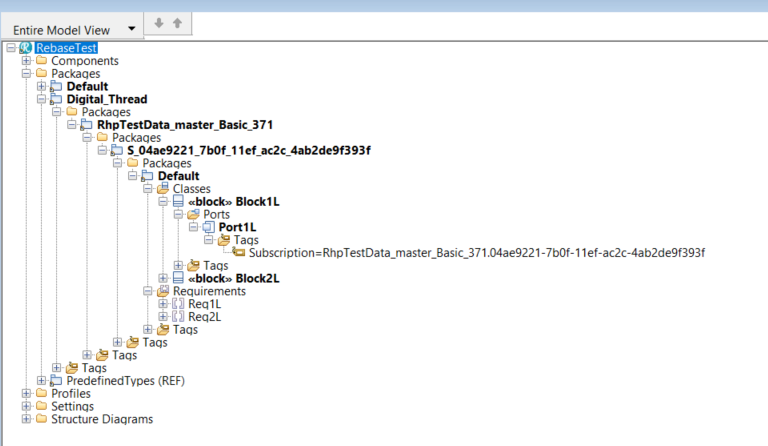
Data After Upgrade
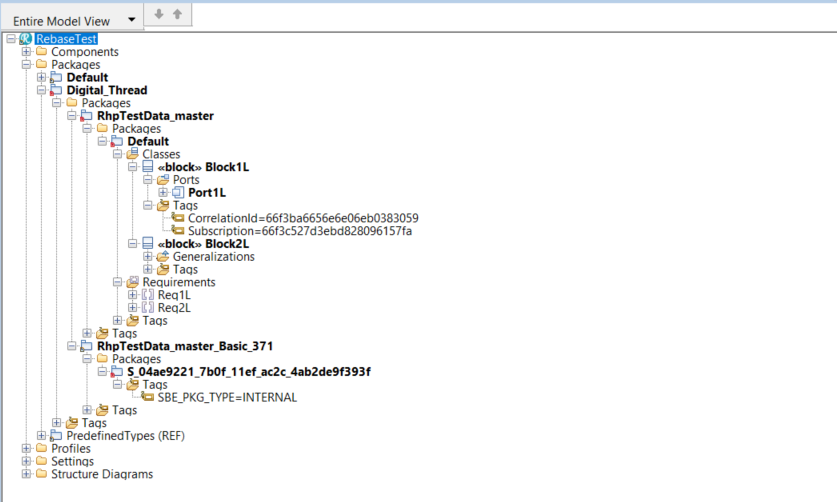
Once the upgrade operation is completed, the hierarchy of data elements will look similar to the
screenshot below. A single Package under theDigital ThreadPackage with the respective
subscribed partition name will be visible, and it will contain all the subscribed items.Additionally, the tags
Subscription IDandCorrelation IDthat were added during the upgrade can be seen with their respective values.
11.2 Migrate from SBE 7.x to SBE 8.x
This section will cover the guide to upgrade from your SBE 7.x to SBE 8.x