
OSLC3 Provider

Adapter & Extension Package Documentation go together
Plugins are Separate
1. Getting Started: Using the Adapter
1.1 Operations Overview
Oslc3-provider supports various functionalities related to the creation and display of OSLC links in the DNG links panel. DNG is an IBM-developed requirements management tool, which implements the OSLC standard for data sharing. At its core, OSLC dictates the representation of resources in RDF format and the linking between resources using URIs; OSLC links contain URIs representing the subject (source resource), the predicate (link type), and the object (target resource) of the link, as well as other metadata (e.g. the URI of the link on the source system, the contributor, time stamps, etc.).
Oslc3-provider is not a traditional SBE adapter; it does not support the standard SBE operations like publish, refresh, etc. Rather, it is a Java microservice that enhances DNG link operations through the DNG links panel. At a high level, oslc3-provider does two main things. 1) It displays inbound OSLC links from the SBE platform to DNG requirements. 2) It serves the SBE embedded links UI, allowing for the creation of OSLC links between DNG requirements and other models on the SBE platform.
Displaying Inbound Links
When the DNG links panel is viewed, DNG queries all registered Jazz friends for their root services document for API discovery, which exposes their service provider catalogs, which in turn expose their query capabilities. For oslc3-provider, this endpoint is: /oslc3-provider/oslc/am/queryCapability/SbeProvider/query. DNG then queries oslc3-provider for the links associated with the requirement being viewed in DNG e.g. oslc.select=dcterms:title,dcterms:identifier,dcterms:references&oslc.where=dcterms:references in [<https://example-elm.com/rm/resources/TX_Jin8cOmGEe-4_ocyPaOPXg>].
In oslc3-provider, we search the SBE platform for the model by the external id that DNG is querying for and fetch all the inbound links pointing to that model. Link promotion, an SBE platform feature, allows us to fetch the inbound links not only to the ASOT DNG model, but also inbound links pointing to any subscribed copies of itself. (Link promotion will be deprecated once we fully support ASOT linking for DNG). Once we have the inbound links, we return the links in the rdf format that the DNG links panel accepts, and the links are shown in the panel.
Creating New OSLC Links
When the create link button is clicked in the DNG links panel, root services is once again queried for discovery, which exposes the service provider catalogs, which in turn exposes the resource picker dialog API, which oslc3-provider then serves:
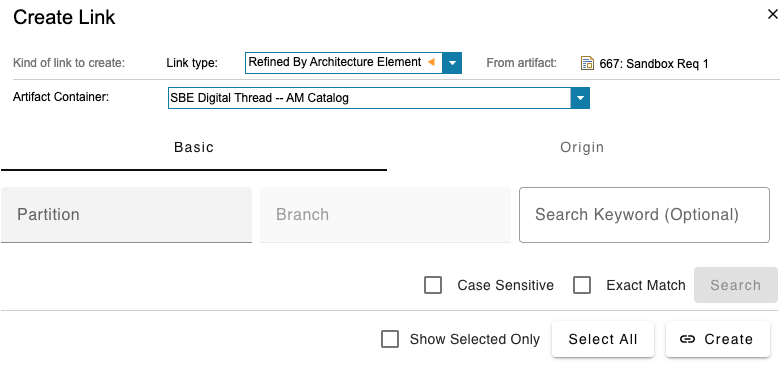
For inbound links, when a link is selected via the links embedded UI, a link is created via the model-service grpc layer from the ASOT model that is selected via the SBE links UI and the ASOT model of the DNG requirement in question. Since this is an inbound link (SBE → DNG), SBE must own the link, which is why the link must be saved to the platform. This inbound link is then fetched as described in Use Case 1 above and displayed in the links panel. For outbound links, when a link is selected via the links embedded UI, SBE returns the URL of the ASOT model that was selected via the SBE links UI, wrapped in rdf xml format. DNG uses this to create a link, which is saved on DNG, since it must be owned by DNG. This link in DNG is essentially a so-called “web” link, which is a hyperlink pointing to the model in the inspector view on the platform.
1.2 Accessing the Adapter
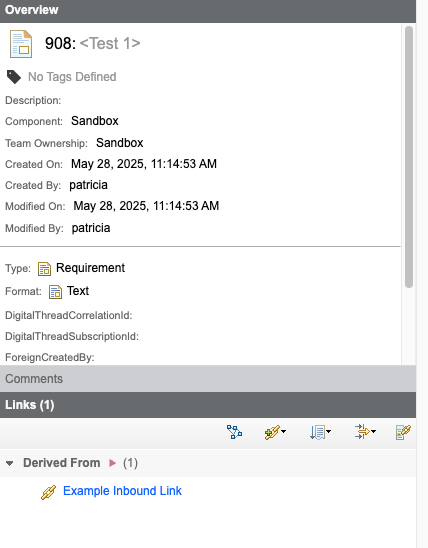
Once DNG has been configured per the instructions in Section 6.2, all inbound links will be fetched via oslc3-provider and displayed in the DNG links panel like so:
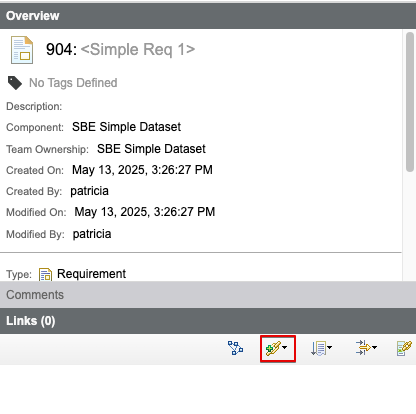
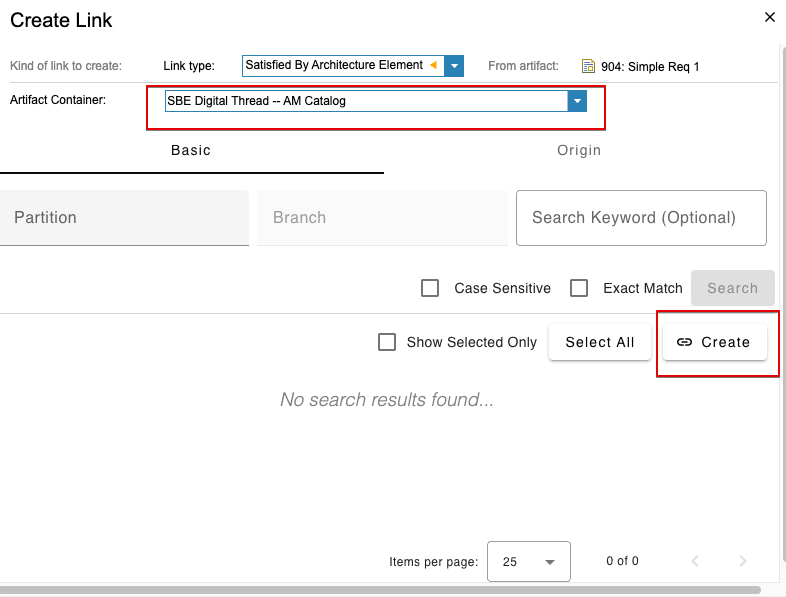
New OSLC links can be created by clicking on the create links button and then selecting the relevant SBE stack from the “Artifact Container” dropdown:
1.3 Attaching & Connecting
Since oslc3-provider is not a traditional SBE adapter, DNG does not need to be attached to an SBE-managed channel. Rather, as long as DNG is configured correctly (see Section 6.2), and as long as the oslc3-provider service is running, the two operations described in Section 1.2 will function automatically.
1.8 Troubleshooting for End Users
Most issues arise from misconfigurations of DNG; in particular, the Jazz friendships must be set up correctly, and the project associations must be set up correctly. See Section 6.2 below for detailed information on configurations.
If oslc3-provider is throwing 403 exceptions, please double check that the oslc3-provider keycloak proxy account has been configured correctly. See Sections 6.2 and 8 for help troubleshooting keycloak configuration.
Remember that oslc3-provider must be running on the stack for which the Jazz friendship has been configured. Otherwise, the enhanced DNG links capabilities will not work.
2. Document Overview
2.1 Document Overview
This document provides essential information for using, configuring, and supporting the SBE Vision oslc3-provider service for DNG. It covers multiple adapter products, each supporting different versions of the external tool. There is a different version of this document for each major release of the SBE Platform.
2.2 Document Orientation
This document is designed to inform users with various roles:
End Users should begin with Section 1 to understand how to access and operate the adapter, and Section 5 for issues pertaining to the setup, configuration, and use of the digital tool itself.
Digital Thread Specialists should focus on Section 1, and also consult Sections 3, 4, and 5 for deployment and semantic mapping. Section 11 contains details related to mapping items from this tool into a semantic ontology.
Administrators should refer to Section 6 and beyond for setup, security, support, and version management.
3. Adapter Use Cases
3.1 Adapter Overview
Oslc3-provider is not a traditional SBE adapter; it does not support the standard SBE operations like publish, refresh, etc. Rather, it is a Java microservice that enhances DNG link operations through the DNG links panel. As stated in the introduction, oslc3-provider does two main things. 1) It displays inbound OSLC links. 2) It serves the SBE embedded links UI, allowing for the creation of OSLC links.
4. Supported Versions
4.1 Supported Adapter Products
7.x and 8.x (features that are specific to a version are noted throughout this document)
4.2 External Tool Versions Supported
DNG 6.0.6+ and DNG 7.0.2 - DNG 7.1.0 are supported by oslc3-provider
4.3 Differences Across Tool Versions
There are no major functional differences between DNG 6.x and DNG 7.x; the most significant changes are under-the-hood changes, such as to the underlying data store (see here and here) and to the Jazz Authorization Server (see here). For other changes, please consult the DNG 7.x release notes.
4.4 Supported Plug-Ins and Add-Ons
DNG provides a client extension API to develop JavaScript plugins. There is currently no DNG plugin developed by SBE.
5. Digital Tool Best Practices
5.1 Tool Configuration Considerations
Please follow the instructions in Section 6.2 carefully, as slight deviations from the correct configurations may result in failures to fetch / create links through the DNG links panel / oslc3-provider.
5.2 Usage Tips & Gotchas
Ensure the Jazz friendships have been set up correctly for Jazz Team Server and DNG. (See Section 6.2 below)
Ensure the project associations are set up correctly for the project area you will be using with oslc3-provider. (See Section 6.2 below)
If oslc3-provider is throwing 403 exceptions, please double check that the oslc3-provider keycloak proxy account has been configured correctly. See Sections 6.2 and 8 for help troubleshooting keycloak configuration.
Remember that oslc3-provider must be running on the stack for which the Jazz friendship has been configured. Otherwise, the enhanced DNG links capabilities will not work.
5.3 Tool Limitations and Workarounds
As of DNG 7.0.2+, the creation of OSLC links with custom link types through oslc3-provider / SBE embedded UI is not functioning properly because of a bug in the DNG tool. A bug has been raised with IBM- thankfully, this is an edge case, as the main use case of oslc3-provider is the creation of inbound, system-defined links (e.g. DNG requirement <-satisfied by- external model).
6. Installation
6.1 Installation Instructions
DNG installation instructions can be found on the official IBM docs. For example, 6.0.6 here and 7.0.2 here. The installation instructions list the system requirements for a variety of supported platforms and operations systems. See also the installation instructions for Jazz Team Server and Jazz Authorization Server (if applicable).
6.2 Configuration
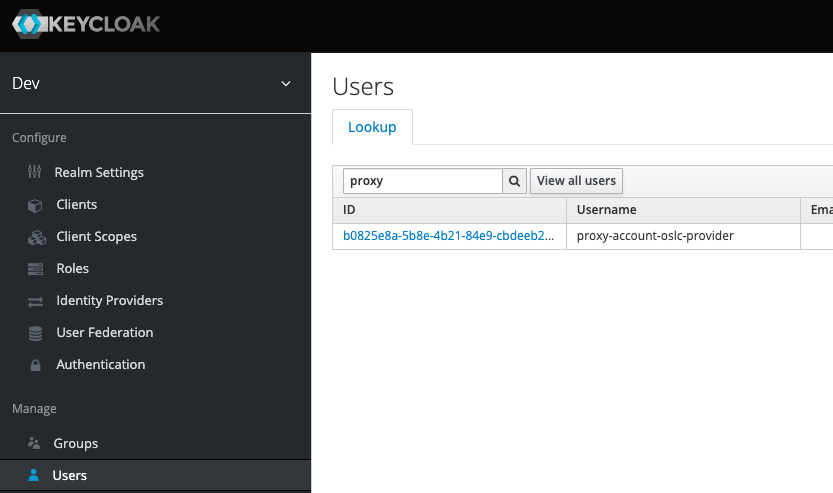
Keycloak proxy account configuration
Login to the relevant backstage’s keycloak admin console (e.g. https://example.sbe-devops.com/auth)
Navigate to “Users”
Lookup “proxy” and select proxy-account-oslc-provider
This proxy account authenticates oslc3-provider against SBE platform
First, check the “Groups” tab. Add account to appropriate group.
If you still see 403 auth exceptions in oslc3-provider, navigate to the “Credentials” tab and reset the password to match the Kubernetes “oslc3-provider-client-secret secret” (NOT OSLC_PROVIDER_PASSWORD).
Adding Jazz Friends
Ensure oslc3-provider pod is running on your stack
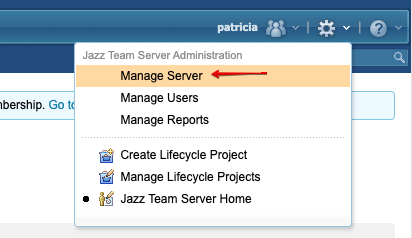
Login to Jazz Team Server (/jts/admin)
Click “Manage Server”
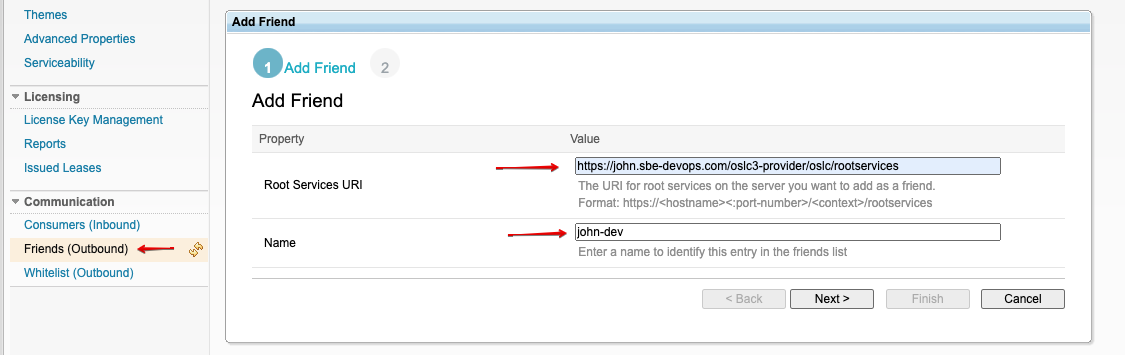
Add Friend
Root Services URI of desired stack e.g. https://john.sbe-devops.com/oslc3-provider/oslc/rootservices
Name e.g. john-dev
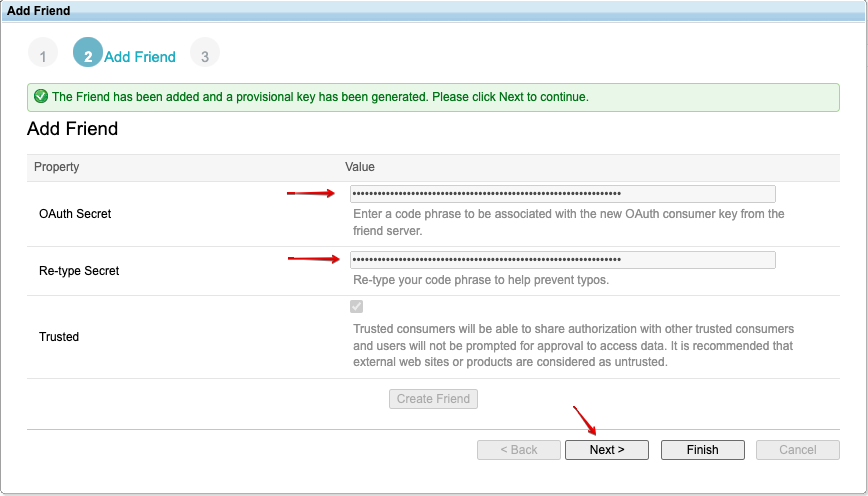
Consumer key can be whatever you want
Adding friend allows for outbound requests from Jazz server to oslc3-provider on sbe stack
Adding associations
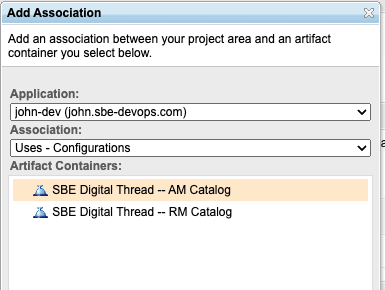
Once created, the Jazz friend must be added to both the GC and the RM projects.
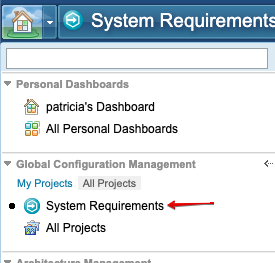
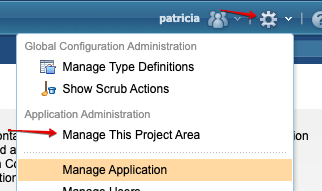
“House” drop down menu → Click on your project → Gear → Manage This Project Area
Scroll down to “Associations” and add AM and RM catalogs, one at a time
Make sure you’ve already added Jazz friend!
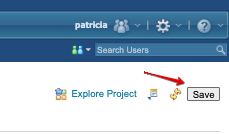
Don’t forget to click Save 🙂
7. Channels and Mappings
7.1 Channel Definition
As stated above, since oslc3-provider is not a traditional SBE adapter, DNG does not need to be attached to an SBE-managed channel.
7.2 Approaches to Mapping
Likewise, since oslc3-provider is not a traditional SBE adapter that supports publishes/refreshes, no mappings are needed. However, relation types (i.e. link dictionary entries) must exist in the Digital Thread ontology for the corresponding DNG system-defined link types as follows:
DNG System-Defined Link Type | Digital Thread Relation Type |
|---|---|
Satisfy Architecture Element - http://jazz.net/ns/dm/linktypes#satisfy | Satisfaction |
Refines Architecture Element - http://jazz.net/ns/dm/linktypes#refine | Refines |
Trace Architecture Element - http://jazz.net/ns/dm/linktypes#trace | Trace |
Derives Architecture Element - http://jazz.net/ns/dm/linktypes#derives | Derivation |
References - http://purl.org/dc/terms/references | References |
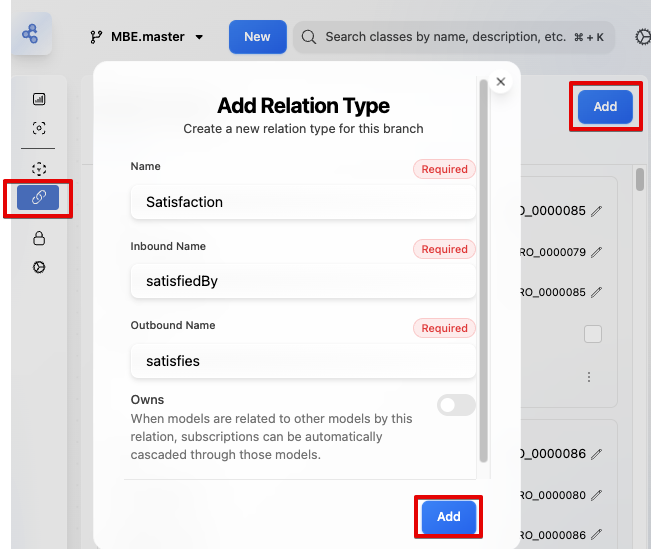
To add a Relation Type, click on the ontology’s entity set branch, navigate to Relation Types, and click Add. Here is an example Satisfaction Relation Type:
8. Security and Access
8.1 Authentication Methods
Up until ELM 6.0, only OAuth 1.0a friend-based interactions were supported. However, since OAuth 1.0a was deprecated and not supported by Spring 6, a workaround was implemented in oslc3-provider to fetch OAuth 2.0 tokens via proxy accounts (see below). In addition, starting with ELM 6.0, the Jazz Security Architecture / Jazz Authorization Server became available to enable such features as OAuth2 and SAML SSO, providing new potential solutions to support OAuth 2.0 in oslc3-provider.
Currently, there is a solution in place in oslc3-provider to circumvent OAuth 1.0a authorization by whitelisting all endpoints and then securing them with a so-called 'authorize by proxy' workflow. First, all endpoints are whitelisted by assigning the Spring ROLE_ANONYMOUS role for all requests to all endpoints. Then, when the controller endpoints are called, access tokens are fetched from Keycloak using a proxy user account and password that are stored as Kubernetes secrets. Thus, in order for DNG to fetch links via oslc3-provider, the proxy user account and password must be registered to Keycloak with the correct credentials (see Section 6.2 above).
In order to deprecate OAuth 1.0a from oslc3-provider, this authorize by proxy solution is necessary for DNG/ELM instances that do NOT have JAS enabled, because as indicated in this doc: https://jazz.net/wiki/bin/view/Deployment/AboutJazzAuthorizationServer , JAS must be enabled in order to use OAuth 2.0.
In addition to this ‘authorize by proxy’ flow, for DNG instances that have JAS enabled, we can register oslc3-provider as a Jazz Team Server registered application. This is required in order to enable OAuth 2.0 interactions between DNG and oslc3-provider, allowing DNG to pass JAS bearer tokens to oslc3-provider:
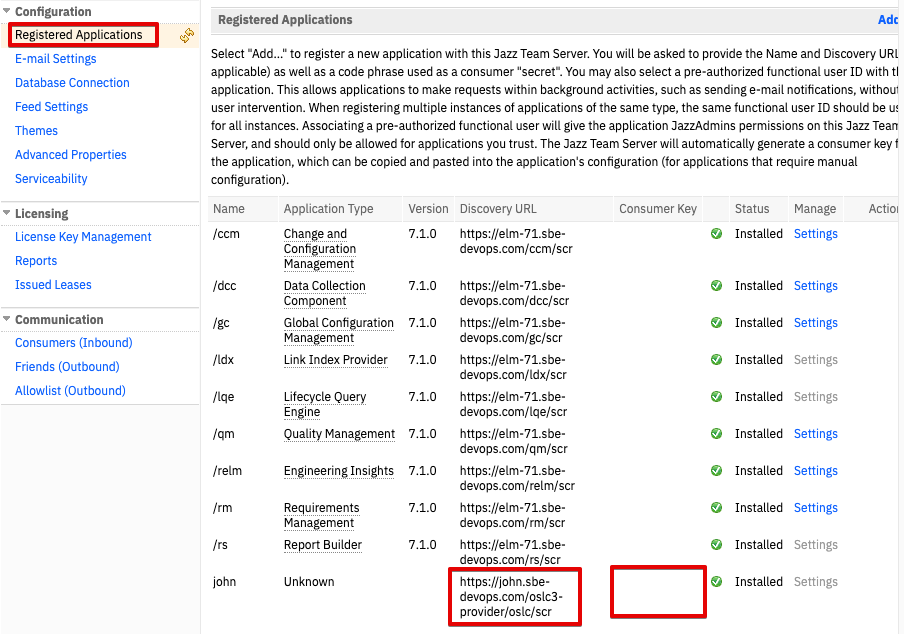
In this OAuth 2.0 flow, DNG fetches and sends tokens from JAS to oslc3-provider as obscured tokens, so oslc3-provider uses the JAS introspection endpoint to authenticate the obscured tokens and parse the groups / granted authorities from the tokens.
8.2 Authorization and Roles
When DNG is set up using LDAP / Jazz Authorization Server, special care must be taken to map users to roles via Jazz Team Server role mappings to match role mappings in the LDAP server, since group mappings are not automatically synced between JTS and the LDAP in use. See this section of the IBM documentation for more information.
8.3 Secure Communication
All communication between clients (browsers, API consumers) and the DNG server should be over HTTPS.
This ensures encryption in transit, protecting:
Login credentials
API requests/responses
8.4 Identity Integration
Oslc3-provider supports DNG auth flows for both locally managed identity management (i.e. via Jazz Team Server) and identity management through Jazz Authorization Server and LDAP, which in turn supports SAML and other third-party OIDC IdPs. The instructions on how to configure Jazz Authorization Server and Jazz Team Server to support LDAP along with third-party OIDC IdPs can be found in this section of the IBM documentation.
9. Release Notes
9.1 Version History
7.10
support oauth2
remove oauth1a dependencies
fix duplicate links
7.9
minor: add logs and operation headers
7.8
remove jira-oslc3-connector dependency to fix mvn builds
7.7
remove dependency on security-util
7.6
Fix for adding a friend in DNG.
7.5
Switch from cxf to spring web
7.4
Adds link promotion, ssl engine safeguard, pom updates
8.3
support oauth2
upgrade to melrose dependencies
fix duplicate links
8.2
minor: add logs and operation headers
8.1
deprecate security-util dependency
8.0
Base Layer Update
update to 8.0
9.2 Breaking Changes
There are currently no breaking changes introduced in 7.x or 8.x releases
11. Technical Reference
11.1 Adapter API Endpoints
Oslc3-provider API endpoint | Function |
|---|---|
/oslc3-provider/oslc/rootservices | OSLC API Discovery |
/oslc3-provider/oslc/am/catalog | SBE OSLC services catalog |
/oslc3-provider/oslc/scr | SCR for Jazz Team Server registration |
/oslc3-provider/oslc/am/queryCapability/SbeProvider/query | Fetching inbound OSLC links |
/oslc3-provider/oslc/am/service/SbeProvider/resourcePicker | OSLC resource picker (for OSLC link creation / SBE embedded UI) |
11.2 Identity
DNG queries for inbound links from the SBE platform with the following query: oslc.select=dcterms:title,dcterms:identifier,dcterms:references&oslc.where=dcterms:references in [<https://example-elm.com/rm/resources/TX_Jin8cOmGEe-4_ocyPaOPXg>].
Given that this URI is used as the external identifier, the oslc3-provider queries the SBE platform for the model that has this URI as its external identifier
11.3 Configuration File Format Reference
N/A - oslc3-consumer does not use a configuration file
11.4 Schema Support
No items/models/properties are supported by the oslc3-provider, since it’s only function is to display and create links. As stated in Section 7.2 above, the following link types are supported (as long as the Link Dictionary Entries exist):
DNG System-Defined Link Type | Digital Thread Link Definition Entry |
|---|---|
Satisfy Architecture Element - http://jazz.net/ns/dm/linktypes#satisfy | Satisfaction |
Refines Architecture Element - http://jazz.net/ns/dm/linktypes#refine | Refines |
Trace Architecture Element - http://jazz.net/ns/dm/linktypes#trace | Trace |
Derives Architecture Element - http://jazz.net/ns/dm/linktypes#derives | Derivation |
References - http://purl.org/dc/terms/references | References |
11.5 Compliance and Certification
As oslc3-provider is not a standard SBE adapter, it does not follow the standard adapter maturity model.