
Cameo 2024x
SBE Cameo 2024x Plugin Documentation
1. Getting Started: Using the Adapter
The Digital Thread Cameo plugin helps connect different software tools by allowing users to publish and refresh data between them. This makes data easier to manage, improves interoperability, and supports efficient integration across platforms.
1.1 Operations Overview
Attach
Publish
Refresh - Soft/Hard
Verify
Reset
1.2 Accessing the Adapter
1.2.1 Digital Thread Menu
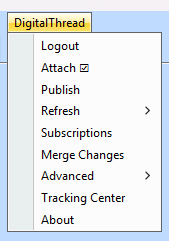
The Digital Thread menu can be seen on the menu bar and becomes accessible once a project is opened. The Digital Thread Menu status is refreshed every 30 seconds.
1.3 Attaching & Connecting
The following channel properties are essential for creating a channel. Creating a channel requires attaching the project first, which is mandatory before performing any publish or refresh operations. These actions can only be executed once the project has been successfully attached.
The channel properties are project, branchName, and versionId. The versionId property is applicable only from version 8.X onwards. To read more about how to fetch the versionId, refer to section 7.1.1.
Name | Required | Description |
|---|---|---|
| Y | Project Name |
| Y (TWC project only) | Applied to a TWC project, not required otherwise |
| N | This applies to a TWC project where we want to publish a exact |
Logging into TWC is required for Digital Thread operations or fetching channels for TWC projects.
To create a baseline channel with theversionIdproperty, it must be done via the SBE embedded UI, where you manually fill in theversionIdchannel property.
1.3.1 Attach
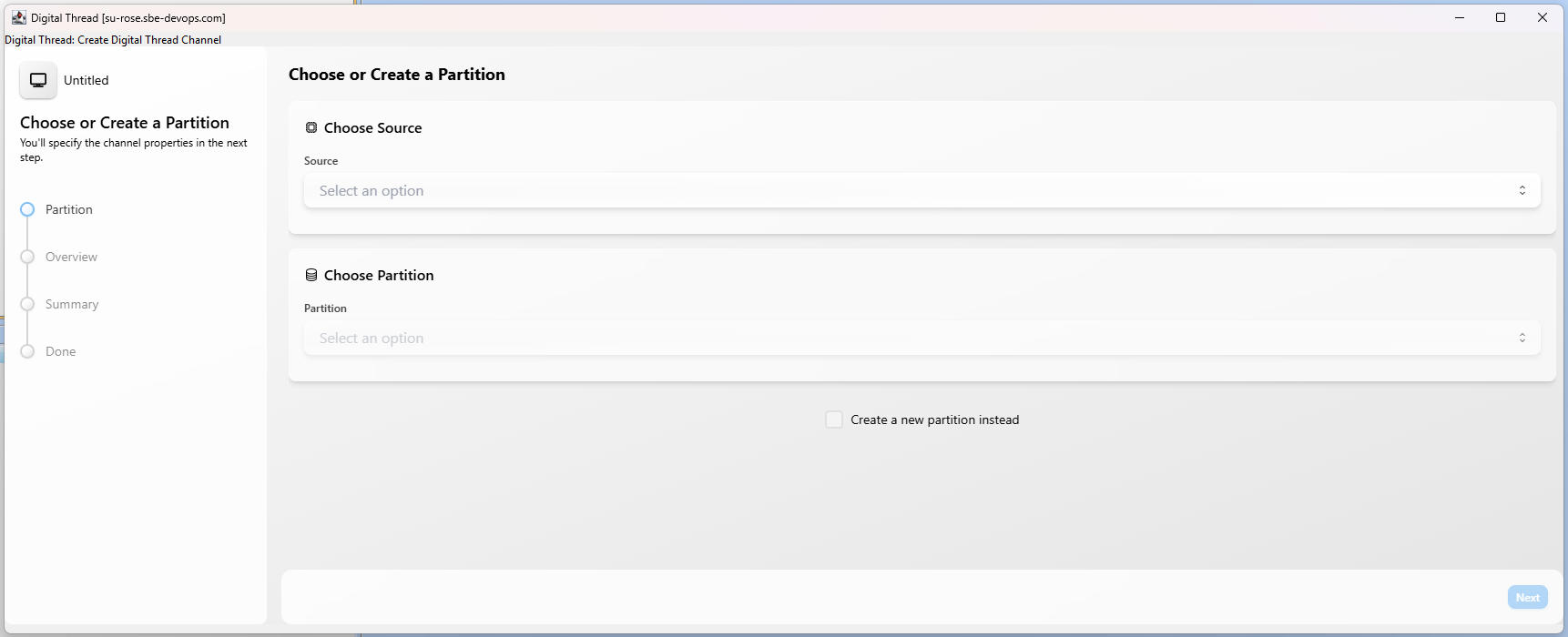
To attach a project, the user must click the Attach button from the Digital Thread menu. This opens a window (as shown below), where the user needs to provide the necessary information such as selecting or creating a valid partition and branch and then proceed to create the channel.
It’s important to note that channel properties do not need to be manually filled, as they are automatically populated by the plugin during the attach process.
1.4 Publishing Items
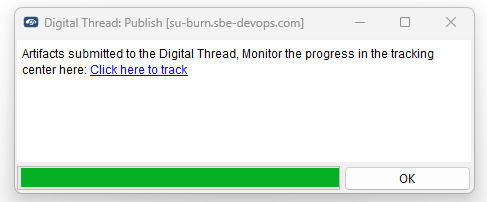
The Publish operation includes all supported item types and their associated links, ensuring that both the elements and their valid relationships are published accurately. It ingests data into SBE from the adapter. The list below outlines the item types that are supported by the plugin for both Publish and Refresh operations.
1.4.1 Supported Meta Class Types
Abstraction
Actor
Activity
ActivityFinalNode
Association
Class
Comment
Connector
ConnectorEnd
Constraint
DataType
DataStoreNode
Dependency
Deployment
Extend
ExtensionPoint
ExecutableNode
ActivityFinal
ForkNode
FinalNode
FlowFinalNode
InitialNode
InputPin
InputExpansionNode
JoinNode
ObjectFlow
CentralBufferNode
Generalization
Include
InformationFlow
InstanceSpecification
Interface
OutputExpansionNode
Package
Port
Property
Operation
Parameter
ParameterSet
Realization
Reception
Signal
State
StateMachine
Region
Slot
Usage
UseCase
ControlFlow
ActivityParameterNode
Action
ActivityEdge
ActivityNode
ActivityPartition
CallOperationAction
OutputPin
ObjectNode
Pin
CallBehaviorAction
ActionInputPin
ValuePin
SendSignalAction
AcceptEventAction
OpaqueAction
AssociationClass
1.5 Refreshing Items (Including Subscribed Items)
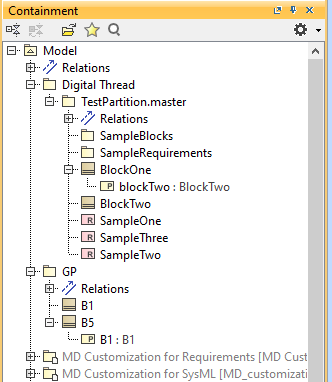
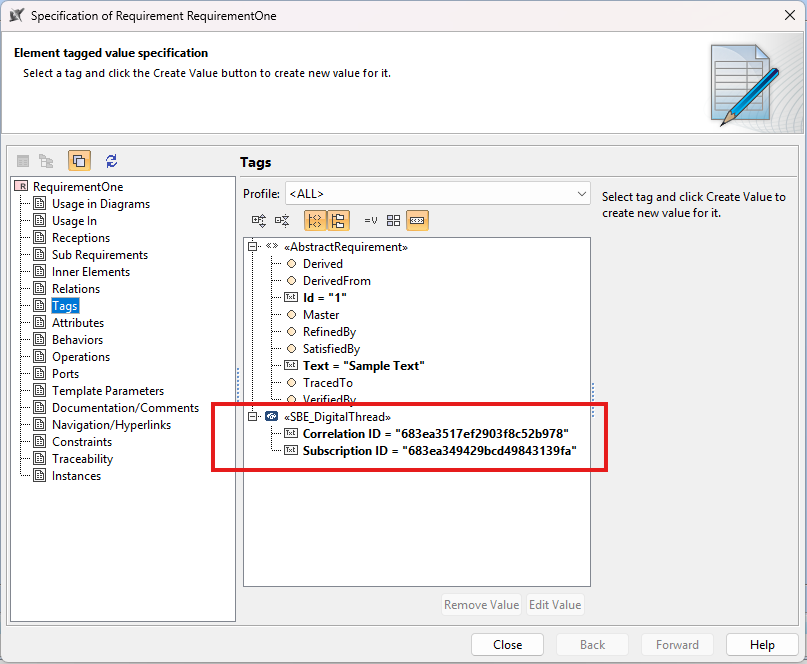
All subscribed items are created under the Digital Thread package according to the mapped hierarchy, along with their associated links. A custom stereotype, SBE Digital Thread, is applied to each subscribed item to store its Subscription ID and Correlation ID.
1.5.1 Hard Refresh
In a hard refresh, the plugin retrieves the entire published and subscribed data from the SBE. A complete refresh is performed on all items received, ensuring that the local model is fully synchronized with the server.
1.5.2 Soft Refresh
In a soft refresh, the entire dataset is not retrieved. Priority is given to locally modified data that has not yet been published. This allows users to continue making changes locally without the risk of those changes being overwritten. Only data that has not been modified locally and has been updated in SBE is received and refreshed during this operation.
1.6 Verify
The verify operation refrains from making any modifications to the external system. Instead, it focuses on comparing the items in the external system with those received from the SBE platform. During this process, the adapters evaluate the metadata (such as correlation ID, subscription ID, etc.), properties, and relationships. They also check for any missing or extra items.
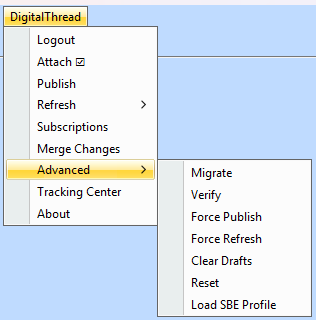
1.7 Advanced Operations
1.7.1 Migrate
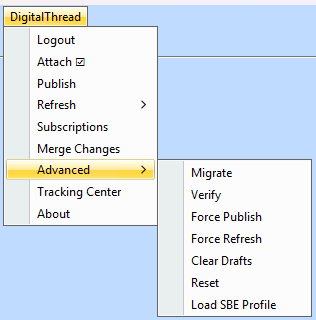
Run Upgrade by clicking the Migrate menu item under Advanced.
Please note that after upgrade, Custom Stereotype SBE_DigitalThread, will be added on
subscribed Elements with a tag value Subscription ID and Correlation ID.
1.7.2 Verify
The verify operation refrains from making any modifications to the external system. Instead, it focuses on comparing the items in the external system with those received from the SBE platform. During this process, the adapters evaluate the metadata (such as correlation ID, subscription ID, etc.), properties, and relationships. They also check for any missing or extra items.
1.7.3 Force Publish
Force Publish triggers a full publish of data, regardless of whether only a subset of data has changed since the last operation. It bypasses the usual "delta" mechanism, which would otherwise only send changes since the last publish. This is useful when you want to ensure that all data is sent to the target system, even if some data hasn't changed or if previous publishes may have missed something.
This feature is available starting from version 8.x.
1.7.4 Force Refresh
Force Refresh triggers a full refresh of data from the source, again bypassing the delta mechanism. It ensures that the local or client system is completely updated with the latest data from the source, not just the changes since the last refresh. This is helpful for resolving sync issues or when you want to guarantee that the client has the most up-to-date and complete data
This feature is available starting from version 8.x.
1.7.5 Clear Drafts
The Clear Drafts action in the SBE platform is an advanced operation available in the Digital Thread adapter menu. This action is designed to remove or clear any "draft" data or unpublished changes that are stored locally for a given channel or project. Drafts typically accumulate when you make changes but haven't yet published them to the SBE server.
1.7.6 Reset
The Reset operation clears the local metadata for the current channel and removes stale subscription data from the project.
1.7.7 Load SBE Profile
SBE Digital Thread Profile is not loaded by default, to load the SBE profile, navigate
to Digital Thread → Advanced → Load SBE Profile.
This action will load the profile into the current project.
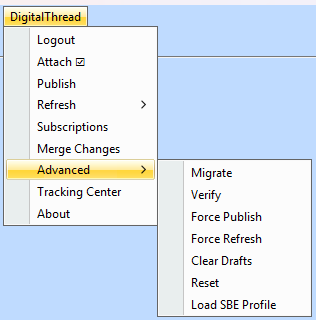
Once the profile is successfully loaded, you will see the SBE Digital Thread profile appear in the project view, confirming the operation.

In the current approach, the SBE Custom Profile is loaded programmatically as part of the project itself. In older versions, the SBE Digital Thread Profile appeared under Project Usages. With the new plugin, we are generating the profile programmatically, so the older profile loaded for backward compatibility is cleaned up automatically.
If users working with older versions encounter an empty SBE_Digital_Thread_Profile under Project Usages, as shown in the screenshot below, they can safely delete it. Removing this profile will not affect any use cases.

1.8 Troubleshooting for End Users
1.8.1 Plugin Browser
If the Browser startup times are really slow (more than 5 mins) and this started after February 1st
2025, it is possible it this was caused by a Windows Defender update.
Moving to the latest version of plugin
should fix the issue.
Alternatively, if we cannot update to latest plugin, follow the docs here to fix the slowdown.
The Chromium binaries are typically in location $USER_HOME\\AppData\\Local\\JxBrowser\\7.41.3 where 7.41.3 is browser version.
1.8.2 Missing Logs
To change the log level of the plugin we need to modify Cameo log4j file as shown below
Navigate to the $CameoHome directory, go to the data directory.
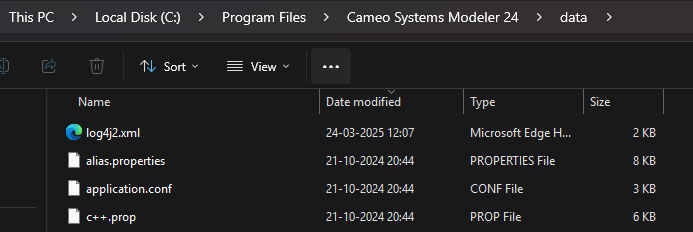
Add the following configuration to the log4j2.xml file as shown in the screenshot:
<Logger name="com.sbevision" level="debug" additivity="false">
   <AppenderRef ref="Console"/>
</Logger>
<Logger name="com.sbevision.connector.sdk" level="error" additivity="false">
   <AppenderRef ref="Console"/>
</Logger>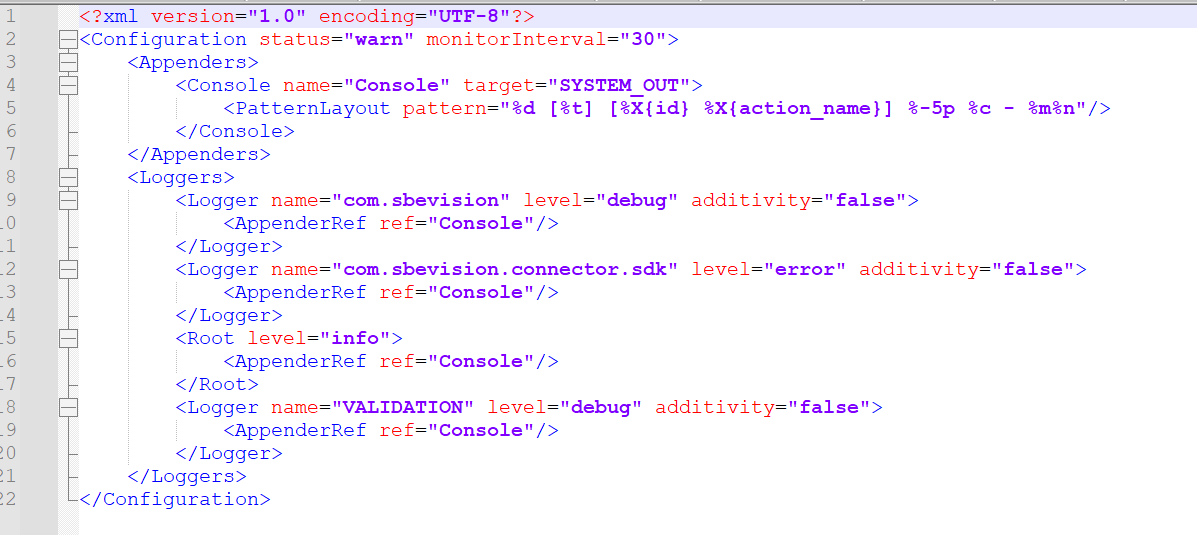
2. Document Overview
2.1 Document Overview
This document provides essential information for using, configuring, and supporting the SBE Vision adapters for Cameo version 2024x.
2.2 Document Orientation
This document is designed to inform users with various roles:
End Users should begin with Section 1 to understand how to access and operate the adapter, and Section 5 for issues pertaining to the setup, configuration, and use of the digital tool itself.
Digital Thread Specialists should focus on Section 1, and also consult Sections 3, 4, and 5 for deployment and semantic mapping. Section 11 contains details related to mapping items from this tool into a semantic ontology.
Administrators should refer to Section 6 and beyond for setup, security, support, and version management.
3. Adapter Use Cases
3.1 Adapter Overview
The purpose of this adapter is to enable data from projects within Cameo Systems Modeler to connect with the SBE Digital Thread platform. Since Cameo is a rich-client application, the use of this adapter is intended for end users operating the tool on their workstation desktops. The adapter is built using the SBE Java Pro-SDK product.
4. Supported Versions
4.1 Supported Adapter Products
This document covers all the version of adapter that support SBE 7.x (woburn) and 8.x (melrose)
4.2 External Tool Versions Supported
The Adapter was tested on
Cameo Systems Modeler 2024x Refresh1
4.3 Differences Across Tool Versions
Functionality remains consistent across versions
4.4 Supported Plug-Ins and Add-Ons
No plug-ins or add-ons are currently supported
5. Digital Tool Best Practices
5.1 Tool Configuration Considerations
There is no separate configuration needed for the MagicDraw plugin. Installing it with the built-in plugin installer handles most of the required setup. The only configurations needed are for the HostName and log settings. Please refer to section 6.2 for instructions on configuring the hostname and logs.
5.2 Usage Tips
5.2.1 Moving Subscribed Items within a Project
This guide outlines the options available for moving subscribed items, such as Requirements, Blocks, etc. outside the Digital Thread package and within the same Cameo project.
If an individual Element is moved out from under a sub Package under the Digital Thread, there is possibility the Element is moved back after a Refresh if Containment relation is mapped
There are 2 possible ways around this issue
Option 1: Moving an Entire Package with Containment
If the user wants to move an entire Package containing Requirements, Blocks, etc. in Cameo, this is allowed and fully supported.
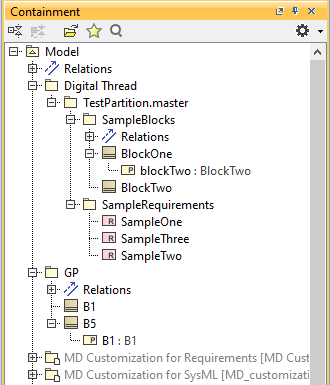
Data received with Containment mappings:
Moving of entire Package outside Digital Thread package:
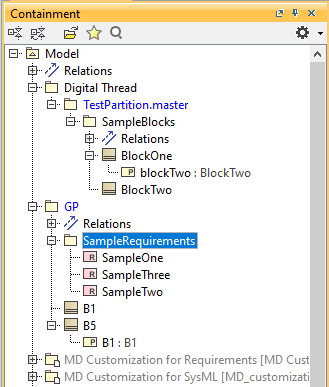
The Package, along with its contained elements, can be moved within the Cameo project.
Important: The elements cannot be moved out of the Package or outside its containment hierarchy.
This option ensures that the Containment relationship remains intact, preserving the organizational structure.
Option 2: Free Movement Without Containment
For users who do not need to maintain containment relationships and prefer to move elements freely within the Cameo project, this approach can be used:
Un-map the containment relationship in both Cameo and the tool from which the subscription is created(Ex: Jama, DNG).
Once un-mapped, all elements are imported as a flat list, without any containment hierarchy.
Elements brought in without Containment relation into Digital Thread package:
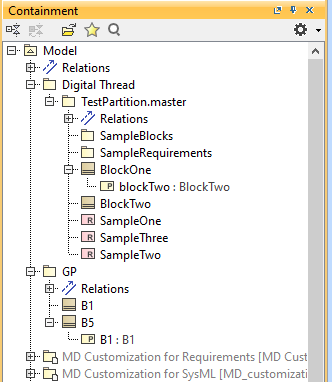
Benefits:
Requirements can be freely moved and placed across the project without impacting the containment structure.
Considerations:
This method eliminates the containment hierarchy, so users must organize the requirements manually as needed.
5.2.2 Adding/Removing Items from Subscription
Users can add an ASOT element to the subscription or remove element from the subscription.
If a channel has an existing subscription, a newly created item can be added to it by right-clicking on the element either in the containment tree or in the diagram. Users can then choose whether to add the item to the subscription or remove it.
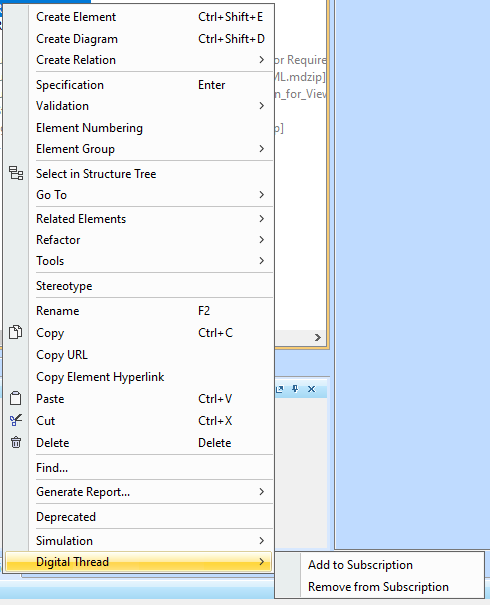
5.2.2.1 Adding an Element to a Subscription
To add an element to an existing subscription, the channel must have at least one subscription. User needs to right-click the element and select the Add to Subscription option. Users can select the subscription to which they want to add the element. A subsequent publish action is required after adding the item for it to be reflected in the diff/merge screen.
5.2.2.2 Removing an Element from a Subscription
If a user wants to remove an element from a subscription, they need to right-click the element and select the Remove from Subscription option. The subscription tag on the element will be cleared, and a subsequent publish action is necessary.
Please note removing the element from Subscription does not remove it from SBE, the element becomes an ASOT item in Cameo channel
5.2.3 PowerType Pair
Pair is used to represent a Property of key-value type.
eg: Status property in Jira is represented as internal: "draft" and display: "In Draft"
To create a Tag of Pair,
Load the
SBE Digital Thread Profileif necessaryCreate a Tag definition using the
Value TypeofPairfrom theSBE Digital Thread ProfileThe
Pairvalue should be created in such a way that the ID comes first, followed by the display
name, with both separated by the delimiter||.
5.2.3.1 Loading SBE Profile
SBE Digital Thread Profile is not loaded by default, to load the SBE profile, navigate
to Digital Thread → Advanced → Load SBE Profile.
This will import the profile into your current project.
Once the profile is successfully loaded, you will see the SBE Digital Thread profile appear in the project view, confirming the operation.

5.2.3.2 Creating Tag Definition of type Pair
We define a new tag of type Pair.
Use the Tag Definitions panel to add a new tag and set its type to Pair.
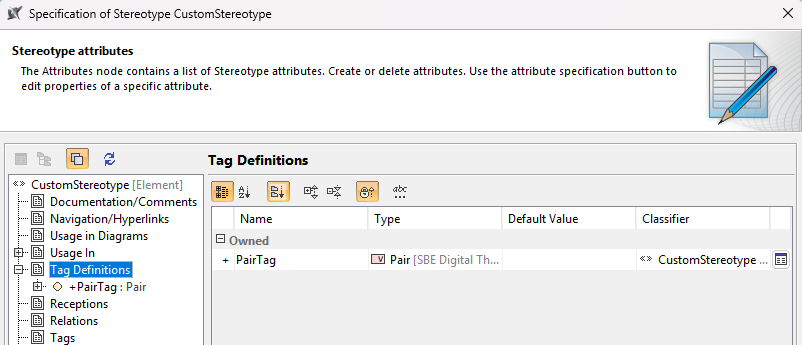
Here is an example of a tag using the Pair type.
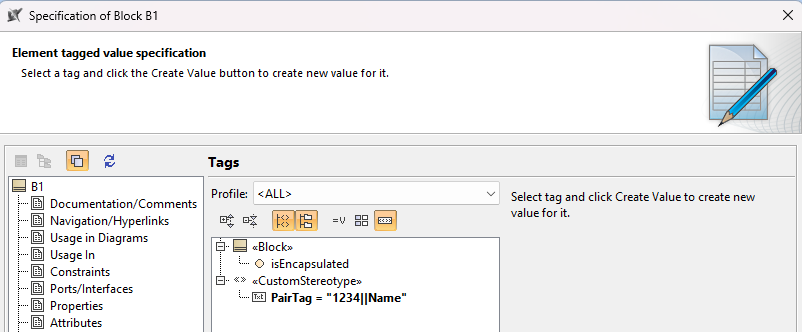
6. Installation
6.1 Installation Instructions
6.1.1 Supported Configurations
OS - Windows
Java - OpenJDK 17.0.8+7
6.1.2 Installation package
Download the Plugin from Nexus Repository Manager
6.1.3 Installation
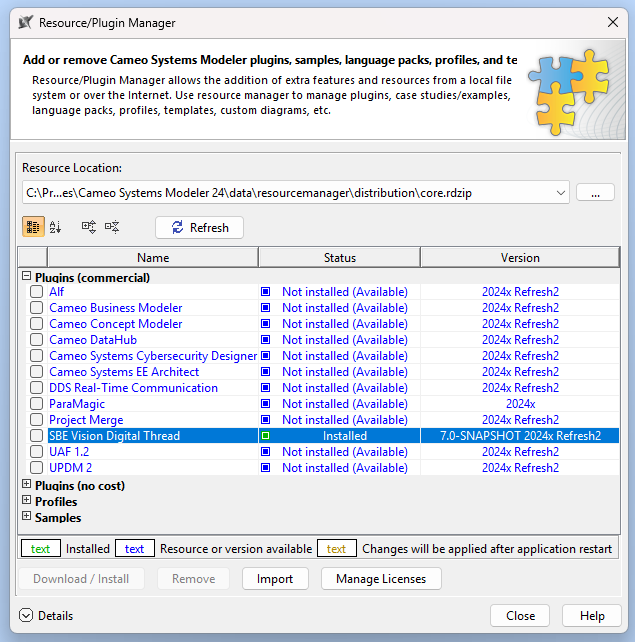
Open Cameo, goto menu item Help->Resource/Plugin Manager
Click on Import button and select the zip file.
6.2 Configuration
6.2.1 Hostname Configuration
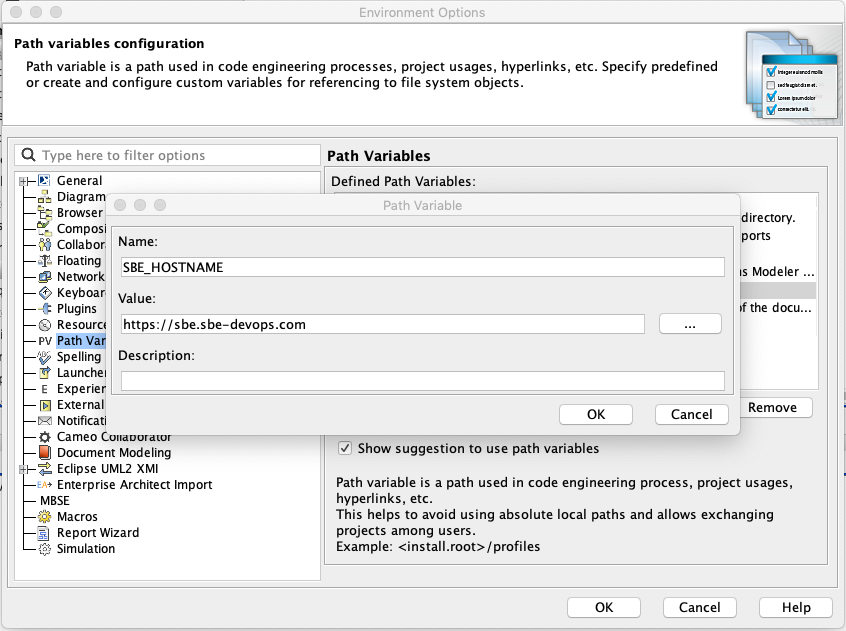
Need to add configuration under Options > Environment > Path Variables
Name: SBE_HOSTNAME
Value: https://sbe.acme.com
Always restart Cameo/Magic Draw whenever the Environment variables are updated.
6.2.2 Configure Logging
To change the log level of the plugin we need to modify Cameo log4j file as shown below
Navigate to the $CameoHome directory, go to the data directory.
Add the following configuration to the log4j2.xml file as shown in the screenshot:
<Logger name="com.sbevision" level="debug" additivity="false">
   <AppenderRef ref="Console"/>
</Logger>
<Logger name="com.sbevision.connector.sdk" level="error" additivity="false">
   <AppenderRef ref="Console"/>
</Logger>
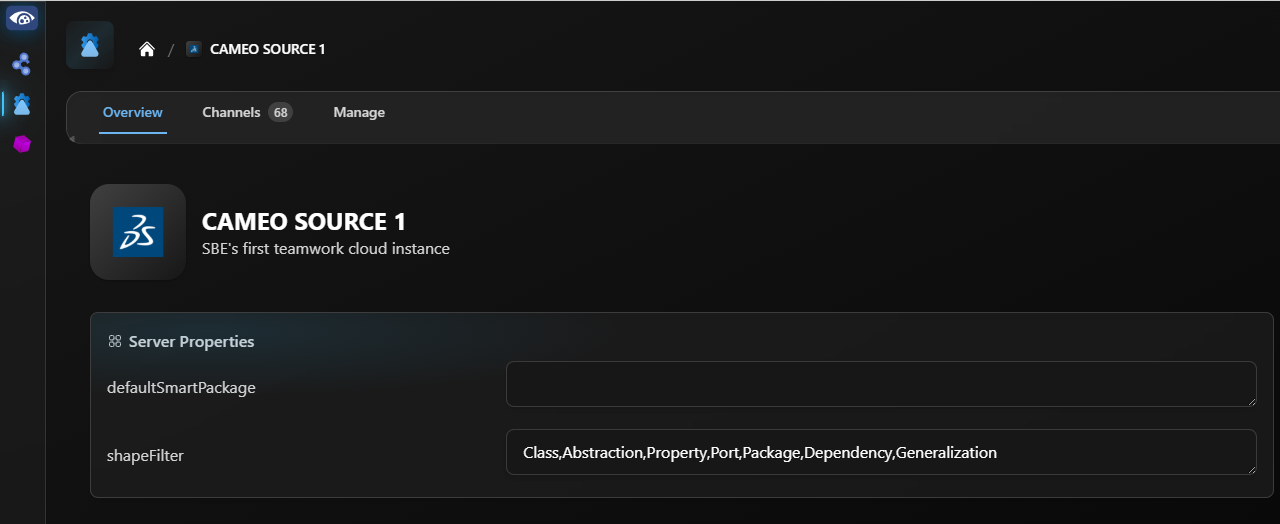
6.3 DataSource Type Definition
Property | Description |
|---|---|
| The |
| The |
6.3.1 Shape Filter
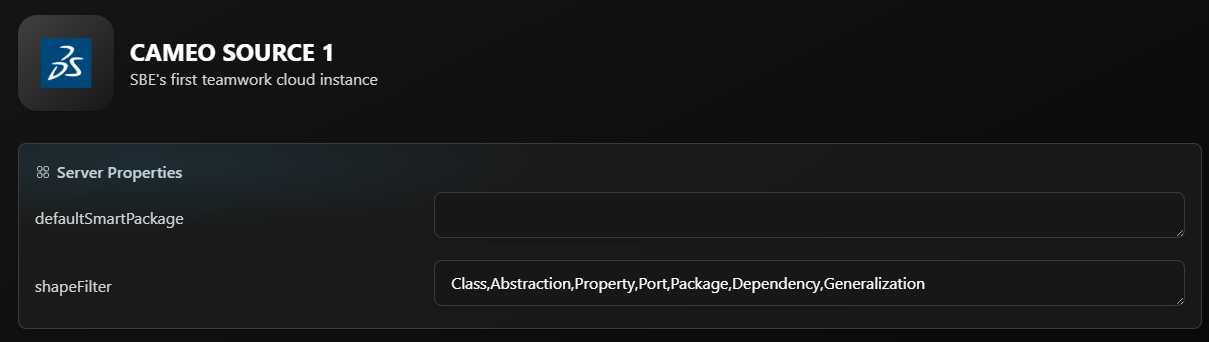
The shapeFilter property is used to filter elements based on their Metaclass or Stereotype name, as
specified in the property's value.
For example:
RequirementandBlockare Stereotypes applied to theClassMetaclass. So if the filter is
set toClass, bothRequirementsandBlockswill be published.To publish only
Blocks, set the filter toBlockthis ensures only elements with theBlock
stereotype are included.To publish only
RequirementsandBlocks, set the value to:Requirement, BlockTo publish
Requirementsalong with theirSatisfyrelation, set the value to:Requirement, Satisfy
The element may contain multiple shapes such as a Metaclass and one or more
applied Stereotypes. If the shapeFilter includes any of those shapes (Metaclass or Stereotype), the
element will be included in the output.
For example:
If the filter includes
Class, all elements whose Metaclass isClasswill be published,
including those with applied stereotypes likeRequirementorBlock.If the filter includes
Requirement, then only elements with theRequirementstereotype will be
published, regardless of their Metaclass.
If this property is not set, all elements in the project will be published.
6.3.2 Smart Package
In Cameo Systems Modeler, a Smart Package is a special type of package that automatically shows elements based on rules you set like their type, stereotype, or relationships. You don’t add elements to it manually. Instead, it finds and displays them for you. A Smart Package does not own the elements it just references them based on the criteria, so the elements still belong to their original location in the model.
For more details, click here to learn more about Smart Packages.
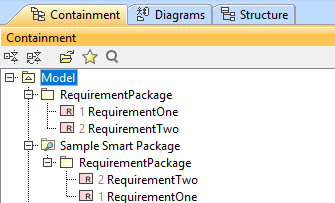
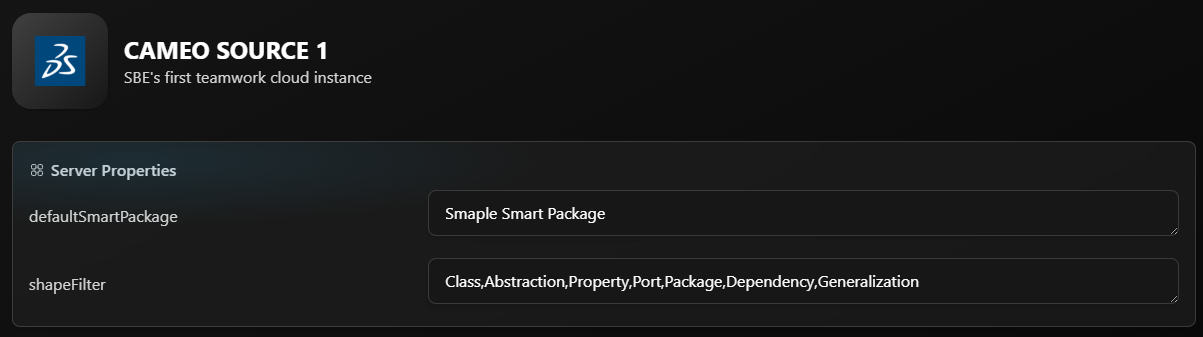
The defaultSmartPackage property enables selective publishing of model elements based on a
specified Smart Package. When this property is set and a Smart Package with the same name exists in the project, only the elements contained within that Smart Package will be published. If no matching Smart Package is found, the entire project will be published instead.
Additionally, if the project has any Digital Thread subscriptions, the subscribed elements under
the Digital Thread Package will also be included in the published output along with the contents
of the specified Smart Package.
If a shape filter is enabled in conjunction with defaultSmartPackage, the filter will be applied
to the combined set of elements from both the Smart Package and the Digital Thread Package. As a result, only the elements that meet the criteria defined by the shape filter will be published.
Note: These filters is applied at the Data Source level, which means all channels within the same Data Source will use these filters.
6.4 Restart Application
Restart the Cameo/MagicDraw application after successful installation and configuration.
7. Channels and Mappings
7.1 Channel Definition
The channel properties are project, branchName, and versionId. The versionId property is applicable only from version 8.X onwards.
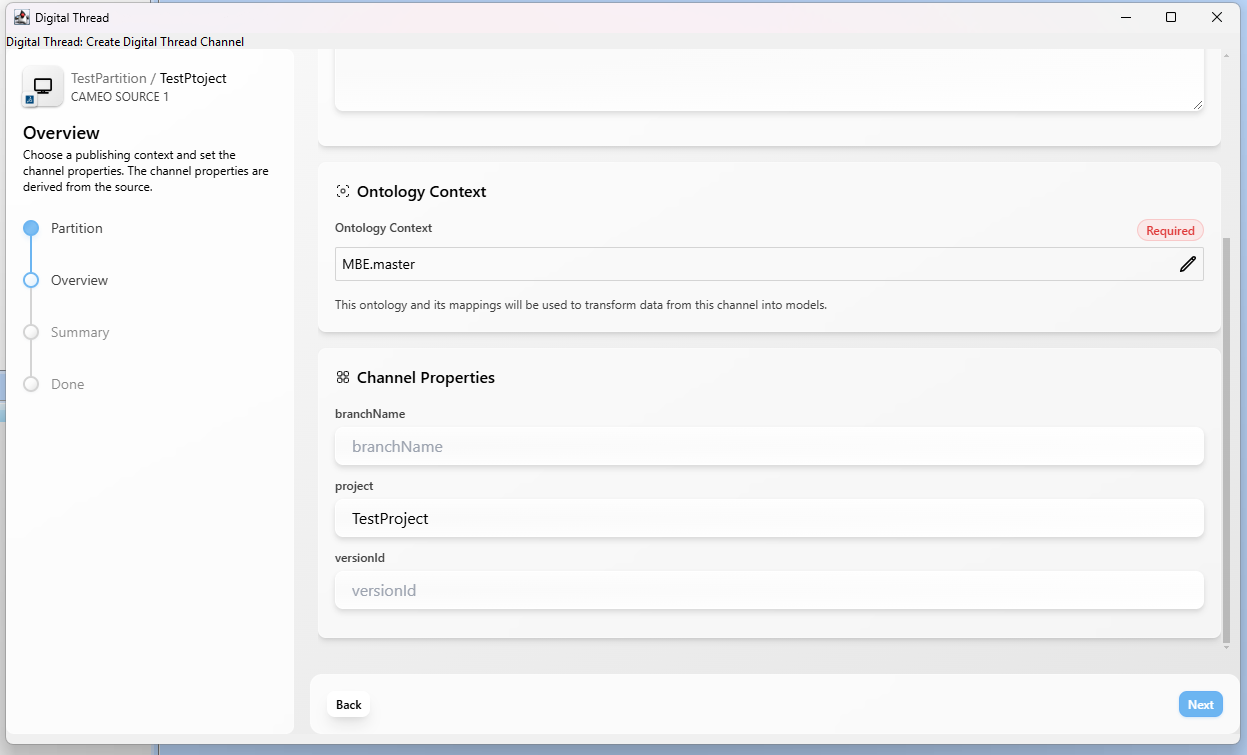
Name | Required | Description |
|---|---|---|
| Y | Project Name |
| Y (TWC project only) | Applied to a TWC project, not required otherwise |
| N | This applies to a TWC project where we want to publish a exact |
Logging into TWC is required for Digital Thread operations or fetching channels for TWC projects.
To create a baseline channel with theversionIdproperty, it must be done via the SBE embedded UI, where you manually fill in theversionIdchannel property.
7.1.1 How to get versionId in MagicDraw
Open the Project's History:
To get the version ID of a TWC project in Cameo using Project History, open the project from the
server, then go toCollaborate > Project History. This opens a window displaying a list of all
committed versions. Each entry includes details such as the author, commit message, timestamp, and the version ID. By selecting a specific entry, you can view its associated version ID, which
uniquely identifies that particular state of the project in Teamwork Cloud.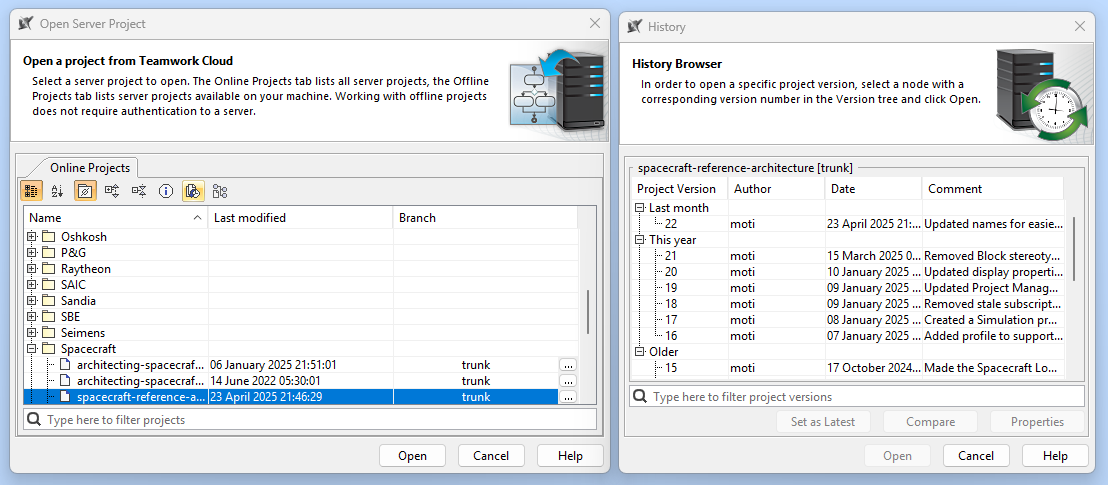
Viewing the Version ID in the Cameo Title Bar:
In Cameo Systems Modeler, when working with a Teamwork Cloud project, the project version ID is displayed on the title bar of the application window. This version ID uniquely identifies the
current state or revision of the project, helping users keep track of changes and ensure they are
working with the correct version.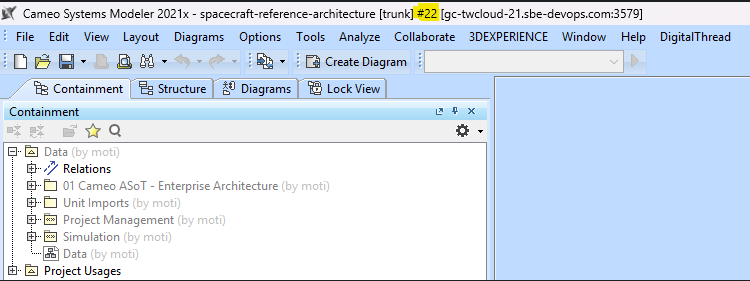
7.2 Approaches to Mapping
Mappings should be created based on the shapes of the elements being published. Every element has one metaclass shape (the base shape) and may have multiple stereotype shapes, especially when custom stereotypes are applied in Cameo. For example, a Requirement can have several shapes depending on the applied stereotypes. All these shapes must be mapped in SBE to ensure correct publishing. The shapes can be viewed in logs such as Kibana, where they appear in the element’s JSON data. Each shape can have its own properties and relationships, which also need to be mapped accurately for proper data representation.
7.2.1 Sample JSON data
        "shapes": [
          {
            "order": 1,
            "shapeId": "Class",
            "shapeType": "METACLASS",
            "attributes": [
              {
                "name": "IsfinalSpecialization",
                "value": {
                  "type": "BOOLEAN",
                  "value": "false"
                }
              },
              {
                "name": "IsLeaf",
                "value": {
                  "type": "BOOLEAN",
                  "value": "false"
                }
              },
              {
                "name": "IsActive",
                "value": {
                  "type": "BOOLEAN",
                  "value": "false"
                }
              },
              {
                "name": "Visibility",
                "value": {
                  "type": "STRING",
                  "format": "STRING",
                  "value": "public"
                }
              },
              {
                "name": "Name",
                "value": {
                  "type": "STRING",
                  "format": "STRING",
                  "value": "RequirementOne"
                }
              },
              {
                "name": "IsAbstract",
                "value": {
                  "type": "BOOLEAN",
                  "value": "false"
                }
              }
            ],
            "relations": [
              {
                "relationName": "DirectedRelationship",
                "targetAddress": {
                  "objectType": "REAL",
                  "externalLocator": {
                    "__sbe_type": "item",
                    "external_id": "_2021x_2_56101ea_1748342400959_569749_3329",
                    "__sbe_item_type": "UmlAbstraction"
                  },
                  "externalName": "Satisfy"
                },
                "linkLocator": {
                  "Destination": "_2021x_2_56101ea_1748342400959_569749_3329",
                  "__sbe_target___sbe_item_type": "UmlAbstraction",
                  "__sbe_source___sbe_item_type": "UmlClass",
                  "Source": "_2021x_2_56101ea_1748342382713_127173_3269",
                  "__sbe_target___sbe_type": "item",
                  "Type": "DirectedRelationship",
                  "__sbe_type": "link",
                  "__sbe_source___sbe_type": "item",
                  "__sbe_source_external_id": "_2021x_2_56101ea_1748342382713_127173_3269",
                  "__sbe_target_external_id": "_2021x_2_56101ea_1748342400959_569749_3329",
                  "__sbe_relation": "DirectedRelationship",
                  "__sbe_shape": "Class"
                }
              }
            ]
          },
          {
            "order": 2,
            "shapeId": "SysML::AbstractRequirement",
            "shapeType": "INHERITED_STEREOTYPE",
            "attributes": [
              {
                "name": "StereotypeProfile",
                "value": {
                  "type": "STRING",
                  "format": "STRING",
                  "value": "SysML"
                }
              },
              {
                "name": "Text",
                "value": {
                  "type": "STRING",
                  "format": "STRING"
                }
              },
              {
                "name": "Id",
                "value": {
                  "type": "STRING",
                  "format": "STRING",
                  "value": "1"
                }
              }
            ]
          },
          {
            "order": 3,
            "shapeId": "SysML::Requirement",
            "shapeType": "STEREOTYPE",
            "attributes": [
              {
                "name": "StereotypeProfile",
                "value": {
                  "type": "STRING",
                  "format": "STRING",
                  "value": "SysML"
                }
              }
            ]
          }
]8. Security and Access
8.1 Authentication Methods
8.1.1 Certificate-Based Authentication (Self-Signed Certificate Support)
To enable secure TLS communication using a self-signed SSL certificate, follow these steps:
Find JRE path used in a cameo: Help → About Cameo Systems Modeler → Environment
Obtain the CA certificate from the deployment environment, or download it by navigating to the SBE hostname in a web browser and saving the certificate in
.cerformat.Go to /jre/lib/security/cacerts [cacerts path inside cameo jvm]
Execute the following command with cert path
keytool -import -trustcacerts -alias sbecert -file C:\temp\caCert.cer -keystore cacertsDefault password "changeit"
Follow the steps below to download the CA certificate from the SBE:
Open a browser and go to your SBE instance
Click the 🔒 lock icon or select View Site Information in the browser’s address bar.
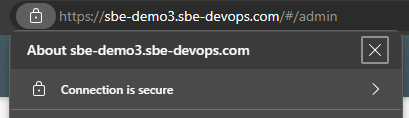
Click “Connection is secure”
Click “Certificate is valid” (or the certificate icon)
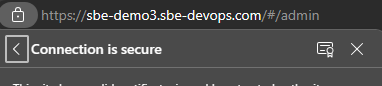
Go to the Details tab
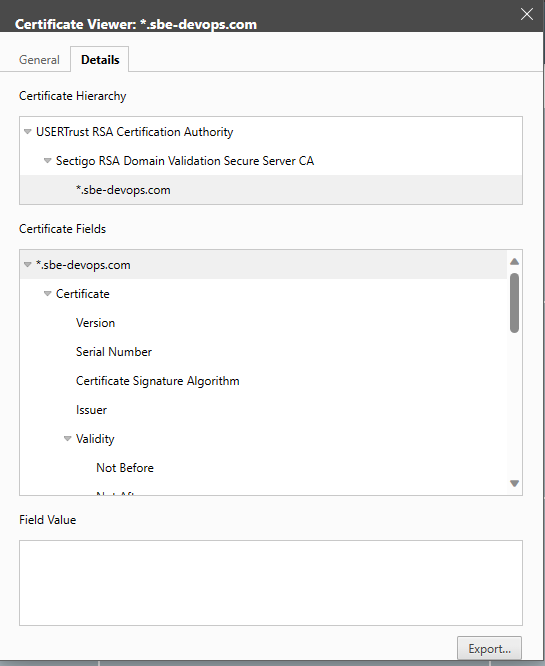
Click Export, and save the file in .cer format
(e.g., caCert.cer)
8.2 Authorization and Roles
The adapter assumes user has necessary read permissions on the project for Publishing a Channel.
Similarly, the adapter assumes that the user has the necessary write permissions on the project to perform any type of Refresh operation. If the user has read-only permissions, the Refresh option is disabled in the Digital Thread menu.
8.3 Secure Communication
The adapter communicated with SBE server using https and grpc, the necessary ports must be opened on the firewall for the adapter.
The port 443 is needed for https communication
Protocols in Use
gRPC: For fast, bidirectional, binary communication between systems.
HTTPS: For browser-based access and RESTful services.
9. Release Notes
9.1 Version History
8.7 (Oct 09, 2025)
Fix Embedded window size for larger screens
Clear messages before Refresh
Implemented refresh action status counter
Added support for MetaClass
Association Class
8.6 (Sep 18, 2025)
SDK
8.18
8.5 (Sep 10, 2025)
Fixed token expiry issue that caused extra login prompts in jxBrowser
Fixed Digital Thread failures caused by JxBrowser conflicts when multiple Cameo instances were open or previous sessions not fully closed
8.4 (Aug 13, 2025)
Added
Force Publish,Force Refresh, andClear Draftsactions in Digital Thread menuAdded support for query-based Smart Packages and publishing Digital Thread subscriptions independently of Smart Packages
Fixed a bug where multivalued enums were not being published
Adapter to show status of the Refresh operation in tracking window
SDK
8.17
8.3 (July 11, 2025)
Fixed unintended publishing of custom stereotype shape on subscribed elements
Clicking
Load SBE Profilewill refresh the current SBE profile
8.2 (July 04, 2025)
SDK
8.15
8.1 (July 03, 2025)
Stereotype
SBE Digital Threadhidden by defaultPublish and Refresh multi-value tags based on property tag multiplicity
SDK
8.14
8.0 (Apr 21, 2025)
Support termination for Digital Thread operations
TWC login warning on attach
Relation filtering bug fix
Improved error logging in the Cameo console
Added support
IsConjugatedattribute forPortelementsAdded
Add to SubscriptionandRemove from SubscriptionfunctionalityFixed
Idattribute display issue in Containment TreeResolved SLF4J binding issue
jxBrowser version
7.42.0SDK
8.11
7.7 (Nov 24, 2025)
SDK
7.51
7.6 (Nov 20, 2025)
Fixed embedded window sizing issues on larger screens
Clear messages prior to refresh
Added a refresh action status counter
Added support for the MetaClass
AssociationClassFixed an issue where SubscriptionIds were not applied to non-NamedElement elements during refresh
Replaced importing of the
SBE_Digital_Thread_Profilewith programmatic creationFixed invalid URL value conversion that caused
MalformedURLExceptionResolved an issue where the Digital Thread Operation window blocked the server disconnect pop-up, causing Cameo to freeze
Fixed Digital Thread failures caused by JxBrowser conflicts when multiple Cameo instances were
open or previous sessions not fully closed
7.5 (Aug 08, 2025)
Fixed a bug where multivalued enums were not being published
Fixed NPE when Smart Package is enabled and the channel has no subscriptions
7.4 (Aug 05, 2025)
Added support for query-based Smart Packages and publishing Digital Thread subscriptions independently of Smart Packages
Adapter to show status of the Refresh operation in tracking window
7.3 (July 18, 2025)
Added
Clear Draftsaction in Digital Thread menuSDK
7.50
7.2 (July 14, 2025)
Stereotype
SBE Digital Threadhidden by defaultPublish and Refresh multi-value tags based on property tag multiplicity
Clicking
Load SBE Profilewill refresh the current SBE profileSDK
7.49
7.1 (May 05, 2025)
Fixed a bug where traceability relations like DerivedFrom, Derived, SatisfiedBy, etc. were not reflected after a Refresh
Support
Pairpower typeAdded
Load SBE Profileaction in Digital Thread menuResolved SLF4J binding issue
Implemented
ResetSDK
7.48
7.0 (Mar 28, 2025)
First version of Adapter for Cameo 2024
Support termination for Digital Thread operations
TWC login warning on attach
Relation filtering bug fix
Improved error logging in the Cameo console
Added support
IsConjugatedattribute forPortelementsAdded
Add to SubscriptionandRemove from SubscriptionfunctionalityFixed
Idattribute display issue in Containment TreejxBrowser version
7.42.0SDK
7.47
10. Technical Reference
10.1 Adapter API Endpoints
Adapter API endpoints are not applicable for this tool.
10.2 Identity
The following are the locator properties
Name | Description |
|---|---|
external_id | unique identifier of element |
10.3 Configuration File Format Reference
This tool does not require or use configuration files.
10.4 Schema Support
The metaclass attributes and links referenced here do not include every element from the UML 2.5.1 specification. Specifically, the following are excluded:
Attributes and relationships that duplicate information already available from a more canonical source (e.g., the OwnedElements link is omitted because each element’s owner link is already published).
Artificial or derived read-only attributes and relationships that do not represent core model data.
Elements with no known practical use, such as the Class link on the Class metaclass.
Naming conventions for metaclasses, attributes, and links follow their capitalized label with spaces removed, rather than their internal attribute names.
Tags associated with stereotypes are only published when the values are set.
States cannot be subscribed to in Cameo without the accompanying Region and StateMachine.
Adapter uses the attribute multiplicity (e.g 0..1, 1.., 0..) on Tags for determining number of
values, i.e, whether its a single value or an array of values (String, Integer, etc.) during Publish. During refresh, it sets values as received.During a refresh, if subscribing to an Association Class along with Blocks and Properties, a relation mapping between the Properties and the Association Class is mandatory
Property --> Association Class (Relation Name: Association)The
OwnedByrelation is not published for Properties or Ports. Their parent–child relationships are instead captured within theParentelement of each Property or Port. TheOwnedByrelation is only published when the parent element is of type Class, Package, Region, or State.
10.4.1 Type: Element
Is Abstract: Yes
Extends:
Description: Element serves as the base metaclass for all supported items, providing key attributes and relationships that are inherited by every schema element. As such, its attributes and links are common across all supported items.
Attributes:
Name | Datatype | Enum | Req’d | R/O | Description |
|---|---|---|---|---|---|
AppliedStereotypes | list of string | no | no | yes | List of stereotypes on this element. Provided for informational purposes only. |
Name | string | no | no | yes | The name attribute of the element. Technically could be changed outside of Cameo, but practically would cause issues. |
QualifiedName | string | no | no | yes | Provided for informational purposes only. |
ServerID | string | no | no | yes | TWC ID. Provided for informational purposes only. |
Documentation | string | no | no | no | Documentation can provide additional information about the purpose, behavior, constraints, or any other relevant details regarding the element. |
Comment | list of string | no | no | no | Internal comments of an element. |
ActiveHyperlink | url | no | no | no | ActiveHyperlink of an element. |
Links:
Name | Types | Multiplicity | Description |
|---|---|---|---|
DirectedRelationship | Dependency, Usage, Include, Extend | 0..* | Collection of simple directed relation elements where owned by this element – e.g. where this element is the “client”. |
OwnedBy | Element | 0..1 | The owning element of this element, only elements in the root package element should not have an owner. The root package does not get published. |
Locator:
Name | Description |
|---|---|
external_id | unique identifier of element |
10.4.2 Type: Class
Is Abstract: No
Extends: Element
Description: Represents an object or a set of objects that share a common structure and behavior.
Attributes:
Name | Datatype | Enum | Req’d | R/O | Description |
|---|---|---|---|---|---|
Classifiers | list of string |
|
| no | List of classifiers name |
IsAbstract | boolean |
| no | no | Is the Class Abstract |
IsActive | boolean |
| no | no | Is the Class Active |
IsFinalSpecialization | boolean |
| no | no | Is the Class Final Specialization |
IsLeaf | boolean |
| no | no | Is the Leaf Object |
Visibility | string | yes | no | no | public, private, protected, package |
Links:
Name | Types | Multiplicity | Description |
|---|---|---|---|
Behavior | Activity, Interaction, Opaque behavior,State machine | 0..* | List of behaviors owned by this Class. (Yet to be supported) |
ClassifierBehavior | Behavior | 0..1 | Primary behavior for this class. (Yet to be supported) |
Representation | CollaborationUse | 0..* | (Yet to be supported) |
Rule | Constraint | 0..* | List of constraints for this class. (Yet to be supported) |
Operation | Operation | 0..* | (Yet to be supported) |
RealizedInterface | FlowSpecification | 0..* | (Yet to be supported) |
Port | Port | 0..* | List of relations to Port type meta class |
Property | Property | 0..* | List of relations to Properties type meta class |
Generalization | Generalization | 0..* | List of generalization relations for this element where this element is the owner. |
OwnReception | Reception | 0..* | List of receptors (that are typically typed by Signal) |
10.4.3 Type: DirectedRelationship
Is Abstract: Yes
Extends: Element
Description: Unidirectional relationship between any two elements.
Attributes:
Name | Datatype | Enum | Req’d | R/O | Description |
|---|---|---|---|---|---|
- | - | - | - | - | - |
Links:
Name | Types | Multiplicity | Description |
|---|---|---|---|
Supplier | Element | 0..1 | Outbound link to a destination Element |
10.4.4 Type: Abstraction
Is Abstract: No
Extends: Dependency
Description: Relation between elements
Attributes:
Name | Datatype | Enum | Req’d | R/O | Description |
|---|---|---|---|---|---|
Visibility | string | yes | no | no | public, private, protected, package |
Links:
Name | Types | Multiplicity | Description |
|---|---|---|---|
Supplier | Element | 0..1 | Outbound link to a destination Element |
10.4.5 Type: Association
Is Abstract: No
Extends: Element
Description: Association Relation between Properties
Attributes:
Name | Datatype | Enum | Req’d | R/O | Description |
|---|---|---|---|---|---|
Visibility | string | yes | no | no | public, private, protected, package |
Links:
Name | Types | Multiplicity | Description |
|---|---|---|---|
OwnedEnd | Property | 0..1 | Outbound links to the owned ends of an association. |
10.4.6 Type: Comment
Is Abstract: No
Extends: Element
Description: Human readable comment
Attributes:
Name | Datatype | Enum | Req’d | R/O | Description |
|---|---|---|---|---|---|
Body | string | no | no | yes | The text of the comment. |
Links:
Name | Types | Multiplicity | Description |
|---|---|---|---|
Annotated | Element | 0..* | List of elements that this comment applies to |
10.4.7 Type: Connector
Is Abstract: No
Extends: Element
Description: Connector Relation between Ports
Attributes:
Name | Datatype | Enum | Req’d | R/O | Description |
|---|---|---|---|---|---|
- | - | - | - | - | - |
Links:
Name | Types | Multiplicity | Description |
|---|---|---|---|
EndOne | Port | 0..* | Outbound link to Port |
EndTwo | Port | 0..* | Outbound link to Port |
10.4.8 Type: ConnectorEnd
Is Abstract: No
Extends: MultiplicityElement
Description: Endpoint of a connector, or a relationship between two or more model elements. Each end of a connector is associated with a role in the relationship and is typically connected to a specific element in the model
Attributes:
Name | Datatype | Enum | Req’d | R/O | Description |
|---|---|---|---|---|---|
Lower | int | no | no | no | lower bound for multiplicity, -1 is * |
Upper | int | no | no | no | upper bound for multiplicity, -1 is * |
Links:
Name | Types | Multiplicity | Description |
|---|---|---|---|
- | - | - | - |
10.4.9 Type: DataType
Is Abstract: No
Extends: Element
Description: DataType Element
Attributes:
Name | Datatype | Enum | Req’d | R/O | Description |
|---|---|---|---|---|---|
IsAbstract | boolean |
| no | no | Is the DataType Abstract |
IsActive | boolean |
| no | no | Is the DataType Active |
IsFinalSpecialization | boolean |
| no | no | Is the DataType Final Specialization |
Visibility | string | yes | no | no | public, private, protected, package |
Links:
Name | Types | Multiplicity | Description |
|---|---|---|---|
- | - | - | - |
10.4.10 Type: Dependency
Is Abstract: No
Extends: Element
Description: Relation between elements
Attributes:
Name | Datatype | Enum | Req’d | R/O | Description |
|---|---|---|---|---|---|
Visibility | string | yes | no | no | public, private, protected, package |
Links:
Name | Types | Multiplicity | Description |
|---|---|---|---|
Supplier | Element | 0..1 | Outbound link to a destination Element |
10.4.11 Type: Extend
Is Abstract: No
Extends: DirectedRelationship
Description: Relation between elements
Attributes:
Name | Datatype | Enum | Req’d | R/O | Description |
|---|---|---|---|---|---|
- | - | - | - | - | - |
Links:
Name | Types | Multiplicity | Description |
|---|---|---|---|
Supplier | Element | 0..1 | Outbound link to a destination Element |
10.4.12 Type: Generalization
Is Abstract: No
Extends: Element
Description: Generalization relation between class
Attributes:
Name | Datatype | Enum | Req’d | R/O | Description |
|---|---|---|---|---|---|
- | - | - | - | - | - |
Links:
Name | Types | Multiplicity | Description |
|---|---|---|---|
General | Class | 0..1 | Outbound link to a destination Class |
10.4.13 Type: Include
Is Abstract: No
Extends: DirectedRelationship
Description: Relation between elements
Attributes:
Name | Datatype | Enum | Req’d | R/O | Description |
|---|---|---|---|---|---|
- | - | - | - | - | - |
Links:
Name | Types | Multiplicity | Description |
|---|---|---|---|
Supplier | Element | 0..1 | Outbound link to a destination Element |
10.4.14 Type: InformationFlow
Is Abstract: No
Extends: Element
Description: Item Flow on Association
Attributes:
Name | Datatype | Enum | Req’d | R/O | Description |
|---|---|---|---|---|---|
- | - | - | - | - | - |
Links:
Name | Types | Multiplicity | Description |
|---|---|---|---|
Conveyed | Association | 0..* | List of conveyed Associations |
Source | Element | 0..* | List of Source Elements |
Target | Element | 0..* | List of Target Elements |
10.4.15 Type: Package
Is Abstract: No
Extends: Element
Description: Contains element
Attributes:
Name | Datatype | Enum | Req’d | R/O | Description |
|---|---|---|---|---|---|
URI | string | N | N | N | Optional URI that can be assigned to a package |
Visibility | string | yes | no | no | public, private, protected, package |
Links:
Name | Types | Multiplicity | Description |
|---|---|---|---|
PackageImport | Package | 0..* | Packages imported by the package |
PackageMerge | Package | 0..* | Packages merged by the package |
10.4.16 Type: Port
Is Abstract: No
Extends: Property
Description: Port element
Attributes:
Name | Datatype | Enum | Req’d | R/O | Description |
|---|---|---|---|---|---|
- | - | - | - | - | - |
Links:
Name | Types | Multiplicity | Description |
|---|---|---|---|
Association | Association | 0..1 |
|
AssociationEnd | Property | 0..1 |
|
10.4.17 Type: Property
Is Abstract: No
Extends: Element
Description: Property element
Attributes:
Name | Datatype | Enum | Req’d | R/O | Description |
|---|---|---|---|---|---|
IsBehavior | boolean | N |
|
|
|
IsComposite | boolean | N |
|
|
|
IsConjugated | boolean | N |
|
|
|
DefaultValue | any | N |
|
| The value can be a Literal String, Literal Integer, Literal Real, etc |
AggregationKind | String | yes | yes | no | Association kind of properties, depends on this association relation gets created |
unit | String | N |
|
| If a property has a data type with an assigned unit, that value is published as a unit attribute |
ClassStereotypes | String | N |
| yes | Applied stereotypes on the type(element) of the property element |
Links:
Name | Types | Multiplicity | Description |
|---|---|---|---|
Association | Association | 0..1 |
|
AssociationEnd | Property | 0..1 |
|
10.4.18 Type: Pseudostate
Is Abstract: Yes
Extends: Element
Description: Paths in State Machines
Attributes:
Name | Datatype | Enum | Req’d | R/O | Description |
|---|---|---|---|---|---|
State | State | N |
|
|
|
StateMachine | StateMachine | N |
|
|
|
10.4.19 Type: Realization
Is Abstract: No
Extends: Element
Description: Relation between elements
Attributes:
Name | Datatype | Enum | Req’d | R/O | Description |
|---|---|---|---|---|---|
- | - | - | - | - | - |
Links:
Name | Types | Multiplicity | Description |
|---|---|---|---|
Supplier | Element | 0..1 | Outbound link to a destination Element |
10.4.20 Type: Usage
Is Abstract: No
Extends: DirectedRelationship
Description: Relation between elements
Attributes:
Name | Datatype | Enum | Req’d | R/O | Description |
|---|---|---|---|---|---|
- | - | - | - | - | - |
Links:
Name | Types | Multiplicity | Description |
|---|---|---|---|
Supplier | Element | 0..1 | Outbound link to a destination Element |
10.4.21 Type: UseCase
Is Abstract: No
Extends: Behavior
Description:
Attributes:
Name | Datatype | Enum | Req’d | R/O | Description |
|---|---|---|---|---|---|
- | - | - | - | - | - |
Links:
Name | Types | Multiplicity | Description |
|---|---|---|---|
Subject | Class[] | 0..* | The subjects to which this UseCase applies. Each subject or its parts realize all the UseCases that apply to it. |
Extend | UseCase[] | 0..* |
|
ExtensionPoint | ExtensionPoint[] | 0..* | need a metaclass for this |
Include | UseCase[] | 0..* |
|
10.4.22 Type: StateMachine
Is Abstract: No
Extends: Behavior
Description:
Attributes:
Name | Datatype | Enum | Req’d | R/O | Description |
|---|---|---|---|---|---|
Visibility | string | yes | no | no | public, private, protected, package |
Links:
Name | Types | Multiplicity | Description |
|---|---|---|---|
- | - | - | - |
10.4.23 Type: Region
Is Abstract: No
Extends: Element
Description:
Attributes:
Name | Datatype | Enum | Req’d | R/O | Description |
|---|---|---|---|---|---|
- | - | - | - | - | - |
Links:
Name | Types | Multiplicity | Description |
|---|---|---|---|
|
|
|
|
10.4.24 Type: Instance Specification
Is Abstract: No
Extends: Element
Description:
Attributes:
Name | Datatype | Enum | Req’d | R/O | Description |
|---|---|---|---|---|---|
Visibility | string | yes | no | no | public, private, protected, package |
Links:
Name | Types | Multiplicity | Description |
|---|---|---|---|
Classifier | Class[] | 0..* |
|
StereotypedElement | Element | 0..1 |
|
ConnectionPoint | Pseudostate[] | 0..* |
|
Slot | Slot | 0..* |
|
10.4.25 Type: Slot
Is Abstract: No
Extends: Element
Description:
Attributes:
Name | Datatype | Enum | Req’d | R/O | Description |
|---|---|---|---|---|---|
Value | any | no | yes | no | Value of a slot property on an object, can be any type since it is defined in cameo runtime |
Links:
Name | Types | Multiplicity | Description |
|---|---|---|---|
owningInstance | InstanceSpecification | 0..* |
|
InstanceValue | InstanceSpecification | 0..* | The InstanceValue relation denotes the InstanceSpecification value assigned to a slot |
DefiningFeature | Property |
|
|
10.4.26 Type: Operation
Is Abstract: No
Extends: Behavioral Feature
Description:
Attributes:
Name | Datatype | Enum | Req’d | R/O | Description |
|---|---|---|---|---|---|
Lower | int |
|
|
|
|
Upper | int |
|
|
|
|
IsOrdered | boolean |
|
|
|
|
IsQuery | boolean |
|
|
|
|
IsUnique | boolean |
|
|
|
|
Links:
Name | Types | Multiplicity | Description |
|---|---|---|---|
BodyCondition | Constraint | 0..1 |
|
Interface | Interface | 0..1 |
|
ownedParameter | Parameter[] | 0..* |
|
RaisedException | Element[] | 0..* |
|
Type | Element | 0..1 |
|
10.4.27 Type: Constraint
Is Abstract: No
Extends: Element
Description:
Attributes:
Name | Datatype | Enum | Req’d | R/O | Description |
|---|---|---|---|---|---|
Specification | any | - | - | - | The value can be a String, Integer, Float, etc |
Visibility | string | yes | no | no | public, private, protected, package |
Links:
Name | Types | Multiplicity | Description |
|---|---|---|---|
BodyContext | Operation | 0..1 |
|
Context | Element | 0..1 |
|
ConstrainedElement | Element[] | 0..* |
|
owningState | State | 0..1 |
|
owningTransition | ProtocolTransition | 0..1 | add Transition and Protocol transition |
postContext | Operation | 0..1 |
|
preContext | Operation | 0..1 |
|
10.4.28 Type: Interface
Is Abstract: No
Extends: Class
Description:
Attributes:
Name | Datatype | Enum | Req’d | R/O | Description |
|---|---|---|---|---|---|
- | - | - | - | - | - |
Links:
Name | Types | Multiplicity | Description |
|---|---|---|---|
nestedClassifier | Class[] | 0..* |
|
ownedAttribute | Property[] | 0..* |
|
ownedOperation | Operation[] | 0..* |
|
ownReception | Reception[] | 0..* |
|
Protocol | ProtocolStateMachine | 0..1 |
|
RedefinedInterface | Interface[] | 0..* |
|
10.4.29 Type: ParameterSet
Is Abstract: No
Extends: Element
Description:
Attributes:
Name | Datatype | Enum | Req’d | R/O | Description |
|---|---|---|---|---|---|
- | - | - | - | - | - |
Links:
Name | Types | Multiplicity | Description |
|---|---|---|---|
Condition | Constraint[] | 0..* |
|
Parameter | Parameter[] | 0..* |
|
10.4.30 Type: Parameter
Is Abstract: No
Extends: Element
Description:
Attributes:
Name | Datatype | Enum | Req’d | R/O | Description |
|---|---|---|---|---|---|
- | - | - | - | - | - |
Links:
Name | Types | Multiplicity | Description |
|---|---|---|---|
- | - | - | - |
10.4.31 Type: Reception
Is Abstract: No
Extends: Element
Description:
Attributes:
Name | Datatype | Enum | Req’d | R/O | Description |
|---|---|---|---|---|---|
- | - | - | - | - | - |
Links:
10.4.32 Type: Interaction
Is Abstract: No
Extends: Behavior (Model Element)
Description:
Attributes:
Name | Datatype | Enum | Req’d | R/O | Description |
|---|---|---|---|---|---|
- | - | - | - | - | - |
Links:
Name | Types | Multiplicity | Description |
|---|---|---|---|
Action | Action[] | 0..* |
|
FormalGate | Gate[] | 0..* |
|
Fragment | InteractionFragment[] | 0..* |
|
Lifeline | Lifeline[] | 0..* |
|
Message | Message[] | 0..* |
|
10.4.33 Type: OpaqueBehavior
Is Abstract: No
Extends: Behavior (Model Element)
Description:
Attributes:
Name | Datatype | Enum | Req’d | R/O | Description |
|---|---|---|---|---|---|
Body | string[] |
|
|
|
|
Language | String[] |
|
|
|
|
Links:
Name | Types | Multiplicity | Description |
|---|---|---|---|
Signal | Signal | 0..1 |
|
10.4.34 Type: Signal
Is Abstract: No
Extends: Classifier (Model Class)
Description:
Attributes:
Name | Datatype | Enum | Req’d | R/O | Description |
|---|---|---|---|---|---|
ownedAttribute | Property[] |
|
|
|
|
Visibility | string | yes | no | no | public, private, protected, package |
Links:
Name | Types | Multiplicity | Description |
|---|---|---|---|
Signal | Signal | 0..1 |
|
10.4.35 Type: Reception
Is Abstract: No
Extends: Element
Description:
Attributes:
Name | Datatype | Enum | Req’d | R/O | Description |
|---|---|---|---|---|---|
- | - | - | - | - | - |
Links:
Name | Types | Multiplicity | Description |
|---|---|---|---|
Signal | Signal | 0..1 |
|
10.4.36 Type: Actor
Is Abstract: No
Extends: Element (Model Class)
Description: Actor for use case
Attributes:
Name | Datatype | Enum | Req’d | R/O | Description |
|---|---|---|---|---|---|
Visibility | string | yes | no | no | public, private, protected, package |
Links:
Name | Types | Multiplicity | Description |
|---|---|---|---|
Source | Association | 0..1 | Source to relation type models |
10.4.37 Type: ExtensionPoint
Is Abstract: No
Extends: Element (Model Class)
Description: Actor for use case
Attributes:
Name | Datatype | Enum | Req’d | R/O | Description |
|---|---|---|---|---|---|
- | - | - | - | - | - |
Links:
Name | Types | Multiplicity | Description |
|---|---|---|---|
OwnedBy | Element | 0..1 | Owner of the extension point |
10.4.38 Type: Activity
Is Abstract: No
Extends: Behavior
Description: Activity used for behavioral diagrams, e.g. activity diagrams
Attributes:
Name | Datatype | Enum | Req’d | R/O | Description |
|---|---|---|---|---|---|
Visibility | string | yes | no | no | public, private, protected, package |
Links:
Name | Types | Multiplicity | Description |
|---|---|---|---|
- | - | - | - |
10.4.39 Type: State
Is Abstract: No
Extends: Vertex
Description: A State is a condition during the lifetime of an object or an interaction during which the object meets certain conditions, performs an action, or waits for an event
Attributes:
Name | Datatype | Enum | Req’d | R/O | Description |
|---|---|---|---|---|---|
IsLeaf | boolean | - | - | - | - |
IsSubmachineState | boolean | - | - | Read Only | - |
IsComposite | boolean | - | - | Read Only | - |
IsSimple | boolean | - | - | Read Only | - |
Links:
Name | Types | Multiplicity | Description |
|---|---|---|---|
|
|
|
|
10.4.40 Type: ActivityNode
Is Abstract: No
Extends: RedefinableElement
Description: An ActivityNode in Cameo represents a point of control flow within an activity diagram, encompassing actions, control nodes, and object nodes.
Attributes:
Name | Datatype | Enum | Req’d | R/O | Description |
|---|---|---|---|---|---|
Name | String | - | - | - | - |
Links:
Name | Types | Multiplicity | Description |
|---|---|---|---|
Outbound | ActivityEdge | - | Outbound link to a destination Element |
10.4.41 Type: Action
Is Abstract: Yes
Extends: Element
Description:
Attributes:
Name | Datatype | Enum | Req’d | R/O | Description |
|---|---|---|---|---|---|
- | - |
|
|
|
|
Links:
Name | Types | Multiplicity | Description |
|---|---|---|---|
- | - | - |
|
10.4.42 Type: CallOperationAction
Is Abstract: No
Extends: Element
Description:
Attributes:
Name | Datatype | Enum | Req’d | R/O | Description |
|---|---|---|---|---|---|
- | - |
|
|
|
|
Links:
Name | Types | Multiplicity | Description |
|---|---|---|---|
InputPin | Pin | 0..1 |
|
OutputPin | Pin | 0..1 |
|
ValuePin | Pin | 0..1 |
|
ActionInputPin | Pin | 0..1 |
|
OwnedBy | Activity | 0..1 | Owner |
10.4.43 Type: CallBehaviorAction
Is Abstract: No
Extends: Element
Description:
Attributes:
Name | Datatype | Enum | Req’d | R/O | Description |
|---|---|---|---|---|---|
- | - |
|
|
|
|
Links:
Name | Types | Multiplicity | Description |
|---|---|---|---|
InputPin | Pin | 0..1 |
|
OutputPin | Pin | 0..1 |
|
ValuePin | Pin | 0..1 |
|
ActionInputPin | Pin | 0..1 |
|
OwnedBy | Activity | 0..1 | Owner |
10.4.44 Type: AcceptEventAction
Is Abstract: No
Extends: Element
Description:
Attributes:
Name | Datatype | Enum | Req’d | R/O | Description |
|---|---|---|---|---|---|
- | - |
|
|
|
|
Links:
Name | Types | Multiplicity | Description |
|---|---|---|---|
OutputPin | Pin | 0..1 |
|
OwnedBy | Activity | 0..1 | Owner |
10.4.45 Type: SendSignalAction
Is Abstract: No
Extends: Element
Description:
Attributes:
Name | Datatype | Enum | Req’d | R/O | Description |
|---|---|---|---|---|---|
- | - |
|
|
|
|
Links:
Name | Types | Multiplicity | Description |
|---|---|---|---|
InputPin | Pin | 0..1 |
|
OutputPin | Pin | 0..1 |
|
ValuePin | Pin | 0..1 |
|
ActionInputPin | Pin | 0..1 |
|
OwnedBy | Activity | 0..1 | Owner |
10.4.46 Type: ValuePin
Is Abstract: No
Extends: Element
Description:
Attributes:
Name | Datatype | Enum | Req’d | R/O | Description |
|---|---|---|---|---|---|
- | - |
|
|
|
|
Links:
Name | Types | Multiplicity | Description |
|---|---|---|---|
Type |
|
|
|
10.4.47 Type: ActionInputPin
Is Abstract: No
Extends: Element
Description:
Attributes:
Name | Datatype | Enum | Req’d | R/O | Description |
|---|---|---|---|---|---|
- | - |
|
|
|
|
Links:
Name | Types | Multiplicity | Description |
|---|---|---|---|
Type |
|
|
|
10.4.48 Type: Activity
Is Abstract: No
Extends: Classifier (Model Class)
Description:
Attributes:
Name | Datatype | Enum | Req’d | R/O | Description |
|---|---|---|---|---|---|
- | - |
|
|
|
|
Links:
Name | Types | Multiplicity | Description |
|---|---|---|---|
|
|
|
|
10.4.49 Type: ActivityParameterNode
Is Abstract: No
Extends: Element
Description:
Attributes:
Name | Datatype | Enum | Req’d | R/O | Description |
|---|---|---|---|---|---|
- | - |
|
|
|
|
Links:
Name | Types | Multiplicity | Description |
|---|---|---|---|
Parameter | Element | 0..1 |
|
Type | - | - |
|
OwnedBy | Activity | 0..1 | Owner |
10.4.50 Type: ActivityPartition
Is Abstract: No
Extends: Element
Description:
Attributes:
Name | Datatype | Enum | Req’d | R/O | Description |
|---|---|---|---|---|---|
- | - |
|
|
|
|
Links:
Name | Types | Multiplicity | Description |
|---|---|---|---|
|
|
|
|
10.4.51 Type: ControlFlow
Is Abstract: No
Extends: Element
Description:
Attributes:
Name | Datatype | Enum | Req’d | R/O | Description |
|---|---|---|---|---|---|
- | - | - | - | - | - |
Links:
Name | Types | Multiplicity | Description |
|---|---|---|---|
Target | Element | 0..1 | Outbound link to a destination Element |
OwnedBy | Activity | 0..1 | Owner |
10.4.52 Type: ActivityFinalNode
Is Abstract: No
Extends: Element
Description:
Attributes:
Name | Datatype | Enum | Req’d | R/O | Description |
|---|---|---|---|---|---|
- | - | - | - | - | - |
Links:
Name | Types | Multiplicity | Description |
|---|---|---|---|
OwnedBy | Activity | 0..1 | Owner |
10.4.53 Type: FlowFinalNode
Is Abstract: No
Extends: Element
Description:
Attributes:
Name | Datatype | Enum | Req’d | R/O | Description |
|---|---|---|---|---|---|
- | - | - | - | - | - |
Links:
Name | Types | Multiplicity | Description |
|---|---|---|---|
OwnedBy | Activity | 0..1 | Owner |
10.4.54 Type: InitialNode
Is Abstract: Yes
Extends: ControlNode
Description: An Initial node is a control node where flow starts when the Activity is invoked. An Activity may have more than one Initial node.
Attributes:
Name | Datatype | Enum | Req’d | R/O | Description |
|---|---|---|---|---|---|
- | - | - | - | - | - |
Links:
Name | Types | Multiplicity | Description |
|---|---|---|---|
OwnedBy | - | - | Owner |
10.4.55 Type: ForkNode
Is Abstract: No
Extends: ControlNode
Description:
Attributes:
Name | Datatype | Enum | Req’d | R/O | Description |
|---|---|---|---|---|---|
- | - | - | - | - | - |
Links:
Name | Types | Multiplicity | Description |
|---|---|---|---|
OwnedBy | - | - | Owner |
10.4.56 Type: JoinNode
Is Abstract: No
Extends: ControlNode
Description:
Attributes:
Name | Datatype | Enum | Req’d | R/O | Description |
|---|---|---|---|---|---|
- | - | - | - | - | - |
Links:
Name | Types | Multiplicity | Description |
|---|---|---|---|
OwnedBy | - | - | Owner |
10.4.57 Type: InputPin
Is Abstract: Yes
Extends: Pin
Description: An input pin is a pin that holds input values to be consumed by an action.
Attributes:
Name | Datatype | Enum | Req’d | R/O | Description |
|---|---|---|---|---|---|
- | - | - | - | - | - |
Links:
Name | Types | Multiplicity | Description |
|---|---|---|---|
OwnedBy | - | - | Owner |
10.4.58 Type: OutputPin
Is Abstract: Yes
Extends: Pin
Description:
Attributes:
Name | Datatype | Enum | Req’d | R/O | Description |
|---|---|---|---|---|---|
- | - | - | - | - | - |
Links:
Name | Types | Multiplicity | Description |
|---|---|---|---|
OwnedBy | - | - | Owner |
10.4.59 Type: ObjectFlow
Is Abstract: Yes
Extends: ActivityEdge
Description: The object flow describes the flow of objects and data within activities.
Attributes:
Name | Datatype | Enum | Req’d | R/O | Description |
|---|---|---|---|---|---|
Name | String | - | - | - | - |
Links:
Name | Types | Multiplicity | Description |
|---|---|---|---|
OwnedBy | - | - | - |
Target | - | - | - |
10.4.60 Type: ObjectNode
Is Abstract: No
Extends: ActivityNode, TypedElement
Description: An Object Node is an Activity node indicating that an instance of a particular classifier, possibly in a particular State, may be available at a particular point in the Activity.
Attributes:
Name | Datatype | Enum | Req’d | R/O | Description |
|---|---|---|---|---|---|
Name | String | - | - | - | - |
Links:
Name | Types | Multiplicity | Description |
|---|---|---|---|
OwnedBy | - | - | - |
10.4.61 Type: Signal
Is Abstract: Yes
Extends: InvocationAction
Description:
Attributes:
Name | Datatype | Enum | Req’d | R/O | Description |
|---|---|---|---|---|---|
Name | String | - | - | - | - |
Links:
Name | Types | Multiplicity | Description |
|---|---|---|---|
OwnedBy | - | - | - |
10.4.62 Type: CentralBufferNode
Is Abstract: Yes
Extends: ObjectNode
Description:
Attributes:
Name | Datatype | Enum | Req’d | R/O | Description |
|---|---|---|---|---|---|
Name | String | - | - | - | - |
Links:
Name | Types | Multiplicity | Description |
|---|---|---|---|
OwnedBy | - | - | - |
10.4.63 Type: DataStoreNode
Is Abstract: Yes
Extends: CentralBufferNode
Description:
Attributes:
Name | Datatype | Enum | Req’d | R/O | Description |
|---|---|---|---|---|---|
- | - | - | - | - | - |
Links:
Name | Types | Multiplicity | Description |
|---|---|---|---|
- | - | - | - |
10.4.64 Type: OpaqueAction
Is Abstract: No
Extends: Element
Description:
Attributes:
Name | Datatype | Enum | Req’d | R/O | Description |
|---|---|---|---|---|---|
- | - |
|
|
|
|
Links:
Name | Types | Multiplicity | Description |
|---|---|---|---|
InputPin | Pin | 0..1 |
|
OutputPin | Pin | 0..1 |
|
ValuePin | Pin | 0..1 |
|
ActionInputPin | Pin | 0..1 |
|
OwnedBy | Activity | 0..1 | Owner |
10.4.65 Type: AssociationClass
Is Abstract: No
Extends: Association, Class
Description: An Association Class is a model element with both Association and Class properties. You can look at an Association Class as an Association that also has Class properties, or as a Class that also has Association properties. Additionally, it connects a set of classifiers and defines a set of features belonging only to the relationship and not to any of the classifiers.
Attributes:
Name | Datatype | Enum | Req’d | R/O | Description |
|---|---|---|---|---|---|
Name | String |
|
|
| Name of the element |
Classifiers | list of string |
|
| no | List of classifiers name |
IsAbstract | boolean |
| no | no | Is the Class Abstract |
IsActive | boolean |
| no | no | Is the Class Active |
IsFinalSpecialization | boolean |
| no | no | Is the Class Final Specialization |
IsLeaf | boolean |
| no | no | Is the Leaf Object |
Links:
Name | Types | Multiplicity | Description |
|---|---|---|---|
Property | Property |
|
11. Upgrade
11.1 Migrate from SBE 7.x to SBE 8.x
This section will cover the guide to upgrade from your SBE 7.x to SBE 8.x