
Installing / Upgrading
Overview
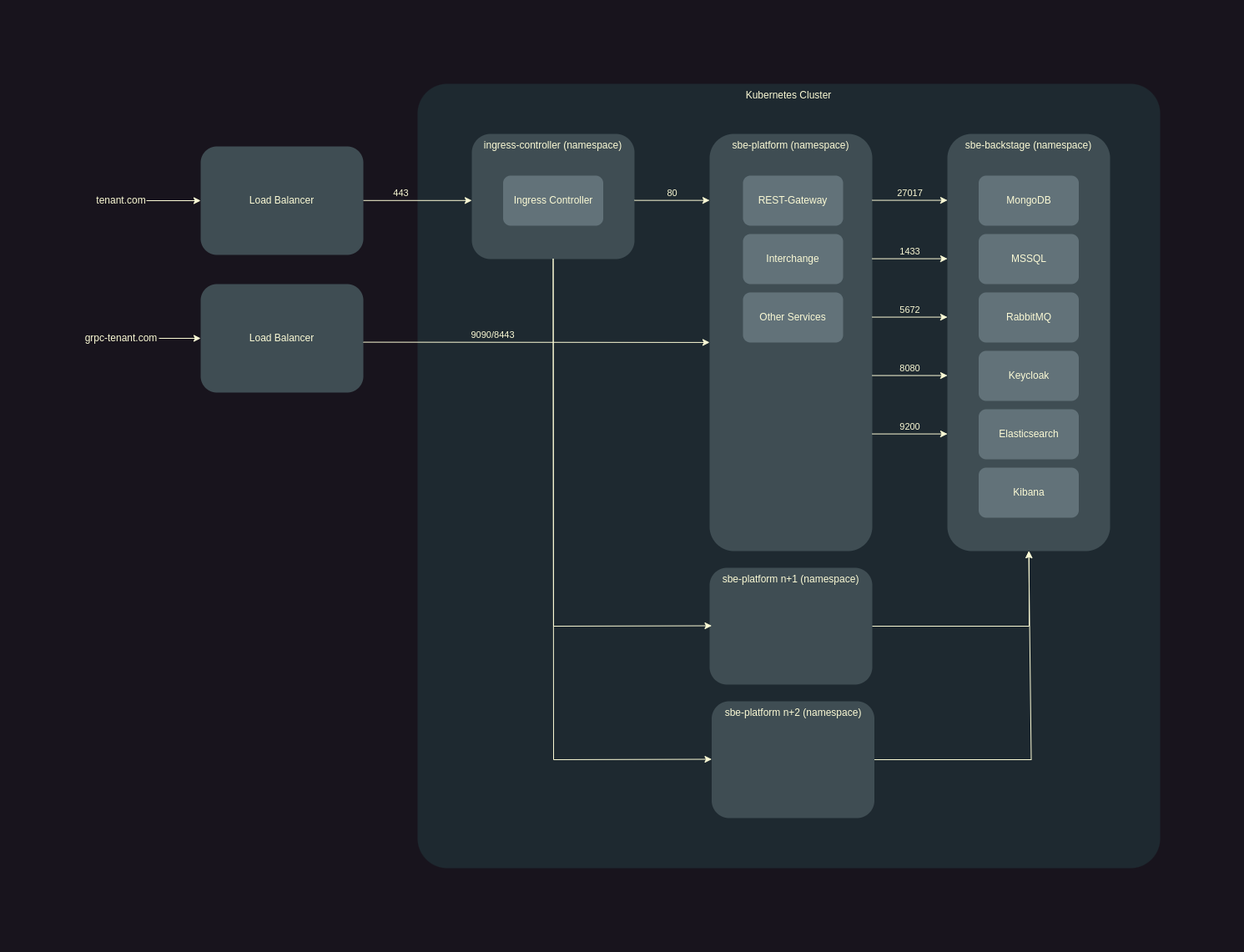
Installation Overview
The manual steps required to deploy an instance of the SBE Platform are as follows:
(Optional) Deploy the Backstage (sbe-backstage-stack) services with helm (unless providing your own shared services)
Deploy the Platform (sbe-full-stack) services with helm
(Optional) Deploy the Adapter (sbe-adapter-stack) services with helm (depending on the Connected Systems you are interested in)
Run the Data Load, which initializes the Data Layer and loads Ontologies, Mappings, and Data Source Types
Upgrade Overview
The manual steps required to upgrade an instance of the SBE Platform are as follows:
(Optional) Upgrade the Backstage (sbe-backstage-stack) services with helm (unless providing your own shared services)
Upgrade the Platform (sbe-full-stack) services with helm
(Optional) Upgrade the Adapter (sbe-adapter-stack) services with helm (depending on the Connected Systems you are interested in)
Using helm v3
Helm is the Kubernetes package manager. It is used to deploy, manage, and upgrade helm releases on a Kubernetes cluster. A helm release is a deployed instance of a helm Chart, which is a collection of Kubernetes manifests that describe what resources to install on the cluster. To install and configure helm v3, follow the guide at helm.sh
Configuring helm repos
In order to connect to SBE's helm Chart repo, use the following CLI commands:
helm repo list
helm repo add tags https://repo.sbevision.com/repository/helm/tags --username $NEXUS_USER --password $NEXUS_PASSWORD
helm repo update
Installing or Upgrading with helm
In order to install or upgrade a release, use the following CLI commands:
helm ls --namespace NAMESPACE
helm upgrade --install RELEASE_NAME REPO_NAME/CHART_NAME --namespace NAMESPACE --create-namespace --version VERSION -f values.yaml
helm upgrade --installis treated likehelm installif the release doesn't already existRELEASE_NAMEis the desired release nameREPO_NAME/CHART_NAMErefers to a Chart name in an added repo, but can also point to a local chart by providing the absolute or relative path instead--namespace NAMESPACEis the desired namespace to install the release in--create-namespacewill create a namespace if it doesn't already exist--version VERSIONis the desired Chart version-f values.yamlrefers to a local values.yaml file which can override the default values used by the Chart
The values.yaml file
The values.yaml file contains fields that override the default values of a Chart, and is tailored to your specific environment and use-case.
In order to recover a values.yaml from an existing release, use the following commands:
helm ls --namespace NAMESPACE
helm get values RELEASE_NAME --namespace NAMESPACE | tail -n +2 > values.yaml
Info
Any manual changes should be documented in some way as the steps may need to be repeated again following an upgrade.
Installing / Upgrading
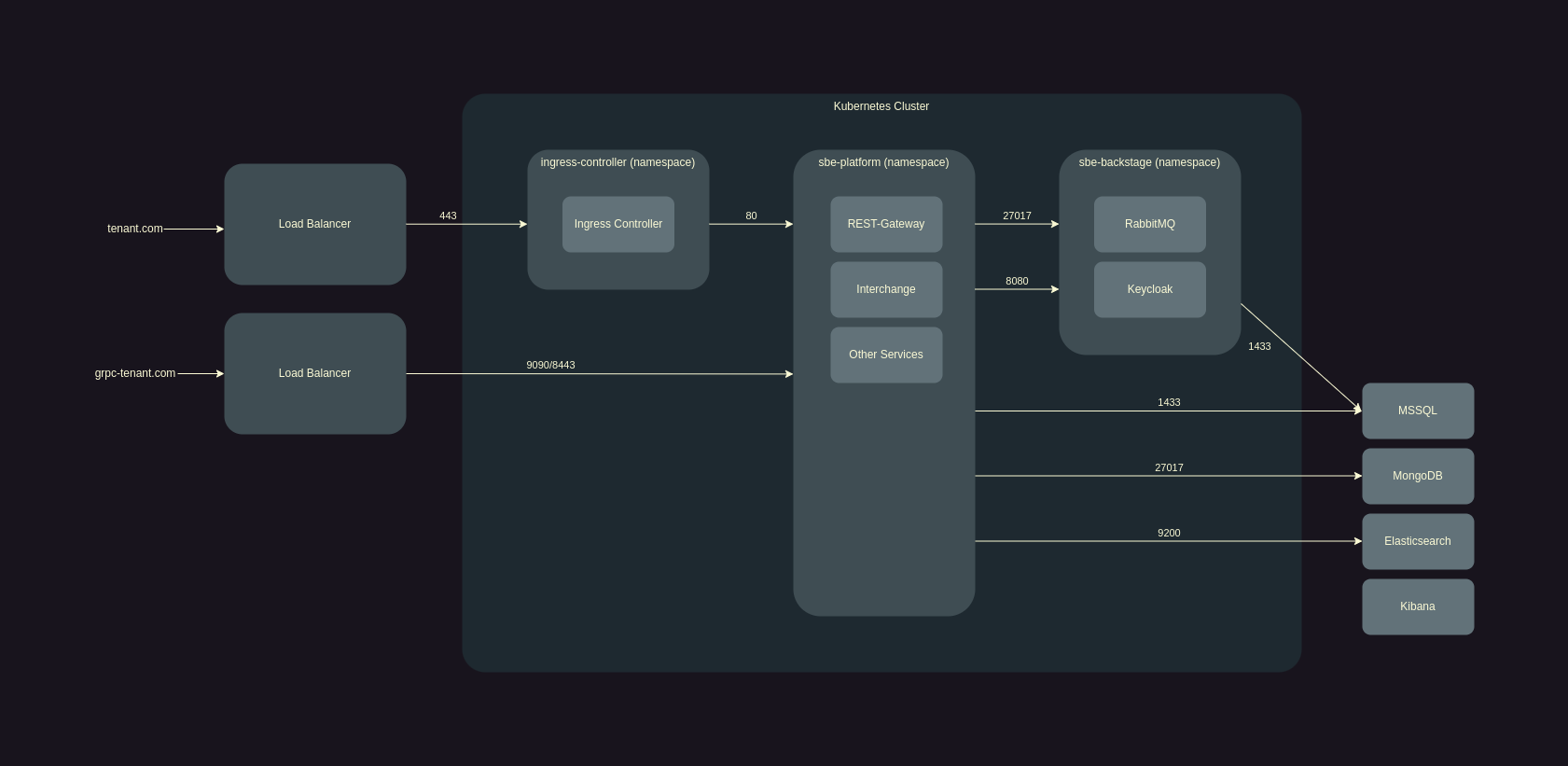
Installing sbe-backstage-stack, sbe-full-stack, and sbe-adapter-stack
Data Load
The Data Load is a 2-stage process that completes the initialization of the SBE Platform. We provide a Postman Collection that can be run from a Developer Workstation with access to the SBE Platform. Alternatively, we maintain a suite of shell scripts if Postman can not be used.
Data Layer Initialization: Creates the MSSQL databases and Elasticsearch indices that will be used by the SBE Platform
Import: Loads initial Ontologies, Mappings, Models, Data Source Types, and Data Sources
In order to run the Data Load using Postman:
File > Import in Postman the Data Load API Collection and the provided Postman Environment
Make the Postman Environment active in the top-right Environment dropdown or in the Environment tab on the left side-bar
Enter credentials for a User with the proper Keycloak roles in the Body of 'Get New Token'/'Fresh Token'
Run 'Fresh Token'
Use Postman Runner to run the Data Layer Initialization Folder
Use Postman Runner to run the Import Folder